
Sample RESTful service
By the default, the plug-in uses sample ORDS RESTful service to upload, display, browse and delete uploaded images in the database. The RESTful service can be used to save uplaoded images in the database, filesystem or external file services.
:::tip A custom RESTful service
Any modifications to the sample RESTful service might be overridden in the future when updating plug-in to the most recent version. Because of that, we strongly recommend implementing your own RESTful service, for example as a copy of sample service. In guidelines section, you will find specification for a custom RESTful service compatible with Rich Text Editor Pro page item.
:::
The plug-in sample RESTful service is created when the plug-in sample application supporting objects are installed or when installing the plug-in using DDL script. The sample RESTful services is used by the plug-in default configuration and the plug-in sample application. Uploaded images are stored in the plug-in sample table UC_FROALA_SAMPLE_CLOB_BLOBS.
The sample RESTful service implements templates described in the table below.
| Template | Method | Description |
|---|---|---|
| browse | GET | Template is used to browse previously uploaded images stored in the database. |
| delete | POST | Template is used to delete images displayed in the Froala image browser. |
| get/:fileid | GET | Template displays uploaded images embedded in CLOB content. |
| upload | POST | Template handles image upload using. |
| browseFolder | GET | An example implementation showing image filtering using custom parameter folder. |
| uploadFolder | POST | An example implementation of uploading images with a custom parameter folder. |
Access token
Section titled “Access token”The plug-in secures RESTful service request using the plug-in access token encoded using plug-in instance-specific salt string defined in the plug-in package UC_FROALA_SETTINGS. The encoded access token is available to all RESTful handlers through default query parameters. The access token is computed and encoded when Oracle APEX engine renders page item implementing the Rich Text Editor Pro.
When processing RESTful image request, a developer can decode the access token and get secured information about application session ID, given URL displaying uploaded images.
Salt string
Section titled “Salt string”The salt string is string definable in the plug-in package UC_FROALA_SETTINGS. The salt string is used to encode the access token and it should be changed after installing the plug-in.
Default query parameters
Section titled “Default query parameters”The plug-in RESTful service template handlers are invoked with additional default data send using query parameters. These query parameters can be used to identify application meta-data (session, id, page id, user) and uploaded image using PL/SQL bind variables.
:::tip Custom query parameters
Custom query parameters require extending sample RESTful handlers (we do not recommend it), or creating a custom RESTful service. A custom query parameters can be defined using the plug-in page item attribute Initialization JavaScript Code and image query parameter options (computed once on a page load) or using the supporting dynamic actions Upload Parameters and Image Browser Parameters.
:::
By the default, the plug-in uses default query parameters described in the table below.
| Parameter Name | Bind variable | Data type | Description | Upload | Browse | Delete |
|---|---|---|---|---|---|---|
| accessToken | :accessToken | VARCHAR2 | A current encoded access token. | :heavy_check_mark: | :heavy_check_mark: | :heavy_check_mark: |
| sessionId | :sessionId | VARCHAR2 | A current APEX session ID. | :heavy_check_mark: | :heavy_check_mark: | :heavy_check_mark: |
| applicationId | :applicationId | VARCHAR2 | A current application ID. | :heavy_check_mark: | :heavy_check_mark: | :heavy_check_mark: |
| pageId | :pageId | VARCHAR2 | A current application page ID | :heavy_check_mark: | :heavy_check_mark: | :heavy_check_mark: |
| appUser | :appUser | VARCHAR2 | A current application username. | :heavy_check_mark: | :heavy_check_mark: | :heavy_check_mark: |
| filename | :filename | VARCHAR2 | An image filename is available only when an image is dragged and dropped from the desktop. | :heavy_check_mark: | :x: | :x: |
| tempUniqueId | :tempUniqueId | VARCHAR2 | An image temporary ID assigned by the plug-in. | :heavy_check_mark: | :x: | :x: |
| imageId | :imageId | VARCHAR2 | An image ID in the database. | :x: | :x: | :heavy_check_mark: |
Sample Templates
Section titled “Sample Templates”The plug-in sample RESTful service implements REST templates enabling the plug-in to work right after installation. These templates are also used by the plug-in sample application to showcase plug-in features. We do not recommend using the sample RESTful service in production enviroment wihout inspecting the code and changing the salt string.
upload
Section titled “upload”The sample upload template uses POST handler to accept uploaded file and save it in the sample application database table UC_FROALA_SAMPLE_CLOB_BLOBS.
| Attribute | |
|---|---|
| RESTful Service Module | Rich Text Editor Pro Sample REST |
| Module Base Path | /ucfroalasamplerest/ |
| URI Template | upload |
| Full URL | https://example-domain.com/ords/RTE/ucfroalasamplerest/upload |
| Handler Method | POST |
| Source Type | PL/SQL |
| Mime Types Allowed | Not defined |
The highlighted lines are the default query parameters referenced as PL/SQL code bind variables.
begin  UC_FROALA_SAMPLE_REST.imageUpload(    // highlight-next-line    p_access_token   => :accessToken,    // highlight-next-line    // highlight-next-line    p_session_id     => :sessionId,    // highlight-next-line    p_application_id => :applicationId,    // highlight-next-line    p_page_id        => :pageId,    // highlight-next-line    p_app_user       => :appUser,    // highlight-next-line    p_image_name     => :filename,    p_image_content  => :body,    p_image_mimetype => :content_type,    // highlight-next-line    p_image_temp_id  => :tempUniqueId,    p_status         => :status  );
end;
The handler uses registered handler parameters described in the table below.
| Name | Bind Variable | Access Method | Source Type | Data Type | Description |
|---|---|---|---|---|---|
| X-APEX-STATUS-CODE | :status | OUT | HTTP HEADER | INTEGER | The HTTP status code returned by ORDS |
It also uses ORDS specific parameter listed in the table below.
| Parameter name | Bind variable | Data Type | Description |
|---|---|---|---|
| content_type | :content_type | VARCHAR2 | Specifies the MIME type of the request body, as indicated by the Content-Type request header. |
| body | :body | BLOB | Specifies the request’s body as a temporary BLOB. |
Learn more about APEX specific REST bind variable at oracle-base.com.
Successful image upload request must be finished with specific JSON printed to the browser buffer. The JSON data is interpreted by Rich Text Editor Pro page item to replace uploaded image in a document, and update the plug-in session state.
{ "data-image-id": "1706", "link": "https://example-domain.com/ords/WS/ucfroalasamplerest/get/1706"}:::tip Secure display handler from leaking images
When upload handler computes an uploaded image URL, an image URL can include custom query parameters. These query parameters can be used in get:/fileid handler.
For example, the image database id can be encoded using salt string and access token encode function to create an image checksum. Learn more here in guidelines for custom RESTful service upload handler.
:::
get/:fileid
Section titled “get/:fileid”The plug-in sample template displaying uploaded images uses GET handler to fetch an image from the sample application table UC_FROALA_SAMPLE_CLOB_BLOBS and streams it’s content to a browser buffer.
| Attribute | |
|---|---|
| RESTful Service Module | Rich Text Editor Pro Sample REST |
| Module Base Path | /ucfroalasamplerest/ |
| URI Template | get/:fileid |
| Full URL | https://example-domain.com/ords/RTE/ucfroalasamplerest/get/:fileid |
| Method | GET |
| Source Type | PL/SQL |
| Mime Types Allowed | Not defined |
The template GET handler uses the plug-in sample implementation in the plug-in package UC_FROALA_SAMPLE_REST.
begin UC_FROALA_SAMPLE_REST.imageGet( p_file_id => :fileid, p_status => :status );end;The template is requested with the default one parameter fileid described in the table below.
| Name | Bind Variable | Access Method | Source Type | Data Type | Description |
|---|---|---|---|---|---|
| X-APEX-STATUS-CODE | status | OUT | HTTP HEADER | INTEGER | The HTTP status code returned by ORDS. |
| fileid | fileid | IN | URI | VARCHAR2 | An image ID to be fisplayed. |
The handler output is the result of procedure WPG_DOCLOAD.download_file streaming uploaded image BLOB into a browser buffer.
sys.HTP.init;sys.OWA_UTIL.mime_header(v_file_mime_type, FALSE);sys.HTP.p('Content-Length: ' || DBMS_LOB.getlength(v_file_blob_content));HTP.p('Content-Disposition: filename="' ||v_file_filename|| '"');sys.HTP.p('Access-Control-Allow-Origin: *');sys.OWA_UTIL.http_header_close;
sys.WPG_DOCLOAD.download_file(v_file_blob_content);
browse
Section titled “browse”The sample browse template uses GET handler to fetch uploaded images from the sample application table UC_FROALA_SAMPLE_CLOB_BLOBS and present them to the end-user using the rich text editor image browser.
| Attribute | |
|---|---|
| RESTful Service Module | Rich Text Editor Pro Sample REST |
| Module Base Path | /ucfroalasamplerest/ |
| URI Template | browse |
| Full URL | https://example-domain.com/ords/RTE/ucfroalasamplerest/browse |
| Method | GET |
| Source Type | PL/SQL |
| Mime Types Allowed |
The highlighted lines are the default query parameters referenced as PL/SQL code bind variables.
begin UC_FROALA_SAMPLE_REST.imageBrowse( // highlight-next-line p_session_id => :sessionId, // highlight-next-line p_access_token => :accessToken, // highlight-next-line p_app_user => :appUser, // highlight-next-line p_application_id => :applicationId, // highlight-next-line p_page_id => :pageId, p_status => :status );end;| Name | Bind Variable | Access Method | Source Type | Data Type |
|---|---|---|---|---|
| X-APEX-STATUS-CODE | status | OUT | HTTP HEADER | INTEGER |
The handler output is Array of JSON objects describing uploaded images and saved in the sample table UC_FROALA_SAMPLE_CLOB_BLOBS.
[ {"url":"https://example-domain.com/ords/WS/ucfroalasamplerest/get/2039108"}, {"url":"https://example-domain.com/ords/WS/ucfroalasamplerest/get/2039105"}, {"url":"https://example-domain.com/ords/WS/ucfroalasamplerest/get/2039106"}, {"url":"https://example-domain.com/ords/WS/ucfroalasamplerest/get/2039107"}]delete
Section titled “delete”The sample delete template uses POST handler deleting an image in the database sample table UC_FROALA_SAMPLE_CLOB_BLOBS.
| Attribute | |
|---|---|
| RESTful Service Module | Rich Text Editor Pro Sample REST |
| Module Base Path | /ucfroalasamplerest/ |
| URI Template | delete |
| Full URL | https://example-domain.com/ords/RTE/ucfroalasamplerest/delete |
| Method | POST |
| Source Type | PL/SQL |
| Mime Types Allowed |
The highlighted lines are the default query parameters referenced as PL/SQL code bind variables.
begin UC_FROALA_SAMPLE_REST.imageDelete( // highlight-next-line p_access_token => :accessToken, // highlight-next-line p_session_id => :sessionId, // highlight-next-line p_application_id => :applicationId, // highlight-next-line p_page_id => :pageId, // highlight-next-line p_app_user => :appUser, p_image_id => :imageId, p_status => :status );end;| Name | Bind Variable | Access Method | Source Type | Data Type |
|---|---|---|---|---|
| X-APEX-STATUS-CODE | status | OUT | HTTP HEADER | INTEGER |
Sample application templates
Section titled “Sample application templates”The sample application templates uploadFolder and browseFolder are used exclusively by the plug-in sample application to showcase the plug-in dynamic actions Uplaod parameters and Image Browser Parameters.
:::tip live demo
Both dynamic action can be tested online in the sample application example page Image Upload Parameters.
:::
These handlers uses the custom query parameter named folder. The value is computed based on page item value (select list), and is used to save the value along with an image in the table UC_FROALA_SAMPLE_CLOB_BLOBS as value for column FOLDER. When the plug-in image browser is invoked, the folder query parameter (page item value) is used computed again, and it is used to filter only images with column FOLDER matching the page item value.
uploadFolder
Section titled “uploadFolder”The handler uses the custom query parameter folder to save the page item current value in the table UC_FROALA_SAMPLE_CLOB_BLOBS.FOLDER column.
| Attribute | |
|---|---|
| RESTful Service Module | Rich Text Editor Pro Sample REST |
| Module Base Path | /ucfroalasamplerest/ |
| URI Template | uploadFolder |
| Full URL | https://example-domain.com/ords/RTE/ucfroalasamplerest/uploadFolder |
| Handler Method | POST |
| Source Type | PL/SQL |
| Mime Types Allowed | Not defined |
begin UC_FROALA_SAMPLE_REST.imageUploadFolder( p_access_token => :accessToken, p_session_id => :sessionId, p_application_id => :applicationId, p_page_id => :pageId, p_app_user => :appUser, p_image_temp_id => :tempUniqueId, p_image_name => :filename, p_image_content => :body, p_image_mimetype => :content_type, // highlight-next-line p_folder => :folder, p_status => :status );end;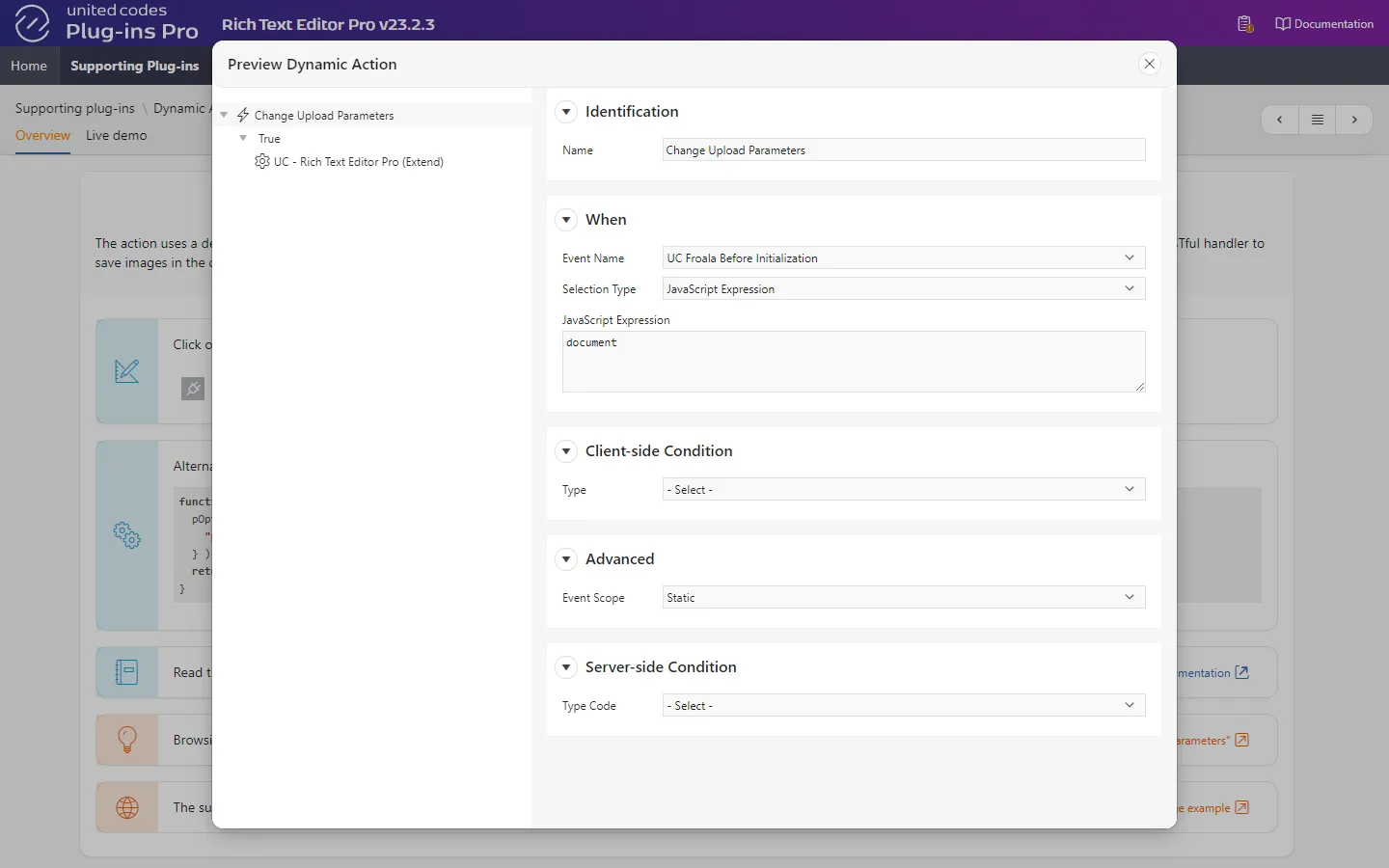
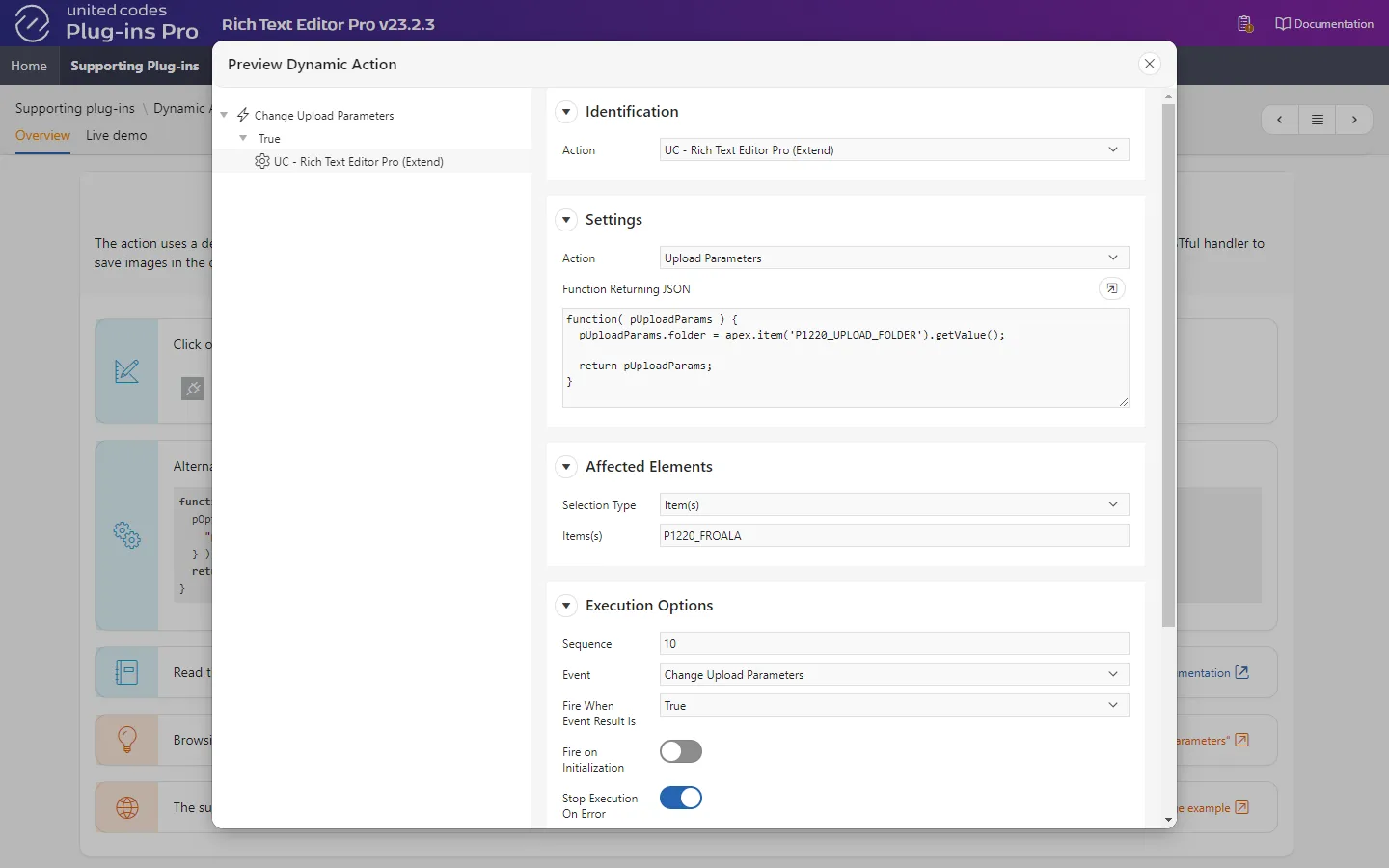
function( pUploadParams ) { pUploadParams.folder = apex.item('P1220_UPLOAD_FOLDER').getValue(); return pUploadParams;}browseFolder
Section titled “browseFolder”The handler uses the custom query parameter folder to list uploaded and saved images in the sample application table UC_FROALA_SAMPLE_CLOB_BLOBS using SQL condition WHERE folder = :folder when the plug-in image browser is invoked.
| Attribute | |
|---|---|
| RESTful Service Module | Rich Text Editor Pro Sample REST |
| Module Base Path | /ucfroalasamplerest/ |
| URI Template | browseFolder |
| Full URL | https://example-domain.com/ords/RTE/ucfroalasamplerest/browseFolder |
| Method | GET |
| Source Type | PL/SQL |
| Mime Types Allowed |
begin UC_FROALA_SAMPLE_REST.imageBrowseFolder( p_session_id => :sessionId, p_access_token => :accessToken, p_app_user => :appUser, p_application_id => :applicationId, p_page_id => :pageId, // highlight-next-line p_folder => :folder, p_status => :status );end;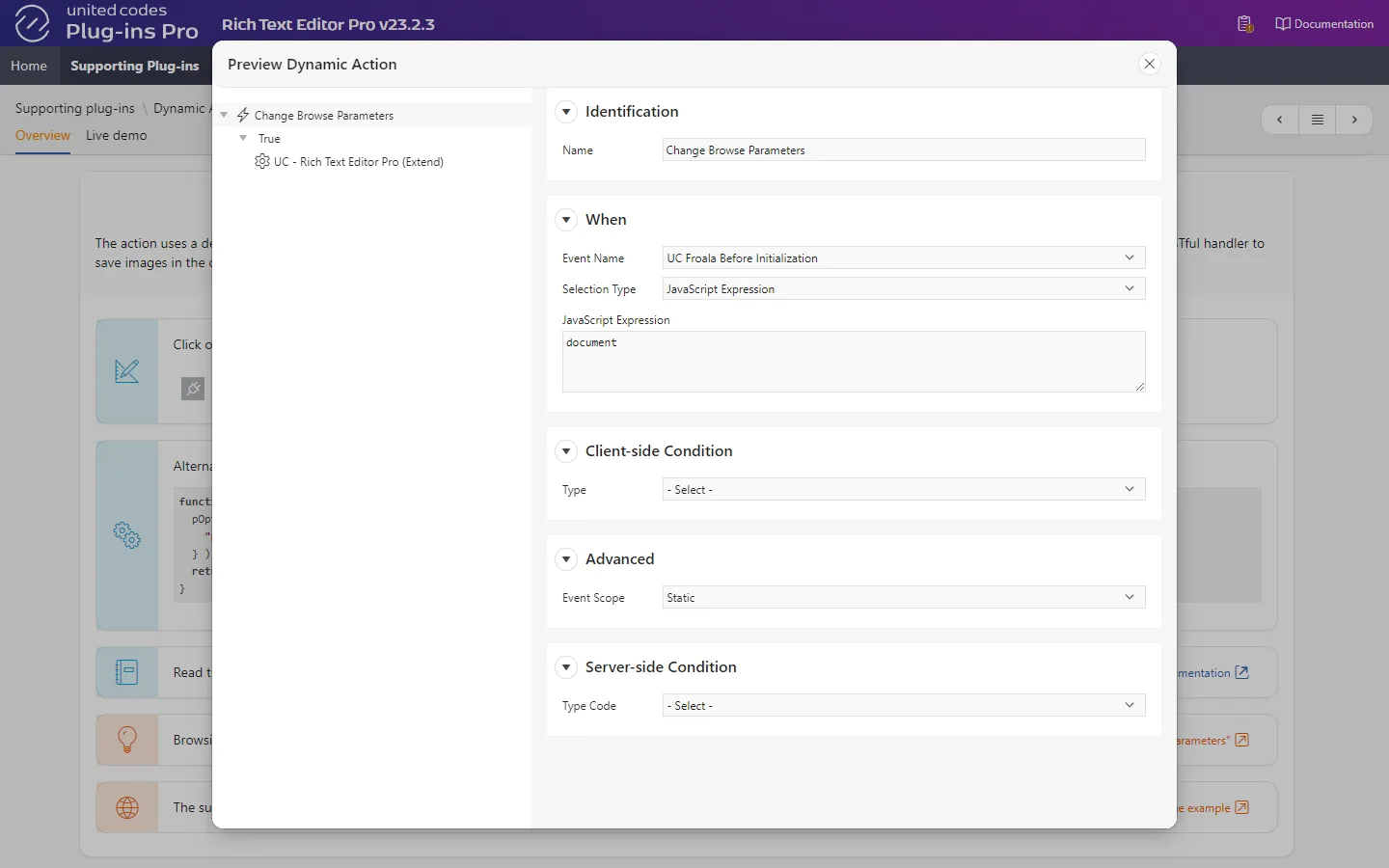
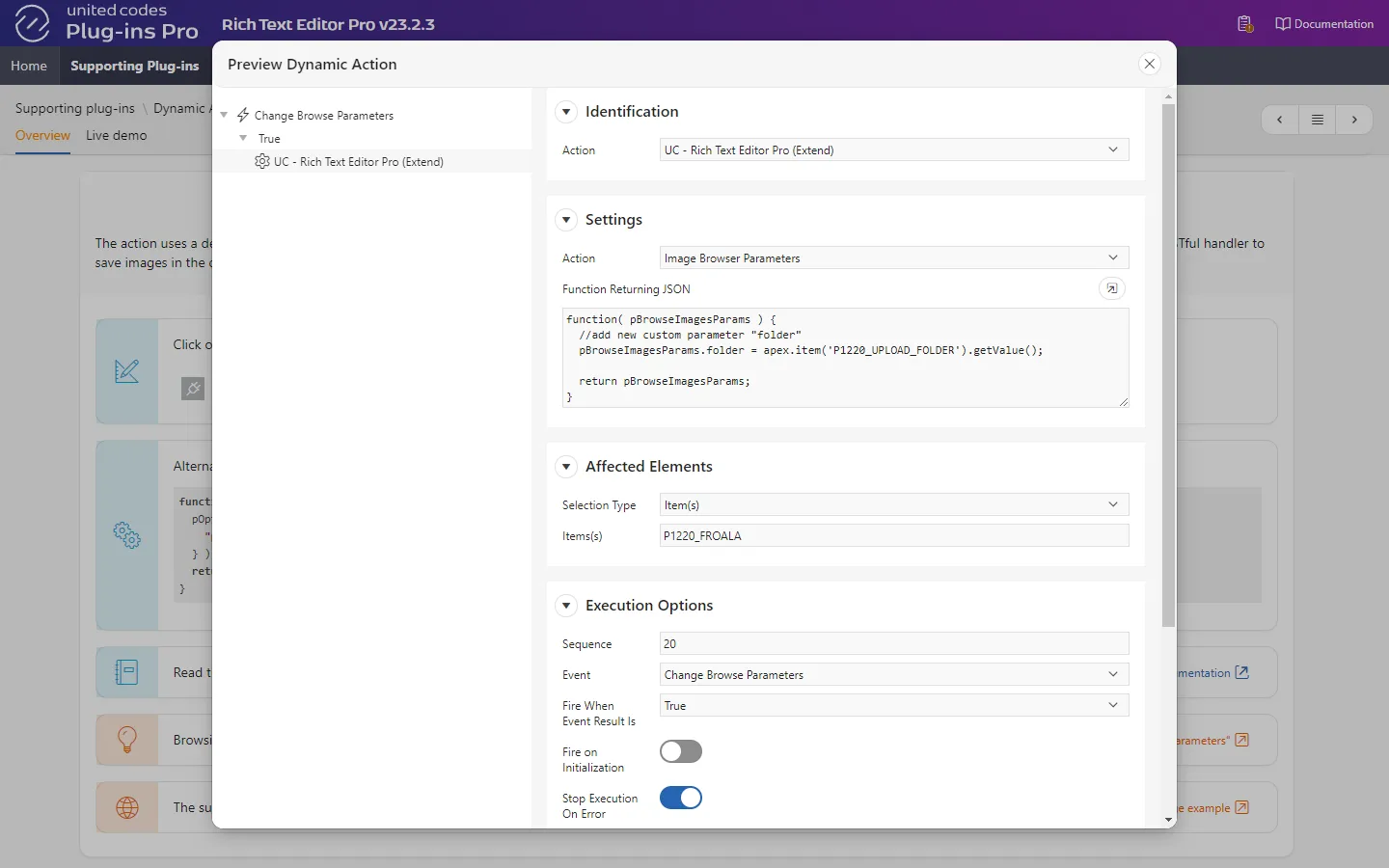
function( pBrowseImagesParams ) { pBrowseImagesParams.folder = apex.item('P1220_UPLOAD_FOLDER').getValue(); return pBrowseImagesParams;}