
Jobs and maintenance
A lot of what ADM does happens on a schedule rather than when a user clicks something: emptying the trash, deleting files whose retention has expired, extracting text so files become searchable, moving content to object storage. If the jobs are not running, none of that happens — and it fails quietly, because nobody is waiting on a screen for it.
Check this after every install and every upgrade.
The scheduled jobs
Section titled “The scheduled jobs”ADM creates three DBMS_SCHEDULER jobs. All three need the create job privilege, which is part of
the installation prerequisites.
| Job | Runs | Does |
|---|---|---|
ADM_DAILY_JOB | Daily at 02:15 | Everything in the daily tasks below. |
ADM_UPLOAD_STAGING_CLEANUP_JOB | Hourly | Discards partially received chunked uploads older than FS_UPLOAD_STAGING_TTL_HOURS. Hourly rather than daily because a staging row holds the bytes of a half-uploaded file — an abandoned multi-gigabyte upload is real space. |
ADM_AI_HOURLY_JOB | Hourly | AI Pack only: syncs every RAG collection — picking up new and changed files, extracting text, chunking and embedding them. |
Confirm they exist and are enabled:
select job_name , enabled , state , last_start_date , next_run_date , failure_count from user_scheduler_jobs where job_name like 'ADM%' order by job_name;Run one by hand — after an install, or to make a change take effect without waiting for the night:
begin sys.dbms_scheduler.run_job(job_name => 'ADM_DAILY_JOB');end;/The daily tasks
Section titled “The daily tasks”adm_job_automations_api.daily_job runs these in order. Each one is a public procedure you can also
call on its own, and each reports failure through an out parameter rather than by raising — so one
failing task does not stop the rest of the run, and the job still ends up reporting an error.
| Task | What it does | Governed by |
|---|---|---|
delete_user_trash | Permanently deletes trashed documents that have sat in the trash longer than the retention window. | CLEAN_TRASH_DAYS |
delete_retention_files | Deletes documents whose retention date has passed. See Records management. | per-document retention date |
delete_expired_embed_tokens | Removes embed tokens past their expiry, so they stop accumulating. | per-token expiry |
process_storage_migrations | Moves content between the database and object storage for anything queued for migration, retrying earlier failures. | MIGRATION_BATCH_SIZE, OBJECT_STORAGE_RETRY_ATTEMPTS |
process_pending_object_storage_deletions | Carries out object deletions whose delay has elapsed. | scheduled delay per deletion |
process_indexing_queue | Extracts text from queued files into the search index. Content is not searchable until this has run. | INDEXING_MAX_ATTEMPTS |
process_object_storage_checksum_verification | Re-reads objects from the bucket and compares them with the stored checksum, logging mismatches. | CHECKSUM_VERIFICATION_BATCH_SIZE, CHECKSUM_REVERIFICATION_DAYS, OBJECT_STORAGE_VERIFY_CHECKSUMS |
process_metadata_backfill | Extracts file.* metadata for documents that never had it — uploaded before the feature existed, or while it was off. | FILE_METADATA_BACKFILL_BATCH_SIZE, FILE_METADATA_EXTRACTION |
cleanup_job_logs | Trims adm_job_logs so it does not grow forever. | — |
Running one task on its own, for instance after fixing whatever was blocking indexing:
declare  l_error boolean;begin  adm_context_api.system_login;  adm_job_automations_api.process_indexing_queue(po_error_occurred => l_error);
  if l_error then    dbms_output.put_line('the task reported a failure - check adm_job_logs');  end if;
commit;end;/Reading the job log
Section titled “Reading the job log”Two places record what happened:
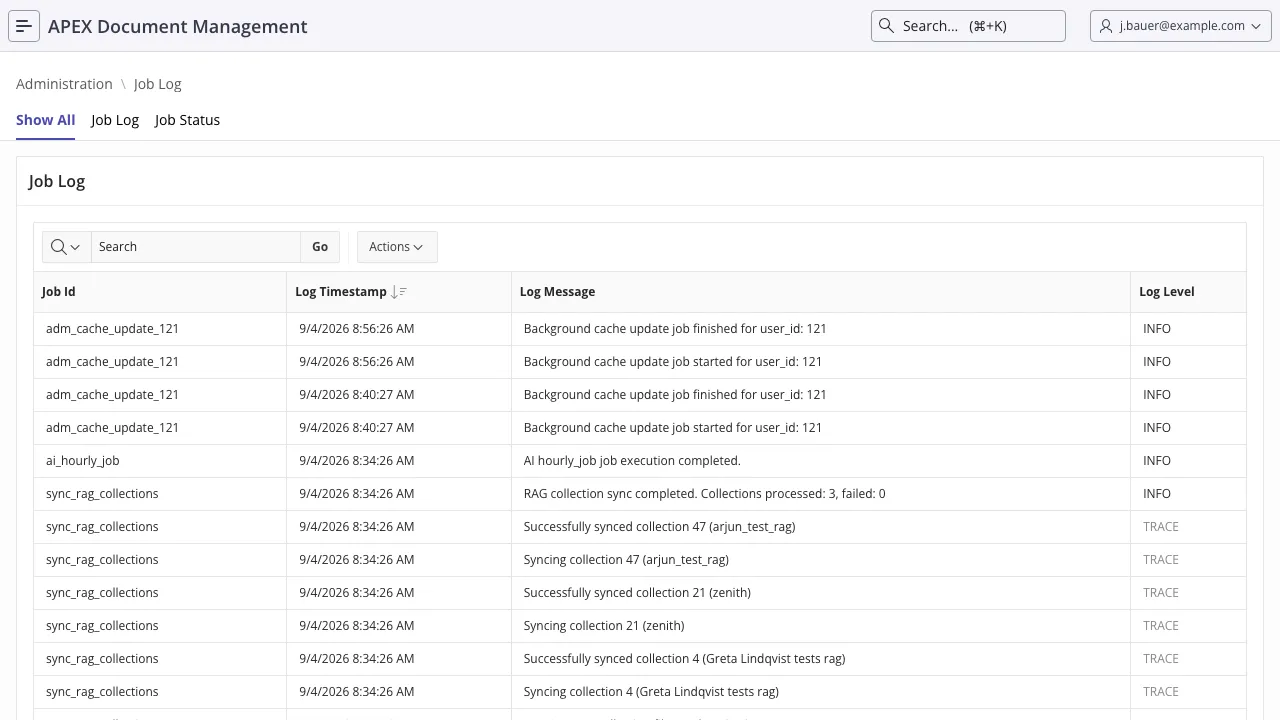
adm_job_status— one row per task, with the last successful run and the last error.adm_job_logs— the messages, atINFO,TRACEorERROR.
adm_report_job_status_v
joins the two: last run, last error, days since each, log counts for the last 24 hours, errors in
the last week, and the most recent message per task.
select job_id , job_last_run_date , days_since_last_run , error_entries_last_week , latest_log_level , latest_log_message from adm_report_job_status_v order by job_last_error_date desc nulls last;The same information is in the application under Administration → Job Log.
What to look for
Section titled “What to look for”| Symptom | Likely cause |
|---|---|
No rows at all in adm_job_status | The job has never run. Check user_scheduler_jobs — most often the create job grant was missing at install time, so the job was never created. |
days_since_last_run growing | The scheduler job is disabled or broken, or the database was down at the scheduled hour. |
Repeated ERROR from process_storage_migrations or checksum verification | Object storage credentials, network egress, or a bucket policy. Try adm_settings_api.test_object_storage_connectivity. |
process_indexing_queue errors on the same files each night | Files the Oracle Text filter cannot read. After INDEXING_MAX_ATTEMPTS they are marked permanently unindexable and stop being retried. |
| Trash never empties | CLEAN_TRASH_DAYS, or a legal hold / retention policy blocking deletion of the documents in it. |