
Settings reference
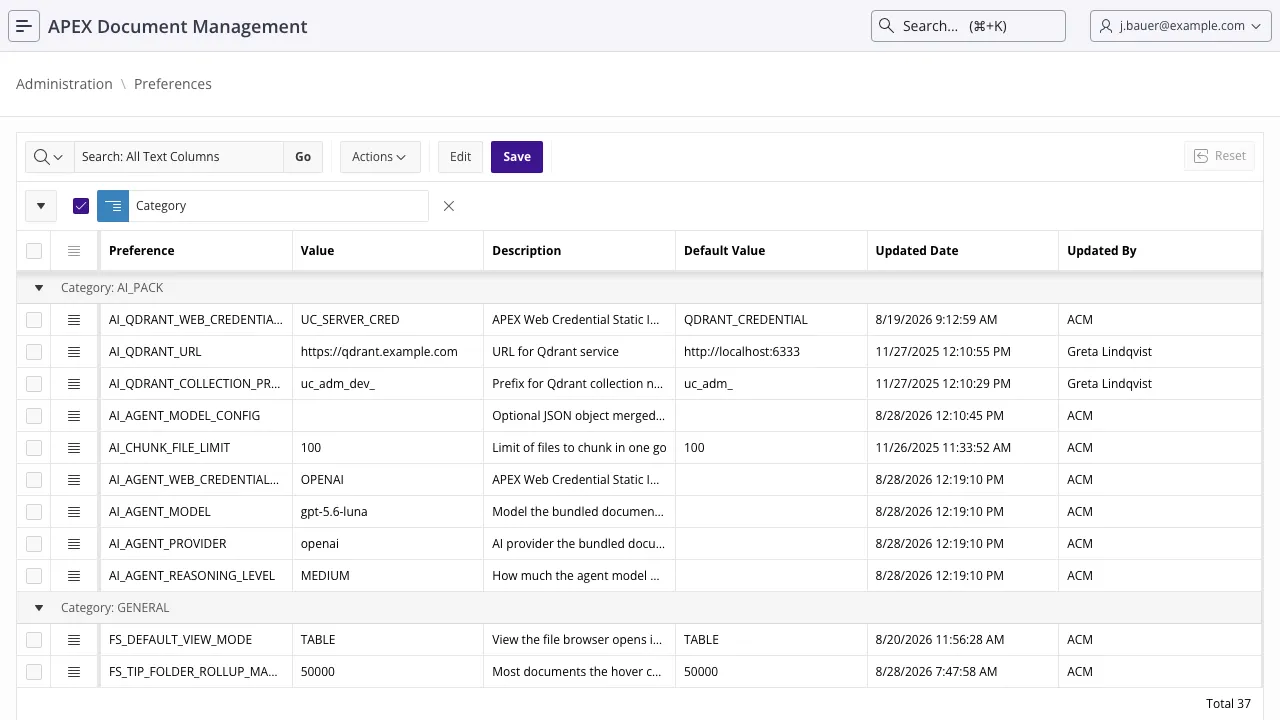
Settings live in the adm_settings table, one row per key, each with a current value, the shipped
default, a description and a category. They are edited in the administration section of the
application, and readable from PL/SQL.
Reading and writing settings
Section titled “Reading and writing settings”Read any setting by key:
select adm_settings_api.get_setting_value('CLEAN_TRASH_DAYS') from dual;Most settings also have a typed getter. Prefer it: it converts, applies the fallback when a row is
missing or unparseable, and most of them are result_cached:
begin if adm_settings_api.is_object_storage_enabled then ... l_days := adm_settings_api.get_clean_trash_days;end;/Because most getters are result-cached, a value you change in one session is not necessarily picked up instantly by another. Rule that out first when a change appears to have no effect.
General
Section titled “General”| Key | Default | What it does |
|---|---|---|
DOWNLOAD_FILE_THRESHOLD | 50000000 | Size in bytes above which the document page offers a download instead of rendering the file in the viewer. Raise it if your users have the bandwidth and want previews of large files; lower it if they do not. |
FILE_METADATA_EXTRACTION | Y | Extract technical metadata (title, author, page count, image dimensions, …) on upload and store it as file.* annotations. See Storage and versioning. |
FILE_METADATA_BACKFILL_BATCH_SIZE | 500 | How many pre-existing documents the daily job backfills metadata for per run. |
Maintenance
Section titled “Maintenance”| Key | Default | What it does |
|---|---|---|
CLEAN_TRASH_DAYS | 30 | How long a trashed document stays in the trash before the daily job deletes it permanently. A retention decision, not a technical one. |
Security
Section titled “Security”| Key | Default | What it does |
|---|---|---|
HASH_PRIVATE_KEY | randomly generated at install | The secret used to checksum share-link and embed URL parameters. Admin-only. |
Office services (AOP / AOE)
Section titled “Office services (AOP / AOE)”| Key | Default | What it does |
|---|---|---|
AOP_API_URL | https://api.apexofficeprint.com/ | APEX Office Print endpoint, used for converting documents to PDF. Point it at your own on-premise AOP server if you run one. |
AOP_API_KEY | (empty) | AOP API key. Admin-only. |
AOE_API_URL | https://api.apexofficeedit.com/ | APEX Office Edit endpoint, used for editing Office documents in the browser. |
AOE_API_KEY | (empty) | AOE API key. |
→ Editing and converting documents
Object storage
Section titled “Object storage”None of these have any effect while OBJECT_STORAGE_ENABLED is N.
| Key | Default | What it does |
|---|---|---|
OBJECT_STORAGE_ENABLED | N | Store the content of new files in OCI Object Storage. Turning it on does not move existing files; moving them is a migration. |
OBJECT_STORAGE_BUCKET | (empty) | Bucket name. |
OBJECT_STORAGE_REGION | (empty) | OCI region identifier, e.g. eu-frankfurt-1. |
OBJECT_STORAGE_NAMESPACE | (empty) | OCI object storage namespace. |
OBJECT_STORAGE_CREDENTIAL_ID | (empty) | Static ID of the APEX Web Credential holding the OCI credentials. Admin-only. |
OBJECT_STORAGE_INDEX | N | Extract text from object-storage files so their content is searchable. Without it, files in the bucket are findable by name only. |
OBJECT_STORAGE_VERIFY_CHECKSUMS | Y | Verify the checksum when storing, and re-verify stored objects over time. |
CHECKSUM_VERIFICATION_BATCH_SIZE | 100 | Files whose checksums the daily job re-verifies per run. |
CHECKSUM_REVERIFICATION_DAYS | 30 | How long before a file is due for re-verification again. |
MIGRATION_BATCH_SIZE | 100 | Files moved per migration batch. |
OBJECT_STORAGE_RETRY_ATTEMPTS | 3 | Retries for a failed object storage operation before it is left for the next run. |
INDEXING_MAX_ATTEMPTS | 3 | Text-extraction attempts before a file is marked permanently unindexable and stops being retried. Some files are rejected by the Oracle Text filter every single time; without this budget one of them would fail the daily job forever. |
→ Object storage setup ·
adm_settings_api.configure_object_storage
sets the whole group in one call, and test_object_storage_connectivity checks it.
File browser
Section titled “File browser”These apply to the <adm-file-browser> region.
| Key | Default | What it does |
|---|---|---|
FS_DEFAULT_VIEW_MODE | TABLE | The view a user who has expressed no preference yet gets: TABLE or GRID. |
FS_DEFAULT_PAGE_SIZE | 200 | Rows fetched per page. Clamped to the component’s own maximum. |
FS_UPLOAD_CHUNK_BYTES | 786432 | Size of one chunk of a chunked upload. Must be a multiple of 3 — otherwise the base64 of a non-final chunk cannot be decoded on its own. |
FS_UPLOAD_MAX_FILE_BYTES | 2147483648 (2 GiB) | Largest file an upload may announce. Checked before any content is transferred, so an oversized file fails immediately instead of after twenty minutes. |
FS_UPLOAD_STAGING_TTL_HOURS | 24 | How long a partially received upload is kept in adm_upload_staging before the cleanup job discards it. |
FS_TIP_FOLDER_ROLLUP | Y | Whether the hover card computes a folder’s recursive size and item counts. The only part of the card that costs real time — a range scan over the folder’s subtree — so turn it off on an instance with a pathological tree. N leaves the rest of the card intact and omits the contents line. |
FS_TIP_FOLDER_ROLLUP_MAX_DOCS | 50000 | How many documents that rollup aggregates before it stops. Past the cap the counts and the size are what was actually reached and the card shows 1.4 GB+ — a partial answer rather than a spinner. A value below 1 is ignored. |
AI Pack
Section titled “AI Pack”Only present once the AI Pack is installed.
| Key | Default | What it does |
|---|---|---|
AI_QDRANT_URL | http://localhost:6333 | Qdrant endpoint holding the vectors. |
AI_QDRANT_COLLECTION_PREFIX | uc_adm_ | Prefix for the Qdrant collection names ADM creates, so one Qdrant instance can serve several systems. |
AI_QDRANT_WEB_CREDENTIAL_ID | QDRANT_CREDENTIAL | Static ID of the APEX Web Credential holding the Qdrant API key. Admin-only. |
AI_CHUNK_FILE_LIMIT | 100 | Files chunked and embedded per run. The throttle on how hard a sync hits your embedding provider. |
AI_TEXT_EXTRACTION | Y | Extract text content into the search index so RAG collections and agent tools can read object-storage files. |
The bundled agents’ model
Section titled “The bundled agents’ model”These five decide which provider and model the two shipped agents — the document assistant and the
single-document agent — run on. uc_ai speaks to OpenAI, Anthropic, Google, Ollama, OCI, xAI,
OpenRouter and Mistral; these settings choose between them.
All five ship empty. While AI_AGENT_PROVIDER is empty, ADM writes nothing and the prompt
profiles run on whatever the AI Pack install created them with (OpenAI, at the time of writing) or on
whatever you set through the uc_ai APIs yourself. Filling the provider in hands the profiles over
to these settings.
| Key | Default | What it does |
|---|---|---|
AI_AGENT_PROVIDER | (empty) | openai, anthropic, google, ollama, oci, xai, openrouter, mistral or responses_api. Empty means hands off, as above. |
AI_AGENT_MODEL | (empty) | The model id, e.g. gpt-5.4, claude-sonnet-4-6, gemini-3-pro-preview, llama3.1. Required as soon as a provider is set — a provider without a model is refused rather than half-applied. |
AI_AGENT_WEB_CREDENTIAL_ID | (empty) | Static ID of the APEX Web Credential holding that provider’s API key. Admin-only. Empty removes the credential from the profile, which is what a local Ollama wants — the credential belongs to the provider you picked, so the previous one is not carried over. |
AI_AGENT_REASONING_LEVEL | (empty) | NONE, LOW, MEDIUM or HIGH. Set NONE for a model without reasoning support, which otherwise fails the call outright. Empty leaves the profile’s own reasoning alone. |
AI_AGENT_MODEL_CONFIG | (empty) | Optional JSON object merged over everything above, for what the four settings do not reach: {"g_base_url":"http://localhost:11434"} for a self-hosted endpoint, {"anthropic":{"g_max_tokens":8192}} for a provider section. Applied last, so it can also correct a key set above. Everything uc_ai accepts in a model config goes through here — see the UC AI documentation. |
→ AI agent tools · RAG configurations
Also refer to
Section titled “Also refer to”- Jobs and maintenance — the batch sizes above only mean something in the context of the job that consumes them
- Administration
adm_settings_api