
Search and taxonomy
Finding a document in ADM works two ways: search for when you remember something about the file, and tags for when you want to narrow a large set down by category.
Searching
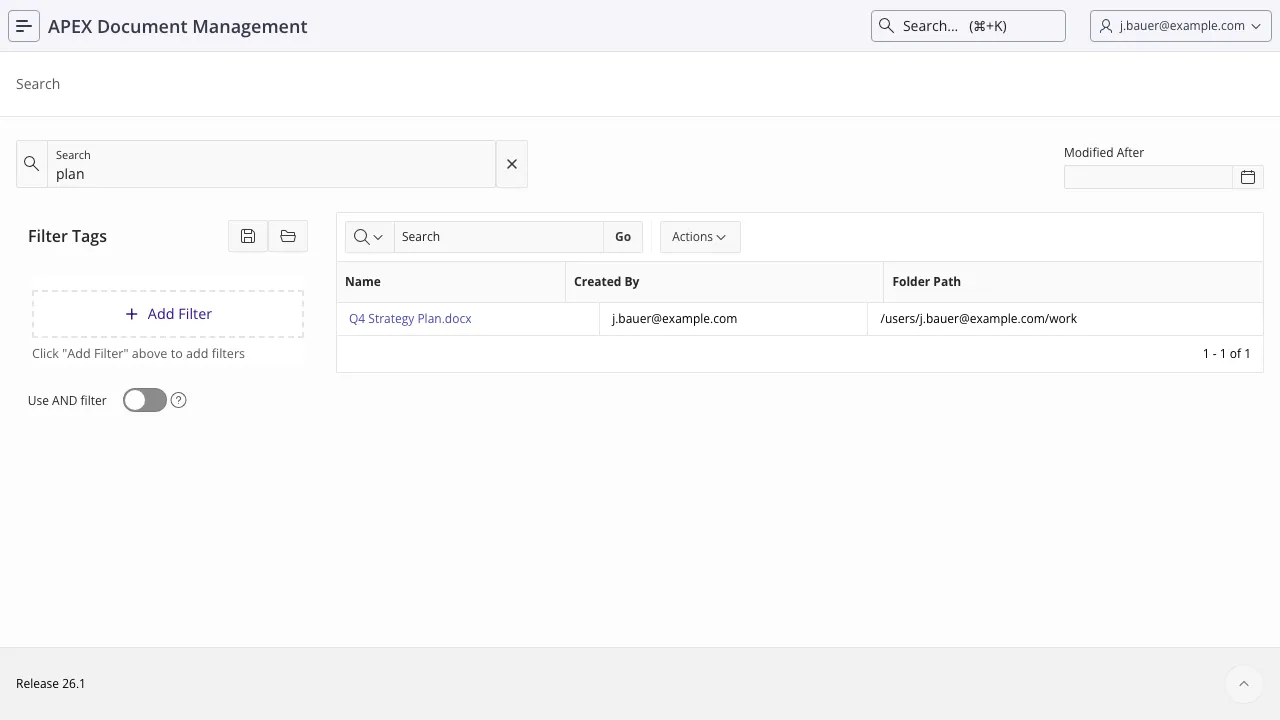
Section titled “Searching”One search box matches on both the filename and the text inside the file, and returns whichever
hits. A search for quarterly finds Quarterly report.xlsx and also finds the contract that
mentions “quarterly” on page 4.
Results are ordered by an Oracle Text relevance score, and only ever include documents the searching user is allowed to see.
You can type freely. The term is turned into a safe Oracle Text query before it is used, so
punctuation, wildcards and stray whitespace do not produce errors or accidentally match everything —
a % in your term matches a literal %.
Results can be narrowed by modified date and by tags (below).
How content becomes searchable
Section titled “How content becomes searchable”A file is not searchable by content until it has been indexed, which is not part of the upload.
Content search is Oracle Text. Two indexes back it:
| Index on | Covers |
|---|---|
adm_document_versions.file_content | Files whose content is in the database. Indexed by Oracle Text directly, using the AUTO_FILTER policy — which is what reads inside PDFs and Office documents. |
adm_document_versions.index_content | Files whose content is in object storage. Their text has to be extracted into the database first; the index covers the extracted text. |
So for a database-stored file, indexing follows the ordinary Oracle Text index sync. For an object-storage file, three things must be true:
OBJECT_STORAGE_INDEXis set toY. Without it, files in the bucket are searchable by name only — no error, just no content matches.- The file has been through the indexing queue (
adm_indexing_queue). Entries are worked byprocess_indexing_queue, which the daily job runs. - Extraction succeeded. Attempts are counted, and after
INDEXING_MAX_ATTEMPTSa file is marked permanently unindexable and stops being retried — some files are rejected by the Oracle Text filter on every single run, and without a budget one of them would fail the job forever.
Searching from PL/SQL
Section titled “Searching from PL/SQL”Two pipelined functions, with different permission behaviour:
-- everything matching, with no permission filter - for admin and reporting useselect *  from table(adm_search_api.search_documents(         p_search_expression => 'quarterly report'       , p_modified_after    => systimestamp - 30       ));
-- only what this user may see - the one to use when acting for a userselect *  from table(adm_search_api.search_user_documents(         p_username          => 'JDOE'       , p_search_expression => 'quarterly report'       ));
Each row carries the document id and name, its folder and folder path, the latest version id, the
owner (user or group), and the Oracle Text score.
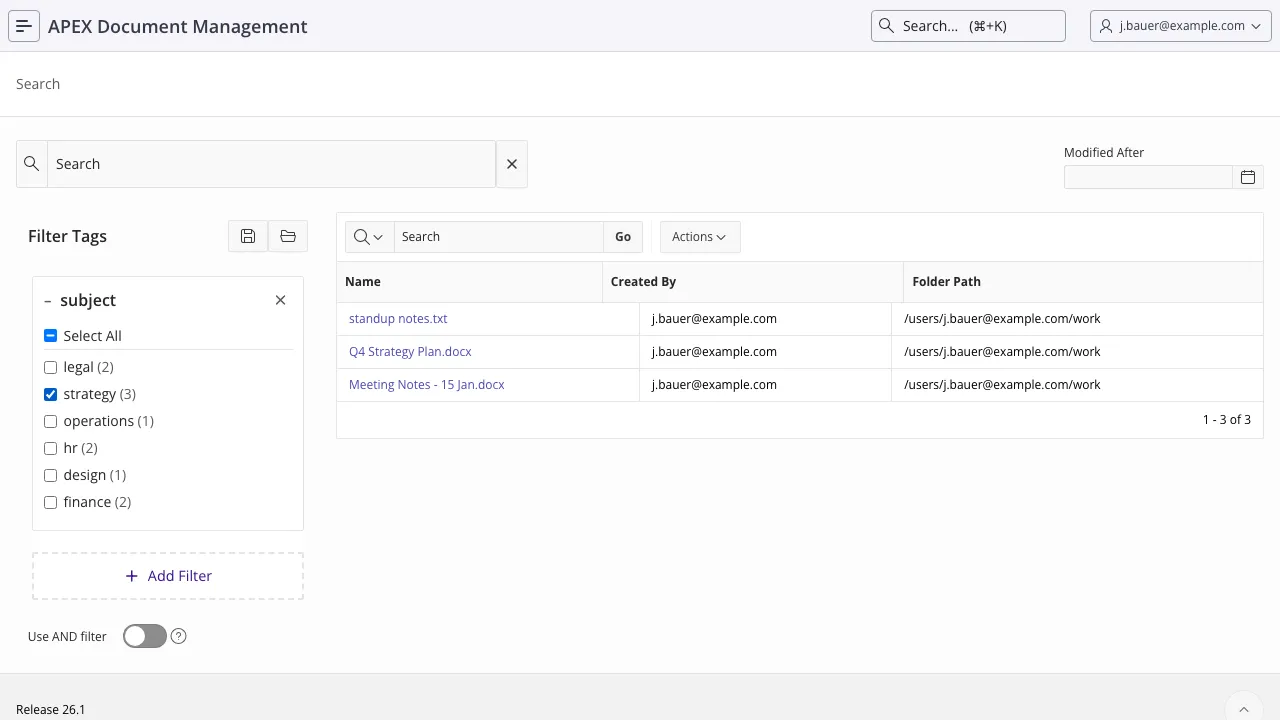
Tags in ADM are key/value pairs, not free-text labels. department = finance,
contract type = NDA, year = 2026. Tag names are lowercased on creation, so Department and
department are the same tag.
Faceted search works on that structure: pick a tag, see which values exist, narrow down.
Tagging from PL/SQL
Section titled “Tagging from PL/SQL”add_tag_to_document creates the tag if it does not exist yet, so there is no separate registration
step:
begin  adm_context_api.system_user_login('JDOE');
  adm_tag_api.add_tag_to_document(    p_document_id => l_document_id  , p_tag_name    => 'department'  , p_tag_value   => 'finance'  );
  commit;end;/
It is idempotent: adding a tag the document already carries replaces the value rather than leaving a second assignment behind. Related calls:
| Call | Does |
|---|---|
create_tag | Register a tag name up front (or get the id of an existing one). |
update_document_tag_value | Change the value, by tag name or by document_tag_id. |
remove_document_tag | Remove one tag from a document. |
remove_all_tags_from_document | Remove all of them. |
Tag groups
Section titled “Tag groups”adm_tag_groups collects tags into named groups, which is how you present a controlled vocabulary
rather than whatever users invent. Groups are managed in the application (Tags, and Edit Group
Tags for the assignment).

Faceted search
Section titled “Faceted search”A facet is “documents carrying this tag”, optionally “…with this value”. Facets combine, either as AND (all of them) or OR (any of them).
In the application, the facet panel next to the results builds them. From PL/SQL, build the facet string with the helpers rather than by hand:
declare  l_facets varchar2(4000);begin  l_facets := adm_search_api.combine_facets(    apex_t_varchar2(      adm_search_api.create_tag_facet(456)                        -- has tag 456, any value    , adm_search_api.create_tag_value_facet(123, 'finance')       -- tag 123 = 'finance'    , adm_search_api.create_tag_value_facet(789, 'high priority')    )  );
  for r in (    select *      from table(adm_search_api.search_user_documents(             p_username        => 'JDOE'           , p_dyn_facets      => l_facets           , p_facet_and_match => 'Y'   -- Y = all facets must match, N = any           ))  ) loop    ...  end loop;end;/
The string format is G#tag_id for a whole tag and I#tag_id#value for a tag with a value, joined
with :. You can write it yourself, but the helpers exist because the separator rules have an edge:
a : only separates facets when it is directly followed by G# or I#, and the value is
everything after the second # — so values containing : and # work, and only the exact sequence
:G# or :I# inside a value cannot be represented.
Saved filter configurations
Section titled “Saved filter configurations”A user can save a set of facets under a name and come back to it. Saved sets are rows in
adm_taxonomy_configs, one per user and name, stored as JSON, and written through
adm_taxonomy_configs_api.save_config. They are personal: the unique key is username plus
configuration name, so two users can each have their own “My open contracts”.
Also refer to
Section titled “Also refer to”- Working with documents — comments and annotations, the other two kinds of metadata
- Jobs and maintenance — the indexing queue
- Settings reference
adm_search_api·adm_tag_api·adm_cache_api