
Merging, splitting and protecting PDF files
The package adm_pdf_api works on PDF documents that are already in ADM. It has nineteen operations:
| Operation | What it does |
|---|---|
get_page_count, get_info |
Read the number of pages and the metadata of a PDF. |
merge |
Join PDF documents into one new document. |
split |
Cut one PDF into several new documents. |
watermark |
Put a text on every page. |
protect |
Set a password to open or to change the PDF. |
to_images |
Convert every page to a JPEG document. |
add_text |
Put texts on the pages. |
add_image |
Put PNG or JPEG images on the pages. |
add_comments |
Add comments (annotations) to the pages. |
add_page_numbers |
Put a page number on every page. |
get_form_fields |
Read the fields of a PDF form. |
fill_form |
Put values into the fields of a PDF form. |
flatten_form |
Turn the fields of a PDF form into fixed content. |
get_attachments |
Make a document of every file that is attached to a PDF. |
add_attachments |
Attach ADM documents to a PDF. |
validate |
Check that AOP can read a PDF. |
verify_signatures |
Check the digital signatures of a PDF in the database. |
sign |
Sign a PDF with a signing key. The key can be in OpenBao, in Vault, in OCI Vault or in the database. |
convert_to_pdf |
Convert a Word, Excel, PowerPoint, text, CSV, HTML or Markdown document to PDF. |
You pass the ID of a document, not the file. ADM checks the rights of the current user, reads the
file, and stores the result as a new document. convert_to_pdf is the one operation whose source
is not a PDF. See
Converting to PDF. get_attachments makes one document for every
attachment. The source documents do not change. The result gets
the same audit trail, versioning and storage policy as every other document.
Every call is synchronous. The call waits until APEX Office Print (AOP) has made the result.
Configure PDF operations
Section titled “Configure PDF operations”The operations use the AOP settings of Converting to PDF, and one more setting for the size of the files.
| Setting | Default | Value |
|---|---|---|
AOP_API_URL |
https://api.apexofficeprint.com/ |
The AOP endpoint. Without a URL, every operation that reaches AOP raises adm_error.e_aop_not_configured. |
AOP_API_KEY |
none | Your AOP key. Only administrators can read it. |
PDF_MAX_FILE_SIZE_MB |
50 |
The largest total size, in megabytes, of the source files of one call. |
SIGNING_TSA_URL |
empty | The address of a time stamp server (RFC 3161) for PDF signatures. See Set up a signing key. |
PDF_MAX_FILE_SIZE_MB adds up the sizes of all source files of the call. A merge of three files
of 20 MB is 60 MB and fails with the default. A value below 1, or a value that is not a number,
gives the default of 50. Write a decimal value with a point, for example 2.5. Every session
reads it in the same way, also a session with a decimal comma.
Signing needs AOP 26.1.2 or later. See Check the version of AOP.
The database must be able to reach the AOP URL. Make sure that the access control list and the proxy of the database allow it.
Run the operations in the file browser
Section titled “Run the operations in the file browser”The file browser runs six of the operations without code: merge, split, watermark, protect, page numbers and images. All six make new documents from PDF documents. The operations on one PDF are in one dialog.
The browser shows the entries when these conditions are true:
- The setting
AOP_API_URLhas a value. - You have edit rights on the folder of the PDF. The new documents go into this folder.
- The document is a PDF.
An embedded folder does not offer the entries, even for a token that holds the grants DOWNLOAD
and UPLOAD. Every operation is a call to AOP, and an embed link is public.
Run an operation on one PDF
Section titled “Run an operation on one PDF”-
Open the row menu of the PDF and choose PDF tools….
-
Choose the operation and fill in the fields.
-
Choose the button at the bottom of the dialog.
The dialog stays open while AOP works. When the operation is complete, the new documents appear in the folder, and the browser selects them. A message names them. The PDF does not change.
| Operation | What the dialog asks for | Names of the results |
|---|---|---|
| Add a watermark | The text, the color, the size, the opacity in percent and the angle. The fields start with a gray text of 48 points, 30 percent opacity and an angle of 45 degrees. | report (watermarked).pdf |
| Add page numbers | The text, with {currentpage} and {totalpage}, the position, and the number of the first page. |
report (numbered).pdf |
| Protect with a password | A password to open the file, a password to change it, or both. The dialog asks for each password twice. | report (protected).pdf |
| Split into several files | The number of pages of each file, or a text. A new file starts at every page that holds the text. | report (part 1).pdf, report (part 2).pdf, … |
| Save the pages as images | Nothing. | report (page 1).jpg, report (page 2).jpg, … |
A field that you leave empty has the default of the operation. If a name is in use, the browser adds a number in front of the extension, as the section Names of the results describes. A split or an image run with many pages makes many documents.
Merge several PDFs
Section titled “Merge several PDFs”-
Select two or more PDFs in the same folder. Press Ctrl (Command on a Mac) or Shift while you select.
-
Choose Merge PDFs… in the bar at the bottom of the file list.
-
Move the files up or down until the pages are in the order that you want.
-
Type a name for the new file, or leave the field empty. Then choose Merge.
The pages are in the order of the list in the dialog. The list starts in the order of the file
list. If you leave the name empty, the name is the name of the first file with (merged), for
example report (merged).pdf. If you type a name that a document in the folder already has, the
dialog shows an error and stays open. The merge does not add a number to a name that you typed.
If one of the selected items is not a PDF, or is protected with a password, Merge PDFs… is gray. The tooltip says how many items stop the merge.
Understand why an entry is not available
Section titled “Understand why an entry is not available”| What you see | Reason |
|---|---|
| No PDF tools… entry | AOP_API_URL has no value, you cannot edit the folder, or the document is not a PDF. |
| PDF tools… is gray | The PDF is protected with a password. ADM cannot process it. The operation Protect with a password makes such a file. |
| The dialog shows an error | The message comes from ADM. For example, the file is larger than PDF_MAX_FILE_SIZE_MB, or AOP fails. Read the message, correct the value if the message names one, and try again. |
| No entry on the page of a document, or in the search results | The new documents go into the folder of the PDF. This folder is not on the screen, so the entry is not there. Open the folder in the file browser. |
Find the IDs of your documents
Section titled “Find the IDs of your documents”Every operation needs a context, like all ADM code. See The security model. The user of the context needs the rights that the rights section lists.
The examples on this page use three PDF files in the home folder of the user JDOE.
contract.pdf has four pages, appendix.pdf has two pages and cover.pdf has one page. The
text of page n of contract.pdf is contract.pdf n. Replace the paths with the paths of your own
files.
add_image also needs an image: a PNG file logo.png in the same folder. See
Add an image. The forms use form.pdf, and the attachments use notes.txt and
logo.png. See Read the form fields of a PDF and
Add attachments to a PDF. To find the ID of a document, query the view adm_my_documents_v. It shows the documents that the
current user can see.
begin  adm_context_api.system_user_login('JDOE');end;/
select document_id, document_name, document_path  from adm_my_documents_v where file_mime_type = 'application/pdf' order by document_name;
DOCUMENT_ID DOCUMENT_NAME DOCUMENT_PATH___________________________________ ________________ ___________________________ 14656350442514809127321893547057 appendix.pdf /users/jdoe/appendix.pdf 19982626115990772135355892324672 contract.pdf /users/jdoe/contract.pdf 17524727571256945082948491804473 cover.pdf /users/jdoe/cover.pdfThe IDs are different in every installation. The next examples look up each document by its path
and keep the ID in a variable. In SQLcl, run set serveroutput on first. None of the examples
commits. Add commit when you want to keep the results.
Create folders for the results
Section titled “Create folders for the results”split and to_images make many documents. The examples on this page put some of these results
in subfolders of their own. This block creates four subfolders in the home folder of JDOE:
pages, halves, sections and images.
declare  l_home_id   adm_folders.folder_id%type;  l_folder_id adm_folders.folder_id%type;begin  adm_context_api.system_user_login('JDOE');
  select folder_id    into l_home_id    from adm_my_folders_v   where folder_path = '/users/jdoe';
  l_folder_id := adm_folder_api.add_folder(p_folder_name => 'pages',    p_parent_folder_id => l_home_id);  l_folder_id := adm_folder_api.add_folder(p_folder_name => 'halves',   p_parent_folder_id => l_home_id);  l_folder_id := adm_folder_api.add_folder(p_folder_name => 'sections', p_parent_folder_id => l_home_id);  l_folder_id := adm_folder_api.add_folder(p_folder_name => 'images',   p_parent_folder_id => l_home_id);end;/
Read the page count and the information of a PDF
Section titled “Read the page count and the information of a PDF”get_page_count returns the number of pages. get_info returns JSON text.
declare  l_document_id adm_documents.document_id%type;begin  adm_context_api.system_user_login('JDOE');
  select document_id    into l_document_id    from adm_my_documents_v   where document_path = '/users/jdoe/contract.pdf';
  dbms_output.put_line('Pages: ' || adm_pdf_api.get_page_count(l_document_id));  dbms_output.put_line(adm_pdf_api.get_info(l_document_id));end;/
Pages: 4{"documentId":15339687151877244144236175298653,"encrypted":false,"signed":false,"signatures":0,"pageCount":4,"metadata":{"documentInfo":{},"technicalInfo":{"numberOfPages":4,"pdfVersion":1.4,"encryption":{"isEncrypted":false},"pages":[{"pageIndex":0,"width":595,"height":842,"rotation":0},{"pageIndex":1,"width":595,"height":842,"rotation":0},{"pageIndex":2,"width":595,"height":842,"rotation":0},{"pageIndex":3,"width":595,"height":842,"rotation":0}],"embeddedFonts":["Helvetica"],"embeddedImagesCount":0}}}metadata holds what AOP reads from the file. The sample file has no title or author, so
documentInfo is empty. signatures is the number of digital signatures in the PDF, and signed
is true when it is more than 0. See Work with signed PDFs. For a PDF that needs a password, get_info does not raise an error. It
returns "encrypted": true, with pageCount and metadata set to null. See
Protect a PDF with a password.
Merge PDF files
Section titled “Merge PDF files”merge takes a list of document IDs and joins the files in the order of the list. You need at
least two IDs. A document can be in the list more than once.
declare  l_contract_id adm_documents.document_id%type;  l_appendix_id adm_documents.document_id%type;  l_merged_id   adm_documents.document_id%type;begin  adm_context_api.system_user_login('JDOE');
  select document_id into l_contract_id from adm_my_documents_v where document_path = '/users/jdoe/contract.pdf';  select document_id into l_appendix_id from adm_my_documents_v where document_path = '/users/jdoe/appendix.pdf';
  l_merged_id := adm_pdf_api.merge(                   p_document_ids => apex_t_number(l_contract_id, l_appendix_id)                 );
  dbms_output.put_line('Pages in the result: ' || adm_pdf_api.get_page_count(l_merged_id));end;/
Pages in the result: 6The result is contract (merged).pdf in the folder of the first document. To choose the name and
the folder, pass p_document_name and p_folder_id. This block joins three files, and it uses
appendix.pdf twice. The target is the folder halves from
Create folders for the results.
declare  l_contract_id adm_documents.document_id%type;  l_appendix_id adm_documents.document_id%type;  l_folder_id   adm_folders.folder_id%type;  l_merged_id   adm_documents.document_id%type;begin  adm_context_api.system_user_login('JDOE');
  select document_id into l_contract_id from adm_my_documents_v where document_path = '/users/jdoe/contract.pdf';  select document_id into l_appendix_id from adm_my_documents_v where document_path = '/users/jdoe/appendix.pdf';  select folder_id   into l_folder_id   from adm_my_folders_v   where folder_path   = '/users/jdoe/halves';
  l_merged_id := adm_pdf_api.merge(                   p_document_ids  => apex_t_number(l_appendix_id, l_contract_id, l_appendix_id)                 , p_folder_id     => l_folder_id                 , p_document_name => 'bundle.pdf'                 );
  dbms_output.put_line('Pages in the result: ' || adm_pdf_api.get_page_count(l_merged_id));end;/
Pages in the result: 8The pages are 2 + 4 + 2.
Split a PDF
Section titled “Split a PDF”split makes several new documents from one PDF. The documents are in page order. You can choose
one of two rules, or no rule:
- With no parameter, every page becomes one document.
- With
p_pages_per_file, every document gets that number of pages. The last document gets the pages that remain. - With
p_split_by_text, a new document starts at every page that holds the text.
You cannot pass both parameters. The function returns the IDs of the new documents.
declare  l_contract_id adm_documents.document_id%type;  l_part_ids    apex_t_number;begin  adm_context_api.system_user_login('JDOE');
  select document_id into l_contract_id from adm_my_documents_v where document_path = '/users/jdoe/contract.pdf';
  l_part_ids := adm_pdf_api.split(p_document_id => l_contract_id);
  dbms_output.put_line('Documents created: ' || l_part_ids.count);end;/
Documents created: 4The new documents are contract (part 1).pdf to contract (part 4).pdf, in the folder of
contract.pdf.
A split makes many documents, so it has no p_overwrite and no name parameter. If a name is in
use, all new documents get the same number. A second split of contract.pdf in the same folder
shows it:
l_part_ids := adm_pdf_api.split(p_document_id => l_contract_id, p_pages_per_file => 2);Documents created: 2select document_name from adm_my_documents_v where folder_path = '/users/jdoe' and document_name like '%part%' order by document_name;DOCUMENT_NAME____________________________contract (part 1) (2).pdfcontract (part 1).pdfcontract (part 2) (2).pdfcontract (part 2).pdfcontract (part 3).pdfcontract (part 4).pdfThe two documents of the second split have the number (2). See
Names that are in use. To keep the results of different splits apart, pass a
folder. This block splits into files of two pages in the folder halves:
declare  l_contract_id adm_documents.document_id%type;  l_folder_id   adm_folders.folder_id%type;  l_part_ids    apex_t_number;begin  adm_context_api.system_user_login('JDOE');
  select document_id into l_contract_id from adm_my_documents_v where document_path = '/users/jdoe/contract.pdf';  select folder_id   into l_folder_id   from adm_my_folders_v   where folder_path   = '/users/jdoe/halves';
  l_part_ids := adm_pdf_api.split(                  p_document_id    => l_contract_id                , p_pages_per_file => 2                , p_folder_id      => l_folder_id                );
  for i in 1 .. l_part_ids.count loop    dbms_output.put_line(l_part_ids(i) || ' pages: ' || adm_pdf_api.get_page_count(l_part_ids(i)));  end loop;end;/
15037504609067981297247147652835 pages: 22025892522007126205319902526341 pages: 2The IDs in this output are different in every run.
Split at a text
Section titled “Split at a text”With p_split_by_text, a document starts at every page that holds the text. In contract.pdf,
page 3 holds contract.pdf 3. In the first split block, replace the call with this call. The
variable l_folder_id holds the ID of the folder sections. The call made two documents of two
pages each:
l_part_ids := adm_pdf_api.split( p_document_id => l_contract_id , p_split_by_text => 'contract.pdf 3' , p_folder_id => l_folder_id );1: pages 22: pages 2Two measured cases give fewer documents than you can expect:
- When the text is on page 1, there is no page in front of it. The call made one document with all
four pages (
contract.pdf 1as the text). - When no page holds the text, the call also made one document with all four pages
(
no such textas the text).
Split a file with one page
Section titled “Split a file with one page”A PDF with one page gives one document. The call does not raise an error.
declare  l_cover_id  adm_documents.document_id%type;  l_folder_id adm_folders.folder_id%type;  l_part_ids  apex_t_number;begin  adm_context_api.system_user_login('JDOE');
  select document_id into l_cover_id  from adm_my_documents_v where document_path = '/users/jdoe/cover.pdf';  select folder_id   into l_folder_id from adm_my_folders_v   where folder_path   = '/users/jdoe/pages';
  l_part_ids := adm_pdf_api.split(p_document_id => l_cover_id, p_folder_id => l_folder_id);
  dbms_output.put_line('Documents created: ' || l_part_ids.count);end;/
Documents created: 1The document is cover (part 1).pdf in the folder pages.
Add a watermark
Section titled “Add a watermark”watermark puts a text on every page and stores the result as a new PDF. Only p_document_id and
p_text are required. Every parameter that you leave out has the default of AOP.
| Parameter | Value |
|---|---|
p_text |
The text, up to 1000 characters. |
p_color |
The color as #rrggbb, for example #ff0000. |
p_font |
The name of the font, up to 100 characters. |
p_size |
The size of the font in points. The value must be more than 0. |
p_opacity |
A number from 0 (not visible) to 1 (solid). |
p_rotation |
The angle of the text in degrees. |
declare  l_contract_id adm_documents.document_id%type;  l_marked_id   adm_documents.document_id%type;begin  adm_context_api.system_user_login('JDOE');
  select document_id into l_contract_id from adm_my_documents_v where document_path = '/users/jdoe/contract.pdf';
  l_marked_id := adm_pdf_api.watermark(                   p_document_id => l_contract_id                 , p_text        => 'DRAFT'                 , p_color       => '#ff0000'                 , p_opacity     => 0.3                 , p_rotation    => 45                 );
  dbms_output.put_line('Pages in the result: ' || adm_pdf_api.get_page_count(l_marked_id));end;/
Pages in the result: 4The result is contract (watermarked).pdf, in the folder of the source. The text of the watermark is
not written to the log or to the audit entry.
Protect a PDF with a password
Section titled “Protect a PDF with a password”protect sets a password to open the PDF (p_read_password), a password to change it
(p_modify_password), or both. You must pass at least one. Each password can have up to 200
characters.
declare  l_contract_id adm_documents.document_id%type;  l_secret_id   adm_documents.document_id%type;  l_pages       pls_integer;begin  adm_context_api.system_user_login('JDOE');
  select document_id into l_contract_id from adm_my_documents_v where document_path = '/users/jdoe/contract.pdf';
  l_secret_id := adm_pdf_api.protect(                   p_document_id   => l_contract_id                 , p_read_password => 'open-sesame'                 );
  dbms_output.put_line(adm_pdf_api.get_info(l_secret_id));
l_pages := adm_pdf_api.get_page_count(l_secret_id);exception when adm_error.e_pdf_encrypted then dbms_output.put_line(sqlcode || ' ' || adm_error.strip_ora_prefix(sqlerrm));end;/{"documentId":11352192574470571628877228451509,"encrypted":true,"pageCount":null,"metadata":null}-20268 Document 11352192574470571628877228451509 is protected with a password and cannot be processed.The result is contract (protected).pdf. AOP cannot read a protected PDF. The result of protect
therefore cannot be the source of any other operation of the package, except get_info. The
passwords are not written to the log, to the audit entry or to an error message.
Convert the pages to images
Section titled “Convert the pages to images”to_images makes one JPEG document for every page. AOP can only make JPEG images. The page
numbers in the names start at 1.
declare  l_contract_id adm_documents.document_id%type;  l_folder_id   adm_folders.folder_id%type;  l_image_ids   apex_t_number;begin  adm_context_api.system_user_login('JDOE');
  select document_id into l_contract_id from adm_my_documents_v where document_path = '/users/jdoe/contract.pdf';  select folder_id into l_folder_id from adm_my_folders_v where folder_path = '/users/jdoe/images';
  l_image_ids := adm_pdf_api.to_images(                   p_document_id => l_contract_id                 , p_folder_id   => l_folder_id                 );
  dbms_output.put_line('Images created: ' || l_image_ids.count);end;/
Images created: 4DOCUMENT_NAME FILE_MIME_TYPE________________________ _________________contract (page 1).jpg image/jpegcontract (page 2).jpg image/jpegcontract (page 3).jpg image/jpegcontract (page 4).jpg image/jpegLike split, to_images has no p_overwrite. A second call for the same document and folder
makes contract (page 1) (2).jpg to contract (page 4) (2).jpg. All images of one call get the
same number.
Add text
Section titled “Add text”add_text puts texts on the pages of a PDF and stores the result as a new PDF. You pass the texts
in a collection of the type adm_pdf_api.t_text_overlays. Fill it with any index, for example
l_texts(1). Every item is a record of the type t_text_overlay. Only text, x and y are
required. Every field that you leave null has the default of AOP.
| Field | Value |
|---|---|
page |
The page number, from 1. Null: every page. |
text |
The text. Up to 1000 characters, in one line. |
x, y |
The position of the text in points. Both values are from 0 to 14400. |
font |
The name of the font, up to 100 characters, for example Arial. |
font_size |
The size of the font in points. The value must be more than 0. The default of AOP is 12. |
color |
The color as #rrggbb. |
rotation |
The angle in degrees, from -360 to 360. A positive angle turns the text counterclockwise. |
bold, italic |
True for bold or italic. Null is false. |
A point is 1/72 inch. The position starts at the lower left corner of the page. The value x is the
distance from the left edge, and y is the distance from the bottom edge. A text starts at its
position, on its baseline. A page of the size A4 is 595 points wide and 842 points high.
This block puts the text APPROVED on page 1, and a note on every page:
declare  l_contract_id adm_documents.document_id%type;  l_texts       adm_pdf_api.t_text_overlays;  l_result_id   adm_documents.document_id%type;begin  adm_context_api.system_user_login('JDOE');
  select document_id into l_contract_id from adm_my_documents_v where document_path = '/users/jdoe/contract.pdf';
  -- a red stamp on page 1  l_texts(1).page      := 1;  l_texts(1).text      := 'APPROVED';  l_texts(1).x         := 72;  l_texts(1).y         := 760;  l_texts(1).font_size := 36;  l_texts(1).color     := '#cc0000';  l_texts(1).bold      := true;
  -- a note at the bottom of every page  l_texts(2).text      := 'Internal use only';  l_texts(2).x         := 72;  l_texts(2).y         := 40;  l_texts(2).font_size := 9;
  l_result_id := adm_pdf_api.add_text(                   p_document_id => l_contract_id                 , p_texts       => l_texts                 );
  dbms_output.put_line('Pages in the result: ' || adm_pdf_api.get_page_count(l_result_id));end;/
select document_name, file_mime_type  from adm_my_documents_v where document_name = 'contract (text).pdf';
Pages in the result: 4
DOCUMENT_NAME FILE_MIME_TYPE______________________ __________________contract (text).pdf application/pdfThe result is contract (text).pdf. This is page 1 of the result, rendered with to_images:

One call takes up to 500 items. The constant adm_pdf_api.c_max_overlay_items holds the limit. ADM
does not write the texts to the log or to the audit entry.
Use placeholders in a text
Section titled “Use placeholders in a text”AOP replaces {currentpage} and {totalpage} in a text that is on every page. This block puts a
header with the page number on every page of contract.pdf:
declare  l_contract_id adm_documents.document_id%type;  l_texts       adm_pdf_api.t_text_overlays;  l_result_id   adm_documents.document_id%type;begin  adm_context_api.system_user_login('JDOE');
  select document_id into l_contract_id from adm_my_documents_v where document_path = '/users/jdoe/contract.pdf';
  l_texts(1).text := 'Contract 4711, page {currentpage} of {totalpage}';  l_texts(1).x    := 72;  l_texts(1).y    := 800;
  l_result_id := adm_pdf_api.add_text(                   p_document_id   => l_contract_id                 , p_texts         => l_texts                 , p_document_name => 'contract (header).pdf'                 );end;/
The result is contract (header).pdf. To start at another number, or to put the number in a
corner, use add_page_numbers.
Handle a page that the PDF does not have
Section titled “Handle a page that the PDF does not have”AOP does not raise an error when a text names a page that the PDF does not have. It puts the text nowhere. ADM reads the page count and raises an error. This block names page 5 of a PDF with four pages:
declare  l_contract_id adm_documents.document_id%type;  l_texts       adm_pdf_api.t_text_overlays;  l_result_id   adm_documents.document_id%type;begin  adm_context_api.system_user_login('JDOE');
  select document_id into l_contract_id from adm_my_documents_v where document_path = '/users/jdoe/contract.pdf';
  l_texts(1).page := 5;  l_texts(1).text := 'Page five';  l_texts(1).x    := 72;  l_texts(1).y    := 72;
  l_result_id := adm_pdf_api.add_text(                   p_document_id   => l_contract_id                 , p_texts         => l_texts                 , p_document_name => 'contract (page five).pdf'                 );exception  when adm_error.e_invalid_param then    dbms_output.put_line(sqlcode || ' ' || adm_error.strip_ora_prefix(sqlerrm));end;/
-20101 Invalid page: 5, the PDF has 4 pagesADM reads the page count with one more call to AOP. It makes this call only when an item has a
page. The same rule applies to add_image and add_comments.
Use special characters in a text
Section titled “Use special characters in a text”Quotes, braces, backslashes and Unicode characters stay in the text. ADM builds the request to AOP
with JSON types, which escape the text. A text is never part of a PL/SQL block. A test with the text
Q'x" \ {} ]; end; /* -- <b> äöüß € 😀 gave a PDF in which AOP found the text. A character that
the font does not have, for example the emoji in this text, makes AOP draw the whole text in another
font.
A line break in a text is not allowed. The call raises e_invalid_param, because AOP does not
draw a line break as a new line.
Add an image
Section titled “Add an image”add_image puts PNG or JPEG images on the pages of a PDF and stores the result as a new PDF. An
image is a document in ADM. The user needs view rights on it, like on the PDF. The type of the
document must be image/png, image/jpeg or image/jpg. You pass the images in a collection of the
type adm_pdf_api.t_image_overlays. Every item is a record of the type t_image_overlay.
| Field | Value |
|---|---|
page |
The page number, from 1. Null: every page. |
document_id |
The ID of the image document. Required. |
x, y |
The position of the lower left corner of the image in points. Both values are required. They have the same meaning as for add_text. |
width, height |
The size in points. The value must be more than 0. Give at least one of them. |
keep_aspect_ratio |
With width and height: true fits the image in the area and keeps its proportions. |
rotation |
The angle in degrees, from -360 to 360. A positive angle turns the image counterclockwise. |
opacity |
From 0 (not visible) to 1 (solid). Null is solid. |
If you give only the width, AOP calculates the height from the proportions of the image. If you give
only the height, AOP calculates the width. If you give both without keep_aspect_ratio, AOP
stretches the image to the size. A call without width and without height raises
e_invalid_param, because AOP then draws the image 50 by 50 points.
The examples use a PNG file logo.png in the home folder of JDOE. Upload your own logo, or run
this block. It makes a small sample image of 96 by 48 pixels, an orange ellipse with blue stripes:
declare  l_home_id adm_folders.folder_id%type;  l_logo_id adm_documents.document_id%type;  l_base64  clob;begin  adm_context_api.system_user_login('JDOE');
  select folder_id    into l_home_id    from adm_my_folders_v   where folder_path = '/users/jdoe';
  -- a PNG of 96 x 48 pixels: an orange ellipse with blue stripes  l_base64 := 'iVBORw0KGgoAAAANSUhEUgAAAGAAAAAwCAYAAADuFn/PAAAA0klEQVR42u3cwQ3DMAwEQRXhclJiCnNXSgN5BrmTOQSugd0H'           || 'QZn0WofXfq+91O9g/itAlwZwQkA/VsYToR8hYxL4KhGTwUdFXK97y/cA/1QRoIYkABkUobkGmzRoQQlgBSWAFJQATlgCMEEBo'           || 'IQlABIUYFgKD2lAEECAhARohgWNGAgCCBACZg9jYHiK8CAHSvg52mBU8KEenIItCZAKVlTAKtgP0iwLlnfBK9mcBrJgZR3Ukns'           || 'BgEsONQB3quRYz5VkaRmkyJgN/VQho3/iMRH0B/9WmBDSM9koAAAAAElFTkSuQmCC';
  l_logo_id := adm_document_api.create_document(                 p_folder_id      => l_home_id               , p_document_name  => 'logo.png'               , p_file_content   => apex_web_service.clobbase642blob(l_base64)               , p_file_mime_type => 'image/png'               );
  dbms_output.put_line('logo.png: ' || sys.dbms_lob.getlength(apex_web_service.clobbase642blob(l_base64)) || ' bytes');end;/
logo.png: 267 bytesThis block puts the logo at the top right of every page. It also puts a large, faint copy of the logo in the middle of every page:
declare  l_contract_id adm_documents.document_id%type;  l_logo_id     adm_documents.document_id%type;  l_images      adm_pdf_api.t_image_overlays;  l_result_id   adm_documents.document_id%type;begin  adm_context_api.system_user_login('JDOE');
  select document_id into l_contract_id from adm_my_documents_v where document_path = '/users/jdoe/contract.pdf';  select document_id into l_logo_id     from adm_my_documents_v where document_path = '/users/jdoe/logo.png';
  -- the logo at the top right of every page, 120 points wide  l_images(1).document_id := l_logo_id;  l_images(1).x           := 420;  l_images(1).y           := 760;  l_images(1).width       := 120;
  -- a large, faint logo in the middle of every page  l_images(2).document_id := l_logo_id;  l_images(2).x           := 200;  l_images(2).y           := 300;  l_images(2).width       := 200;  l_images(2).opacity     := 0.2;  l_images(2).rotation    := 30;
  l_result_id := adm_pdf_api.add_image(                   p_document_id => l_contract_id                 , p_images      => l_images                 );
  dbms_output.put_line('Pages in the result: ' || adm_pdf_api.get_page_count(l_result_id));  dbms_output.put_line(    'Images in the PDF: '    || json_value(adm_pdf_api.get_info(l_result_id), '$.metadata.technicalInfo.embeddedImagesCount')  );end;/
Pages in the result: 4Images in the PDF: 4AOP embeds an image once for every page that uses it. The four pages with two places for the logo
give four embedded images. This is page 1 of contract (image).pdf:

ADM sends the content of every image to AOP. The size of the PDF and the size of the image for
every item count for PDF_MAX_FILE_SIZE_MB. A logo that you use in 100 places counts 100 times.
ADM checks the type and the first bytes of every image before it sends a file. This block makes two errors. The first call uses a PDF as the image. The second call has no size:
declare  l_contract_id adm_documents.document_id%type;  l_cover_id    adm_documents.document_id%type;  l_images      adm_pdf_api.t_image_overlays;  l_result_id   adm_documents.document_id%type;begin  adm_context_api.system_user_login('JDOE');
  select document_id into l_contract_id from adm_my_documents_v where document_path = '/users/jdoe/contract.pdf';  select document_id into l_cover_id    from adm_my_documents_v where document_path = '/users/jdoe/cover.pdf';
  -- a PDF is not an image  l_images(1).document_id := l_cover_id;  l_images(1).x           := 72;  l_images(1).y           := 72;  l_images(1).width       := 100;
  begin    l_result_id := adm_pdf_api.add_image(l_contract_id, l_images, p_document_name => 'x1.pdf');  exception    when adm_error.e_not_supported then      dbms_output.put_line(sqlcode || ' ' || adm_error.strip_ora_prefix(sqlerrm));  end;
  -- no width and no height  l_images(1).width := null;  begin    l_result_id := adm_pdf_api.add_image(l_contract_id, l_images, p_document_name => 'x2.pdf');  exception    when adm_error.e_invalid_param then      dbms_output.put_line(sqlcode || ' ' || adm_error.strip_ora_prefix(sqlerrm));  end;end;/
-20107 Unsupported image type: application/pdf of document 19130807317799991035179981518505, use PNG or JPEG-20101 Invalid size of image 1: give the width, the height or bothThe document ID in the first message is different in every run.
Transparent images and their order
Section titled “Transparent images and their order”AOP draws every image that follows a transparent image of the same page in the wrong place. The offset is the position of the transparent image. ADM prevents this in two ways:
- ADM draws the images of a page in the order of the collection, but the images with an opacity below 1 come after the others.
- An image with an opacity below 1 and without a page cannot be in the same call as an image with
a page. AOP draws the images of the pages after the images of every page. The call raises
e_invalid_param:
-20101 Invalid opacity of image 1: an image without a page cannot be transparent when another image has a page. Give it a pageGive the transparent image a page, or use two calls. The second call can take the result of the first call as its PDF.
Add comments
Section titled “Add comments”add_comments adds comments to the pages of a PDF and stores the result as a new PDF. A comment is a
highlight annotation with a note. The note has the text of the comment. You pass the comments in a
collection of the type adm_pdf_api.t_comments. Every item is a record of the type t_comment.
| Field | Value |
|---|---|
page |
The page number, from 1. Null: every page. |
text |
The text of the note. Required. Up to 2000 characters. |
x, y |
The lower left corner of the colored area in points. Both values are required. |
color |
The color of the area as #rrggbb. |
width, height |
The size of the area in points. The values must be more than 0. The defaults of AOP are 200 and 50. |
declare  l_contract_id adm_documents.document_id%type;  l_comments    adm_pdf_api.t_comments;  l_result_id   adm_documents.document_id%type;begin  adm_context_api.system_user_login('JDOE');
  select document_id into l_contract_id from adm_my_documents_v where document_path = '/users/jdoe/contract.pdf';
  l_comments(1).page   := 2;  l_comments(1).text   := 'Check the delivery date with legal.';  l_comments(1).x      := 72;  l_comments(1).y      := 700;  l_comments(1).color  := '#ffe066';  l_comments(1).width  := 180;  l_comments(1).height := 24;
  l_comments(2).page   := 4;  l_comments(2).text   := 'Signature missing.';  l_comments(2).x      := 72;  l_comments(2).y      := 200;  l_comments(2).color  := '#ff9999';
  l_result_id := adm_pdf_api.add_comments(                   p_document_id => l_contract_id                 , p_comments    => l_comments                 );
  dbms_output.put_line('Pages in the result: ' || adm_pdf_api.get_page_count(l_result_id));end;/
Pages in the result: 4The result is contract (comments).pdf. How a PDF viewer draws a highlight depends on the viewer.
Some viewers draw the color over the page content, so use a light color. A comment does not change
the page content. The text of a comment is not written to the log or to the audit entry.
Add page numbers
Section titled “Add page numbers”add_page_numbers puts a page number on every page of a PDF and stores the result as a new PDF. All
parameters except the document are optional. With the defaults, page 1 of a PDF with four pages gets
the text Page 1 of 4 at the bottom center, in 10 points.
| Parameter | Value |
|---|---|
p_format |
The text. {currentpage} is the number of the page. {totalpage} is the number of pages of the PDF. The format needs {currentpage}. Up to 1000 characters. The default is Page {currentpage} of {totalpage}. |
p_position |
One of the constants in the next table. The default is bottom-center. |
p_start_at |
The number of the first page. 0 or more. The default is 1. |
p_font |
The name of the font, up to 100 characters. |
p_size |
The size of the font in points. More than 0. The default is 10. |
p_color |
The color as #rrggbb. |
p_margin |
The distance to the edge of the page in points. The default is 36 (half an inch). |
| Constant | Position |
|---|---|
adm_pdf_api.c_position_bottom_left |
bottom-left |
adm_pdf_api.c_position_bottom_center |
bottom-center |
adm_pdf_api.c_position_bottom_right |
bottom-right |
adm_pdf_api.c_position_top_left |
top-left |
adm_pdf_api.c_position_top_center |
top-center |
adm_pdf_api.c_position_top_right |
top-right |
This block uses the defaults:
declare  l_contract_id adm_documents.document_id%type;  l_result_id   adm_documents.document_id%type;begin  adm_context_api.system_user_login('JDOE');
  select document_id into l_contract_id from adm_my_documents_v where document_path = '/users/jdoe/contract.pdf';
  l_result_id := adm_pdf_api.add_page_numbers(p_document_id => l_contract_id);
  dbms_output.put_line('Pages in the result: ' || adm_pdf_api.get_page_count(l_result_id));end;/
Pages in the result: 4The result is contract (numbered).pdf. This block uses a German format, puts the number at the top
right, and starts at 5:
declare  l_contract_id adm_documents.document_id%type;  l_result_id   adm_documents.document_id%type;begin  adm_context_api.system_user_login('JDOE');
  select document_id into l_contract_id from adm_my_documents_v where document_path = '/users/jdoe/contract.pdf';
  -- "Seite 5 von 4" is on the first page. {totalpage} is the number of pages of the PDF.  l_result_id := adm_pdf_api.add_page_numbers(                   p_document_id   => l_contract_id                 , p_format        => 'Seite {currentpage} von {totalpage}'                 , p_position      => adm_pdf_api.c_position_top_right                 , p_start_at      => 5                 , p_size          => 11                 , p_color         => '#444444'                 , p_document_name => 'contract (Seiten).pdf'                 );
  dbms_output.put_line('Pages in the result: ' || adm_pdf_api.get_page_count(l_result_id));end;/
Pages in the result: 4With p_start_at => 5, the first page has the number 5 and the third page has the number 7. The
{totalpage} stays 4, because it is the number of pages of the PDF. This is page 3 of the result:

To make sure that the numbers are on the right pages, split the result at the text of page 3. AOP finds the text and starts a new document at that page. The two documents have two pages each:
declare l_seiten_id apex_t_number; l_doc_id adm_documents.document_id%type; l_ids apex_t_number; l_folder_id adm_folders.folder_id%type;begin adm_context_api.system_user_login('JDOE'); select document_id into l_doc_id from adm_my_documents_v where document_path = '/users/jdoe/contract (Seiten).pdf'; select folder_id into l_folder_id from adm_my_folders_v where folder_path = '/users/jdoe/images'; -- split by text: the page that holds "Seite 7 von 4" is the third page l_ids := adm_pdf_api.split( p_document_id => l_doc_id , p_split_by_text => 'Seite 7 von 4' , p_folder_id => l_folder_id ); dbms_output.put_line('Documents: ' || l_ids.count); for i in 1 .. l_ids.count loop dbms_output.put_line(i || ': pages ' || adm_pdf_api.get_page_count(l_ids(i))); end loop;end;/Documents: 21: pages 22: pages 2How ADM places the number
Section titled “How ADM places the number”ADM replaces {currentpage} and {totalpage} itself and makes one text for every page. AOP cannot
start at a number for a text. ADM also needs the width of the text to put it in the center or at the
right edge. The call reads the size of every page from the PDF with one more call to AOP. A PDF can
have pages of different sizes, and every page gets its own position.
The width of a text is the width in Helvetica. The result is exact for Helvetica and Arial. A test with Times New Roman at 20 points put a number at the bottom right 13 points in front of the margin. Another font makes the text wider or narrower than the estimate, so the text is off the center or off the margin.
A page that has a rotation in the PDF (the entry /Rotate) is an upright page for ADM. The number is
at the edge of the unrotated page. On a rotated page, this is a side edge.
Read the form fields of a PDF
Section titled “Read the form fields of a PDF”get_form_fields returns the fields of a PDF form. For every field, it gives the name, the type,
the current value, the options of a radio group or a list, and the pages. A PDF without a form gives
an empty collection.
The examples for forms use the file form.pdf in the home folder of JDOE. It has five fields. Use
your own form: ADM does not make forms. This block lists the fields:
declare  l_form_id adm_documents.document_id%type;  l_fields  adm_pdf_api.t_form_fields;begin  adm_context_api.system_user_login('JDOE');
  select document_id    into l_form_id    from adm_my_documents_v   where document_path = '/users/jdoe/form.pdf';
  l_fields := adm_pdf_api.get_form_fields(l_form_id);
  for i in 1 .. l_fields.count loop    dbms_output.put_line(      l_fields(i).name      || ' | ' || l_fields(i).field_type      || ' | page ' || l_fields(i).pages(1)      || case when l_fields(i).field_type = adm_pdf_api.c_field_boolean           then ' | checked: ' || case when l_fields(i).checked then 'yes' else 'no' end           else ' | value: ' || l_fields(i).value         end      || case when l_fields(i).options.count > 0           then ' | options: ' || apex_string.join(l_fields(i).options, ', ')         end    );  end loop;end;/
First Name | string | page 1 | value:Last Name | string | page 1 | value:Agree | boolean | page 1 | checked: noradiolist | radio | page 1 | value: | options: List A, List BCountry | select | page 1 | value: | options: Austria, Germany, SwitzerlandEvery field is a record of the type adm_pdf_api.t_form_field. The type of the field decides which
members have a value:
field_type |
The field is | value |
checked |
options |
|---|---|---|---|---|
string |
A text field. | The text. Null when the field is empty. | Null | Null |
boolean |
A check box. | Null | True or false. | Null |
radio |
A group of radio buttons. | The selected option. Null when no option is selected. | Null | The options. |
select |
A drop-down list or a list box. | The selected option. Null when no option is selected. | Null | The options. |
signature |
A signature field. | Null | Null | Null |
The type is the text that AOP uses. A PDF can have other types, and fill_form refuses them. The
collection has the fields in the order of the PDF. pages has one page number for every widget of
the field, so the radio group has two entries. A name that belongs to more than one field has one
entry for each field.
Fill a form
Section titled “Fill a form”fill_form puts values into the fields of a PDF form. It stores the result as a new PDF document.
The fields that you do not name keep their values. The fields stay fields, so you can fill the
result again. You pass the values in a collection of the type adm_pdf_api.t_form_values. Every
item is a record of the type t_form_value.
| Type of the field | Set | Remark |
|---|---|---|
string |
value |
Null makes the field empty. The text can have line breaks. |
boolean |
checked |
Do not set value. |
radio |
value |
The name of an option. Null is not allowed. |
select |
value |
The name of an option. Null is not allowed. |
The name is the name that get_form_fields returns. It is case sensitive. This block fills all
five fields of form.pdf. Then it reads the values from the result:
declare  l_form_id   adm_documents.document_id%type;  l_values    adm_pdf_api.t_form_values;  l_result_id adm_documents.document_id%type;  l_fields    adm_pdf_api.t_form_fields;begin  adm_context_api.system_user_login('JDOE');
  select document_id    into l_form_id    from adm_my_documents_v   where document_path = '/users/jdoe/form.pdf';
  l_values(1).name  := 'First Name';  l_values(1).value := 'Zoë "Z" O''Brien';  l_values(2).name  := 'Last Name';  l_values(2).value := 'Müller-Ärger';  l_values(3).name    := 'Agree';  l_values(3).checked := true;  l_values(4).name  := 'radiolist';  l_values(4).value := 'List B';  l_values(5).name  := 'Country';  l_values(5).value := 'Germany';
  l_result_id := adm_pdf_api.fill_form(                   p_document_id => l_form_id                 , p_values      => l_values                 );
  -- read the values back from the result  l_fields := adm_pdf_api.get_form_fields(l_result_id);  for i in 1 .. l_fields.count loop    dbms_output.put_line(      l_fields(i).name || ': '      || case when l_fields(i).field_type = adm_pdf_api.c_field_boolean           then case when l_fields(i).checked then 'checked' else 'not checked' end           else l_fields(i).value         end    );  end loop;end;/
select document_name, file_mime_type  from adm_my_documents_v where document_name = 'form (filled).pdf';
First Name: Zoë "Z" O'BrienLast Name: Müller-ÄrgerAgree: checkedradiolist: List BCountry: Germany
DOCUMENT_NAME FILE_MIME_TYPE____________________ __________________form (filled).pdf application/pdfThe result is form (filled).pdf. The values with quotes and umlauts are in the fields as you
passed them. This is the top of page 1 of the result, rendered with to_images:
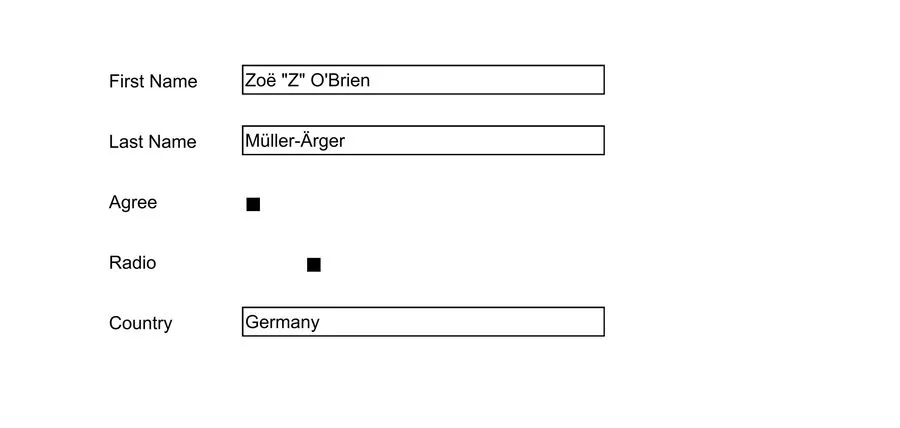
The source document does not change. ADM does not write the values to the log or to the audit entry.
Handle values that ADM refuses
Section titled “Handle values that ADM refuses”AOP does not check the values. It ignores a name that the PDF does not have. It writes an option
that a list does not have. It turns any text for a check box into a checked box. So ADM reads the
fields of the PDF first, with one more AOP call, and checks every value before it fills the form.
Each of these cases raises e_invalid_param, and no document is made:
- The PDF has no field with the name.
- The value is of the wrong kind:
checkedfor a text field, orvaluefor a check box. - A radio group or a list gets no option, or an option that it does not have.
- The field has another type, for example
signature. - The collection has the same name twice.
- A name has more than 500 characters, or a value has more than 4000 characters.
This block calls fill_form five times with a value that ADM refuses:
declare  l_form_id adm_documents.document_id%type;  l_values  adm_pdf_api.t_form_values;  l_id      adm_documents.document_id%type;
  procedure try_fill (    p_label in varchar2  )  as  begin    l_id := adm_pdf_api.fill_form(p_document_id => l_form_id, p_values => l_values);    dbms_output.put_line(p_label || ' -> filled');  exception    when others then      dbms_output.put_line(p_label || ' -> ' || sqlcode || ' ' || substr(sqlerrm, instr(sqlerrm, ': ') + 2));  end try_fill;begin  adm_context_api.system_user_login('JDOE');
  select document_id    into l_form_id    from adm_my_documents_v   where document_path = '/users/jdoe/form.pdf';
  l_values(1).name  := 'Surname';  l_values(1).value := 'Smith';  try_fill('unknown field');
  l_values.delete;  l_values(1).name  := 'radiolist';  l_values(1).value := 'List C';  try_fill('unknown option');
  l_values.delete;  l_values(1).name  := 'Agree';  l_values(1).value := 'yes';  try_fill('text for a check box');
  l_values.delete;  l_values(1).name  := 'Country';  try_fill('no option');
  l_values.delete;  l_values(1).name  := 'First Name';  l_values(1).value := 'Ada';  l_values(2).name  := 'First Name';  l_values(2).value := 'Grace';  try_fill('field twice');end;/
unknown field -> -20101 Invalid name of form value 1: the PDF has no form field with the name "Surname"unknown option -> -20101 Invalid value of form value 1: it is not one of the options of the field "radiolist"text for a check box -> -20101 Invalid value of form value 1: the field "Agree" is a check box, use checked and not valueno option -> -20101 Invalid value of form value 1: the field "Country" needs the name of an option in valuefield twice -> -20101 Invalid name of form value 2: the field is in the collection twiceThe messages name the field and the position of the value. They never hold a value. One call takes
up to 500 values. The constants adm_pdf_api.c_max_form_values,
c_max_form_name_length and c_max_form_value_length hold the limits.
Flatten a form
Section titled “Flatten a form”flatten_form turns all fields of a PDF into fixed content. The values that the fields show stay
visible. The fields are gone, so nobody can change the values. The call also flattens signature
fields. A PDF without fields gives an unchanged copy.
This block flattens the filled form of the previous section and counts the fields before and after:
declare  l_filled_id adm_documents.document_id%type;  l_flat_id   adm_documents.document_id%type;begin  adm_context_api.system_user_login('JDOE');
  select document_id    into l_filled_id    from adm_my_documents_v   where document_path = '/users/jdoe/form (filled).pdf';
  dbms_output.put_line('Fields before: ' || adm_pdf_api.get_form_fields(l_filled_id).count);
  l_flat_id := adm_pdf_api.flatten_form(p_document_id => l_filled_id);
  dbms_output.put_line('Fields after:  ' || adm_pdf_api.get_form_fields(l_flat_id).count);end;/
select document_name  from adm_my_documents_v where document_name like 'form (%' order by document_name;
Fields before: 5Fields after: 0
DOCUMENT_NAME________________________________form (filled) (flattened).pdfform (filled).pdfA rendered image of the flattened page and an image of the filled form are the same. The test suite of ADM compares them. AOP has a second setting that keeps the signature fields. ADM does not offer it, because it works only for a signed PDF, and ADM does not sign PDF files.
Add attachments to a PDF
Section titled “Add attachments to a PDF”A PDF can hold other files as attachments. A PDF viewer shows them with a paper clip. add_attachments
puts ADM documents into a PDF and stores the result as a new PDF document. The attachments that the
PDF has already stay. You pass the IDs of the documents in a collection of the type
apex_t_number. The attachments can be of any type, but not empty. The name of an attachment in the
PDF is the name of its document.
This block attaches notes.txt and logo.png to contract.pdf:
declare  l_contract_id adm_documents.document_id%type;  l_notes_id    adm_documents.document_id%type;  l_logo_id     adm_documents.document_id%type;  l_result_id   adm_documents.document_id%type;begin  adm_context_api.system_user_login('JDOE');
  select document_id into l_contract_id from adm_my_documents_v where document_path = '/users/jdoe/contract.pdf';  select document_id into l_notes_id    from adm_my_documents_v where document_path = '/users/jdoe/notes.txt';  select document_id into l_logo_id     from adm_my_documents_v where document_path = '/users/jdoe/logo.png';
  l_result_id := adm_pdf_api.add_attachments(                   p_document_id    => l_contract_id                 , p_attachment_ids => apex_t_number(l_notes_id, l_logo_id)                 );
  dbms_output.put_line('Pages in the result: ' || adm_pdf_api.get_page_count(l_result_id));end;/
select document_name, file_mime_type  from adm_my_documents_v where document_name = 'contract (attachments).pdf';
Pages in the result: 4
DOCUMENT_NAME FILE_MIME_TYPE_____________________________ __________________contract (attachments).pdf application/pdfThe user needs the right to view every attachment document. In an embed session, the token needs
the grant DOWNLOAD for every attachment, like for a source PDF. The size of the attachments
counts for PDF_MAX_FILE_SIZE_MB together with the size of the PDF. A call takes up to 100
attachments. The constant adm_pdf_api.c_max_attachments holds the limit.
Two attachments of one PDF cannot have the same name. If a name is in use, AOP replaces the first attachment and gives no error. So ADM refuses two attachments with the same name, also when the names differ only in case. This applies to the name of a document that is in another folder too. ADM cannot see the attachments that the PDF has already. A new attachment with the name of an old one replaces it.
AOP accepts only some types of files as the type of an attachment. It refuses, for example,
application/octet-stream, application/json and application/zip, and then the call fails. ADM
gives AOP the type of the document when AOP accepts it, and text/plain when it does not. The name
and the bytes of the file do not change.
Take the attachments out of a PDF
Section titled “Take the attachments out of a PDF”get_attachments makes a new document for every attachment of a PDF. The name of a document is the
name of the attachment. The documents go to the folder of the source, or to p_folder_id. The type
of a document comes from its content and its name. The function returns the IDs of the new
documents.
This block takes the attachments out of contract (attachments).pdf. It puts them in a new
folder:
declare  l_home_id    adm_folders.folder_id%type;  l_folder_id  adm_folders.folder_id%type;  l_source_id  adm_documents.document_id%type;  l_ids        apex_t_number;begin  adm_context_api.system_user_login('JDOE');
  select folder_id into l_home_id from adm_my_folders_v where folder_path = '/users/jdoe';  select document_id into l_source_id from adm_my_documents_v where document_path = '/users/jdoe/contract (attachments).pdf';
  l_folder_id := adm_folder_api.add_folder(p_folder_name => 'attachments', p_parent_folder_id => l_home_id);
  l_ids := adm_pdf_api.get_attachments(             p_document_id => l_source_id           , p_folder_id   => l_folder_id           );
  dbms_output.put_line('Documents made: ' || l_ids.count);end;/
select document_name, file_mime_type  from adm_my_documents_v where document_path like '/users/jdoe/attachments/%' order by document_name;
Documents made: 2
DOCUMENT_NAME FILE_MIME_TYPE________________ _________________logo.png image/pngnotes.txt text/plainThe bytes of the new documents are the bytes that add_attachments put in. The test suite of ADM
compares them one by one. A PDF without attachments is a normal case. The call returns an empty
collection and makes no document. This block calls get_attachments for contract.pdf:
declare  l_contract_id adm_documents.document_id%type;  l_ids         apex_t_number;begin  adm_context_api.system_user_login('JDOE');
  select document_id into l_contract_id from adm_my_documents_v where document_path = '/users/jdoe/contract.pdf';
  l_ids := adm_pdf_api.get_attachments(l_contract_id);
  dbms_output.put_line('Documents made: ' || l_ids.count);end;/
Documents made: 0AOP gives the same error for a PDF without attachments and for a file that it cannot read. When AOP
finds no attachment, ADM asks AOP to check the file with validate, one more call. If the file is
not valid, get_attachments raises e_pdf_operation_failed.
Names of the attachments
Section titled “Names of the attachments”If a name is in use in the folder, all documents of the call get the same number in front of the
extension. This is the same rule as for split and to_images. This block takes the attachments
out again, into the folder attachments:
declare  l_source_id  adm_documents.document_id%type;  l_folder_id  adm_folders.folder_id%type;  l_ids        apex_t_number;begin  adm_context_api.system_user_login('JDOE');
  select document_id into l_source_id from adm_my_documents_v where document_path = '/users/jdoe/contract (attachments).pdf';  select folder_id   into l_folder_id from adm_my_folders_v   where folder_path   = '/users/jdoe/attachments';
  l_ids := adm_pdf_api.get_attachments(l_source_id, l_folder_id);  dbms_output.put_line('Documents made: ' || l_ids.count);end;/
select document_name  from adm_my_documents_v where document_path like '/users/jdoe/attachments/%' order by document_name;
Documents made: 2
DOCUMENT_NAME________________logo (2).pnglogo.pngnotes (2).txtnotes.txtThe author of a PDF chooses the names of the attachments. ADM changes what it does not allow in the name of a document:
- A path in front of the name is cut off.
../up/evil.txtbecomesevil.txt. - Every character that is not allowed becomes
_. These are/,\,<,>,",|,?,*, control characters and bidirectional overrides. - A name that is empty after this, or that has only dots, becomes
attachment. - A name that is too long is cut in front of the extension.
- If two attachments get the same name, the second one gets a number. Case does not matter.
An attachment is a file from an author that you may not know. ADM stores it like any upload, and
the hooks of ADM run for every document. The size of all files together must not be more than
PDF_MAX_FILE_SIZE_MB, and a PDF can have up to 100 attachments. Otherwise the call raises
e_limit_exceeded and makes no document. APEX does not unpack a file that is more than 200 times
larger than its compressed size, for example a file of zeros. ADM refuses a file that is more than
150 times larger, and the call raises e_pdf_operation_failed.
Check that a PDF is valid
Section titled “Check that a PDF is valid”validate checks the structure of a PDF document and says whether AOP can read it. The call is for
diagnosis, so a file that is no good gives an answer and no error. The function returns a record of
the type adm_pdf_api.t_validation with these members:
| Member | Value |
|---|---|
valid |
True when AOP can open the PDF and read its page tree. False when it cannot. Null when ADM cannot tell. |
encrypted |
True for a PDF that is protected with a password. |
message |
The text of AOP for a file that is not valid, or a text of ADM. |
validate does not look at the type of the document. The content decides. An empty file, and a
file that does not start with %PDF-, give valid false. The type of the document can be
text/plain for a good PDF. A PDF that needs a password gives valid null and encrypted true,
because AOP cannot read it and ADM does not send it. This block checks four files:
declare  l_result adm_pdf_api.t_validation;
  procedure check_file (    p_path in varchar2  )  as    l_document_id adm_documents.document_id%type;  begin    select document_id      into l_document_id      from adm_my_documents_v     where document_path = p_path;
    l_result := adm_pdf_api.validate(l_document_id);
    dbms_output.put_line(      p_path      || ' | valid: ' || case when l_result.valid then 'true' when not l_result.valid then 'false' else 'null' end      || ' | encrypted: ' || case when l_result.encrypted then 'true' else 'false' end      || ' | ' || l_result.message    );  end check_file;begin  adm_context_api.system_user_login('JDOE');
  check_file('/users/jdoe/contract.pdf');  check_file('/users/jdoe/broken.pdf');  check_file('/users/jdoe/notes.txt');  check_file('/users/jdoe/contract (protected).pdf');end;/
/users/jdoe/contract.pdf | valid: true | encrypted: false | PDF is valid/users/jdoe/broken.pdf | valid: false | encrypted: false | Page tree root must be a dictionary/users/jdoe/notes.txt | valid: false | encrypted: false | The file is not a PDF: it has no PDF header./users/jdoe/contract (protected).pdf | valid: null | encrypted: true | The PDF is protected with a password. ADM cannot check its structure.broken.pdf is a PDF that was cut after the first 100 bytes of the upload. The message of
broken.pdf is the message of AOP. valid is true when AOP can read the file, also when AOP must
repair it. A PDF that lost its end, with the table of objects, is valid, because AOP builds the table
again. A file is not valid when AOP cannot find its pages.
The user needs view rights on the document and, in an embed session, the grant DOWNLOAD. The size
of the file counts for PDF_MAX_FILE_SIZE_MB. If AOP does not answer, validate raises
e_pdf_operation_failed. This is an error and not the answer valid false.
Work with signed PDFs
Section titled “Work with signed PDFs”A digital signature covers the exact bytes of a file. If one byte changes, the signature is not valid. Every operation that makes a new PDF from a source writes a new file, so the new file does not hold the signature of the source. ADM refuses these operations for a signed PDF, unless you accept the loss of the signature. To add a signature to a PDF, see Sign a PDF document.
Find out whether a PDF is signed
Section titled “Find out whether a PDF is signed”get_info returns the members signed and signatures. This block reads them for a PDF with one
signature:
declare  l_document_id adm_documents.document_id%type;  l_info        clob;begin  adm_context_api.system_user_login('JDOE');
  select document_id    into l_document_id    from adm_my_documents_v   where document_path = '/users/jdoe/contract signed.pdf';
  l_info := adm_pdf_api.get_info(l_document_id);
  dbms_output.put_line('signed: ' || json_value(l_info, '$.signed'));  dbms_output.put_line('signatures: ' || json_value(l_info, '$.signatures'));end;/
signed: truesignatures: 1ADM finds the signatures in the bytes of the file. It does not read the whole file into a text, and
it does not call AOP. A signature is an entry /ByteRange with four numbers, together with a
/Contents that holds a signature. These cases are not signatures:
- A signature field that nobody has signed. Such a field has no
/Contents, or/Contentsis full of zeros. - Text that looks like
/ByteRange, but the numbers do not fit the file, or the bytes in the gap are not a signature.
A document time stamp has the same structure and counts as a signature, because a change to the file breaks it in the same way. A PDF that needs a password also has a count of signatures.
Verify the signatures of a PDF
Section titled “Verify the signatures of a PDF”verify_signatures checks every signature of a PDF in the database. It returns one entry for every
signature, in the order of the file. A PDF without a signature gives an empty collection. The call
does not use AOP, and it reads a PDF that needs a password, because a signature is not encrypted.
For every signature, ADM makes these checks:
digest_ok: the digest of the signed bytes is the digest in the signature. If it is false, the signed bytes changed after the signing.signature_ok: the signature of the signed attributes is valid for the public key of the certificate in the signature. ADM checks it withDBMS_CRYPTO.VERIFY.covers_whole_file: the signed bytes reach the end of the file. If it is false, the file has bytes behind the signature. The later signature of a second signer is one case. A change that an incremental update added is another.signing_key_idandsigning_key_name: the key of ADM that has the certificate of the signer. See Set up a signing key.
This block checks four documents. The first is a PDF with two signatures. The second is the same kind of PDF, with a letter of its text changed after the signing. The third and the fourth are PDFs that AOP signed:
declare  l_infos adm_pdf_api.t_signature_infos;
  function text_of (    p_value in boolean  ) return varchar2  as  begin    return case when p_value then 'true' when not p_value then 'false' else 'null' end;  end text_of;
  procedure show (    p_path in varchar2  )  as    l_document_id adm_documents.document_id%type;  begin    select document_id      into l_document_id      from adm_my_documents_v     where document_path = p_path;
    dbms_output.put_line(p_path);    l_infos := adm_pdf_api.verify_signatures(l_document_id);
    for i in 1 .. l_infos.count loop      dbms_output.put_line(        '  ' || i || ': ' || l_infos(i).field_name || ', ' || l_infos(i).signer_dn      );      dbms_output.put_line(        '     digest_ok: ' || text_of(l_infos(i).digest_ok)        || ', signature_ok: ' || text_of(l_infos(i).signature_ok)        || ', covers_whole_file: ' || text_of(l_infos(i).covers_whole_file)        || ', has_timestamp: ' || text_of(l_infos(i).has_timestamp)      );      dbms_output.put_line(        '     registered key: ' || coalesce(l_infos(i).signing_key_name, '-')        || case when l_infos(i).problem is not null then ', problem: ' || l_infos(i).problem end      );    end loop;  end show;begin  adm_context_api.system_user_login('JDOE');
  show('/users/jdoe/agreement.pdf');  show('/users/jdoe/agreement changed.pdf');  show('/users/jdoe/aop wrong key.pdf');  show('/users/jdoe/aop timestamp.pdf');end;/
/users/jdoe/agreement.pdf 1: Signature1, C=AT,O=ADM Test,CN=ADM Test Signer digest_ok: true, signature_ok: true, covers_whole_file: false, has_timestamp: false registered key: Contracts 2: Signature2, C=AT,O=ADM Test,CN=ADM Second Signer digest_ok: true, signature_ok: true, covers_whole_file: true, has_timestamp: false registered key: -/users/jdoe/agreement changed.pdf 1: Signature1, C=AT,O=ADM Test,CN=ADM Test Signer digest_ok: false, signature_ok: true, covers_whole_file: true, has_timestamp: false registered key: Contracts, problem: The digest of the file is not the digest of the signature. The file changed after the signing/users/jdoe/aop wrong key.pdf 1: Signature1, C=US,E=XXX@gmail.com,OU=AOP,O=Arthasoft,CN=Kiran Kandel digest_ok: true, signature_ok: false, covers_whole_file: true, has_timestamp: false registered key: -, problem: The signature is not valid for the key of the certificate/users/jdoe/aop timestamp.pdf 1: Signature1, C=US,E=XXX@gmail.com,OU=AOP,O=Arthasoft,CN=Kiran Kandel digest_ok: true, signature_ok: true, covers_whole_file: true, has_timestamp: true registered key: -The first signer of the first file signed the file before the second signer added a signature. So
covers_whole_file is false for the first signature, and both signatures are valid. The file
aop wrong key.pdf shows why ADM checks signatures. AOP gave this file back with HTTP status 200.
The tool pdfsig of Poppler says that its signature is not valid. The recording used a registered key
Contracts that has the certificate of the first signer. See Set up a signing key. The names of the signers are the names of the test certificates.
signer_dn is the subject of the certificate in the order of RFC 2253: the last part of the name
in the certificate comes first. signing_time is the time that the signer claims. Nothing proves
it, unless the signature has a time stamp token.
What verify_signatures does not check:
- That the certificate is trusted. ADM does not build a chain from the certificate to a root certificate, and it has no list of roots. A self-signed certificate gives the same result as a certificate of a public authority.
- That the certificate was not revoked. ADM makes no OCSP request and reads no CRL.
- The time stamp token of a signature.
has_timestampsays only that the token is in the signature. A document time stamp (kindisTIMESTAMP) is listed and not checked. - That the signature conforms to PAdES.
- Algorithms other than RSA. For an ECDSA or an RSASSA-PSS signature the entry has a
problemandsignature_okis null.
The check of the signature needs DBMS_CRYPTO.VERIFY. The development database for this page is
Oracle 26ai Free, and the call works there. The product also supports Oracle 19c. ADM has not run
on 19c, and the package DBMS_CRYPTO of 19c may not have VERIFY. In a database without it,
signature_ok is null for every signature, and the entry says why. A user needs view rights on the
document, and in an embed session the grant DOWNLOAD.
Make a changed copy of a signed PDF
Section titled “Make a changed copy of a signed PDF”These operations write a new file for a source. They raise adm_error.e_pdf_signed for a signed
source: merge, split, watermark, protect, add_text, add_image, add_comments,
add_page_numbers, fill_form, flatten_form and add_attachments. For merge, every document of
the collection is a source. A signed document as an attachment of add_attachments is not a source:
AOP puts it into the PDF without a change.
The operations that only read work on a signed PDF: get_page_count, get_info, get_form_fields,
get_attachments, validate and to_images.
To accept the loss of the signature, pass p_invalidate_signatures => true. This block calls
watermark for a signed PDF two times:
declare  l_document_id adm_documents.document_id%type;  l_result_id   adm_documents.document_id%type;begin  adm_context_api.system_user_login('JDOE');
  select document_id    into l_document_id    from adm_my_documents_v   where document_path = '/users/jdoe/contract signed.pdf';
  begin    l_result_id := adm_pdf_api.watermark(                     p_document_id => l_document_id                   , p_text        => 'COPY'                   );  exception    when adm_error.e_pdf_signed then      dbms_output.put_line(sqlerrm);  end;
  l_result_id := adm_pdf_api.watermark(                   p_document_id           => l_document_id                 , p_text                  => 'COPY'                 , p_invalidate_signatures => true                 );
  dbms_output.put_line('Result: ' || l_result_id);  dbms_output.put_line('Signatures in the result: ' || json_value(adm_pdf_api.get_info(l_result_id), '$.signatures'));end;/
ORA-20269: Document 4191923718866330274338844987 has a digital signature and this operation would make it invalid.Result: 19543530527687681031690929997428Signatures in the result: 0The first call raises the error and makes no document. The second call makes
contract signed (watermarked).pdf. The source does not change, and it keeps its signature.
No signature of the source covers the whole file of the result. What the file holds depends on the operation. This was measured with AOP 26.1.2:
merge,split,watermark,add_textandadd_page_numberswrite a new file. The file still holds the signature field and the old signature data, and the signature is not valid. A reader can show it as an invalid signature.splitkeeps it only in the part that has the page with the field. ADM does not count it, because the data is in a compressed part of the file.flatten_formdeletes the signature field with the other fields. The result has no trace of the signature.fill_formadds an incremental update behind the signed bytes. The old signature stays in the result. It is valid for its range, and it does not cover the whole file.signaturesis 1 for the result.
To see which of these cases a result is, call get_provenance.
ADM makes this check after the rights check and after it reads the content, because only the
content shows the signatures. A user who has no right to read the document gets e_no_permission
and learns nothing about the signatures. The audit entry of a result that replaced signatures says
how many it replaced:
PDF watermark (1 signature(s) invalidated): contract signed.pdf -> contract signed (watermarked).pdfIn a folder with the signing mode SIGN the rules are different, because ADM signs the result. A
source that ADM signed is not refused. A source with two or more valid signatures is always refused.
See Sign the results automatically.
See where a PDF comes from
Section titled “See where a PDF comes from”ADM sets a status for every PDF version when it stores the version. The status says whether the
file is still the file that a signing key of ADM signed. get_provenance returns the status. It
reads one column and does not read the file.
| Status | Meaning |
|---|---|
NOT_SIGNED |
The PDF has no signature. |
ADM_SIGNED |
Every signature is of a signing key of ADM. Every digest and every signature is valid. The last signature covers the whole file. |
MODIFIED |
A signature of a signing key of ADM is in the file, and a check fails. A byte of the signed range changed, or the file has more bytes behind the last signature. |
FOREIGN_SIGNED |
The PDF has a signature of a certificate that is not a signing key of ADM. No check of an ADM signature fails. |
UNKNOWN |
ADM cannot say. The PDF needs a password, or cannot be read, or a signature of an ADM key cannot be checked. A version from before ADM kept the status also has this answer. |
A certificate belongs to ADM when a signing key that is registered in ADM has it. The status of the key does not matter. A key that an administrator disabled stays a key of ADM, because its signatures stay what they were. When a file has several signatures, the first ones must be valid. Only the last one must cover the whole file. This is how a second signer adds a signature.
This block signs a PDF, makes two changed copies of the signed PDF, and reads the status of every file:
declare  l_key_id   adm_signing_keys.signing_key_id%type;  l_form_id  adm_documents.document_id%type;  l_signed   adm_documents.document_id%type;  l_values   adm_pdf_api.t_form_values;
  procedure show_status (    p_document_id in adm_documents.document_id%type  )  as    l_name adm_documents.document_name%type;  begin    select d.document_name into l_name from adm_documents d where d.document_id = p_document_id;    dbms_output.put_line(rpad(l_name, 52) || adm_pdf_api.get_provenance(p_document_id));  end show_status;begin  adm_context_api.system_user_login('JDOE');
  select k.signing_key_id into l_key_id from adm_signing_keys k where k.key_name = 'Contracts';  select d.document_id    into l_form_id    from adm_my_documents_v d   where d.document_path = '/users/jdoe/application form.pdf';
  l_signed := adm_pdf_api.sign(l_form_id, l_key_id, p_timestamp => false);
  l_values(1).name  := 'First Name';  l_values(1).value := 'Ada';
  dbms_output.put_line(rpad('Document', 52) || 'Status');  show_status(l_form_id);  show_status(l_signed);  show_status(adm_pdf_api.watermark(l_signed, 'COPY', p_invalidate_signatures => true));  show_status(adm_pdf_api.fill_form(l_signed, l_values, p_invalidate_signatures => true));end;/
Document Statusapplication form.pdf NOT_SIGNEDapplication form (signed).pdf ADM_SIGNEDapplication form (signed) (watermarked).pdf NOT_SIGNEDapplication form (signed) (filled).pdf MODIFIEDThe recording was made with AOP 26.1.2 and a key Contracts of the provider DATABASE, which
JDOE may use. The two changed copies have a different status because the operations write
different files:
watermarkwrites a new file. The signature of the source is not valid in it, and ADM finds no live signature. The status isNOT_SIGNED.fill_formadds an incremental update behind the signed bytes. The signature of the source stays valid for its range and does not cover the whole file. The status isMODIFIED.
ADM sets the status in create_document and add_document_version. So it covers every way that
a PDF version comes into ADM: an upload, the result of a PDF operation, an edit in the PDF editor,
a version that an extraction or a hook adds, and the restore of an old version. The restore
reads the bytes of the old version again, so a restored version has the status that its bytes
have. ADM does not sign an upload. It only classifies the file.
The classification never fails an upload. If it fails, the version gets UNKNOWN, and the error is
in the debug log. A file that is not a PDF is not read for it and has no status. get_provenance
returns null for a document that is not a PDF. It raises adm_error.e_version_not_found for a
version of another document. The user needs view rights on the document.
What the status does not say. ADM does not check that a certificate is trusted, that it was not revoked, or when the signature was made. See Verify the signatures of a PDF. A signature that an operation left in a rewritten file, and that is not valid, is not counted. The signature data is inside a compressed part of the file, where ADM does not read. The status of a rewritten file is for its live signatures only.
See the status in the document info
Section titled “See the status in the document info”The Document info drawer of a PDF shows the status in the line PDF Signature. The line
gives the status of the latest version. If the document has an older version, the status of the
version before follows in parentheses, for example Not signed (previous version: Signed by ADM).
| Status | Text in the drawer |
|---|---|
NOT_SIGNED |
Not signed |
ADM_SIGNED |
Signed by ADM |
MODIFIED |
Signature of ADM, file changed afterwards |
FOREIGN_SIGNED |
Signed by someone else |
UNKNOWN |
Not checked |
adm_pdf_api.get_provenance_summary returns the same line. It reads two columns and does not read
the file. The user needs view rights on the document, as for get_provenance. The drawer does not
show the line for a document in the trash.
An administrator can list every PDF version that is no longer the file that ADM signed. See Find the PDFs that changed after ADM signed them.
Classify the versions that exist already
Section titled “Classify the versions that exist already”A version that ADM stored before it kept the status has no status, and get_provenance answers
UNKNOWN for it. adm_pdf_provenance_api.backfill classifies these versions. Only an
administrator or the system user can call it. It reads every file through the storage of ADM, so
files in object storage are downloaded. Use p_max_versions for a batch, and call it again until
it returns 0:
declare  l_count number;begin  adm_context_api.system_login;
  loop    l_count := adm_pdf_provenance_api.backfill(p_max_versions => 500);    dbms_output.put_line('classified: ' || l_count);    exit when l_count = 0;    commit;  end loop;end;/
The default is the latest version of every PDF document that is not in the trash. With
p_all_versions => true the call also classifies the older versions. With p_document_id it works
for one document. A version that cannot be read gets UNKNOWN, so the loop ends. The call does not
commit.
Set up a signing key
Section titled “Set up a signing key”A signing key is the address of a private key and the public certificate that belongs to it. A signature in a PDF holds the certificate and a value that only the private key can make. ADM never sends the private key to AOP. A key has a provider, and the provider is the place where the private key is.
Choose where the private key is
Section titled “Choose where the private key is”| Provider | Where the private key is | What ADM needs |
|---|---|---|
TRANSIT |
In the Transit secrets engine of OpenBao or HashiCorp Vault. The key does not leave the server. | The address of the server, the name of the key, and an APEX web credential with a token. |
OCI_VAULT |
In OCI Vault. The key does not leave the vault. | DBMS_CLOUD, and a credential for it. |
DATABASE |
In the ADM database, in a table, encrypted. | Nothing. Not recommended. |
With TRANSIT and OCI_VAULT, ADM sends a SHA-256 digest to the service. The service returns the
signature. ADM stores no private key and no token. Use one of these two providers, or put a key
service of your own behind one of them. OpenBao and Vault are open source or have a free edition and
run in Docker. OCI_VAULT is optional: ADM works without DBMS_CLOUD.
All three providers use the same call to sign, adm_pdf_api.sign. See Sign a PDF document.
Check the version of AOP
Section titled “Check the version of AOP”Signing needs APEX Office Print 26.1.2 or later. AOP 26.1.2 added the setting that ADM uses to
sign. With an older AOP, ADM is still installed and valid, and every other operation works. The call
to sign raises adm_error.e_aop_too_old and sends nothing. This block shows the installed
version:
begin dbms_output.put_line('AOP version: ' || aop_api_pkg.c_aop_version);end;/AOP version: 26.1.2To get a newer version, install the database packages of AOP from the download of APEX Office Print
(aop_db_pkg.sql). The error message names both versions:
ORA-20277: Signing needs APEX Office Print 26.1.2 or newer. Version 26.1 is installed.ADM does not name the setting of AOP 26.1.2 in static code. A recorded test put the AOP package 26.1
back into the development database. Every package of ADM stayed valid, sign raised the error above,
and the other operations worked:
aop version 26.1supports_eid_sign: falsesign -> ORA-20277: Signing needs APEX Office Print 26.1.2 or newer. Version 26.1 is installed.pages: 1watermark ok: 8951761289851484446832604235340Set up a key in OpenBao or Vault
Section titled “Set up a key in OpenBao or Vault”The TRANSIT provider uses the Transit secrets engine, with the API of HashiCorp Vault. OpenBao is
a fork of Vault with the same API for Transit. ADM calls POST /v1/<mount>/sign/<key>/sha2-256 with
prehashed set to true and signature_algorithm set to pkcs1v15, as the
Transit API describes. The
token goes in the header X-Vault-Token. These steps used OpenBao 2.7.1 in Docker.
Start a test server
Section titled “Start a test server”Run a throwaway OpenBao in dev mode with Docker Compose. Dev mode keeps the data in memory, has no TLS, and uses a fixed root token. Use it for tests only. For a real server, use your own OpenBao or Vault with TLS and a policy for the signing token.
The container joins the Docker network of the database container, so the database reaches it as
http://adm-openbao:8200 and you reach it as http://localhost:8200. The variable ADM_DB_NETWORK
names that network. To find the network of a database container, run
docker inspect <container> --format '{{range $k, $v := .NetworkSettings.Networks}}{{$k}}{{end}}'.
The compose file docker-compose.openbao.yml
Save this text as docker-compose.openbao.yml:
services:  openbao:    image: openbao/openbao:latest    container_name: adm-openbao    command: ["server", "-dev", "-dev-listen-address=0.0.0.0:8200"]    environment:      BAO_DEV_ROOT_TOKEN_ID: adm-dev-root-token    cap_add:      - IPC_LOCK    ports:      - "8200:8200"    networks:      - db
networks:  db:    name: ${ADM_DB_NETWORK:?set ADM_DB_NETWORK to the Docker network of the database container}    external: true
Start the server with these commands:
export ADM_DB_NETWORK=<network of the database container>docker compose -f docker-compose.openbao.yml up -dexport BAO_ADDR=http://localhost:8200 BAO_TOKEN=adm-dev-root-token Container adm-openbao Creating Container adm-openbao Created Container adm-openbao Starting Container adm-openbao StartedCreate the key in Transit
Section titled “Create the key in Transit”Enable the Transit engine, and make an RSA key of 2048 bits or more. ADM supports RSA keys. The key is not exportable, so nobody can read the private key.
curl -s -X POST -H "X-Vault-Token: $BAO_TOKEN" $BAO_ADDR/v1/sys/mounts/transit \ -d '{"type":"transit"}' -o /dev/null -w "HTTP %{http_code}\n"curl -s -X POST -H "X-Vault-Token: $BAO_TOKEN" $BAO_ADDR/v1/transit/keys/contracts \ -d '{"type":"rsa-2048"}' -o /dev/null -w "HTTP %{http_code}\n"HTTP 204HTTP 200Make a certificate for the key
Section titled “Make a certificate for the key”A PDF reader shows the certificate as the identity of the signer. Transit has a key and no
certificate, and it cannot export the private key. So openssl cannot sign a certificate with it.
The script signing/make-transit-certificate.sh makes the certificate in four steps. It reads
the public key from Transit. It builds a certificate with this public key and a throwaway key, and it
discards the throwaway signature. It lets Transit sign the part of the certificate that a signature
covers. Then it puts the pieces together and makes sure that the self-signature is valid.
./signing/make-transit-certificate.sh --key contracts \ --subject "/CN=ADM Contracts/O=Acme/C=AT" --days 1825 > contracts.pemopenssl x509 -in contracts.pem -noout -subject -issuer -dates -fingerprint -sha256the self-signature of the certificate: OKsubject=CN=ADM Contracts, O=Acme, C=ATissuer=CN=ADM Contracts, O=Acme, C=ATnotBefore=Oct 16 11:16:49 2026 GMTnotAfter=Oct 15 11:16:49 2031 GMTsha256 Fingerprint=D4:67:C9:14:3C:E1:6C:56:30:48:FD:46:90:7A:E0:BD:FF:C1:22:BB:59:4C:0C:19:77:73:F5:DE:22:51:EE:50The certificate is self-signed. pdfsig reports a self-signed certificate as “issuer is unknown”,
because no trusted authority issued it. For a certificate from your own authority, or from a public
one, add --csr. The script then writes a signing request, which Transit signs in the same way. Send
the request to the authority, and register the certificate that you get back.
./signing/make-transit-certificate.sh --key contracts \ --subject "/CN=ADM Contracts/O=Acme/C=AT" --csr > contracts.csrthe signing request: Certificate request self-signature verify OKThe script needs bash, curl, openssl 3 or newer (tested with 4.0.3), and python3. Transit can keep the
certificate with the key. Then register_key can read it, and you do not pass it:
python3 -c 'import json; print(json.dumps({"certificate_chain": open("contracts.pem").read()}))' > body.jsoncurl -s -X POST -H "X-Vault-Token: $BAO_TOKEN" $BAO_ADDR/v1/transit/keys/contracts/set-certificate \ -d @body.json -o /dev/null -w "HTTP %{http_code}\n"HTTP 200Limit the token
Section titled “Limit the token”ADM needs two rights: reading the key, and signing with it. This policy gives them for one key
and nothing else. The tests of this page used a token with the policy. It signed with contracts,
and Transit refused the key adm-test and the creation of a key with status 403.
cat > policy.json <<'JSON'{"policy": "path \"transit/keys/contracts\" {\n capabilities = [\"read\"]\n}\npath \"transit/sign/contracts/sha2-256\" {\n capabilities = [\"update\"]\n}\n"}JSONcurl -s -X PUT -H "X-Vault-Token: $BAO_TOKEN" $BAO_ADDR/v1/sys/policies/acl/adm-contracts-signer -d @policy.jsoncurl -s -X POST -H "X-Vault-Token: $BAO_TOKEN" $BAO_ADDR/v1/auth/token/create \ -d '{"policies":["adm-contracts-signer"],"no_parent":true,"period":"768h"}'A token with a period does not expire as long as something renews it. Renew it before the period ends, or make a new token and change the credential.
Save the token in an APEX web credential
Section titled “Save the token in an APEX web credential”ADM does not store the token in its own tables. The token is in an APEX web credential of the type
HTTP Header, in the workspace of the ADM application. APEX stores the value encrypted and does not
show it again. The key row of ADM holds only the static ID of the credential. This is the same
mechanism that you use for a REST data source, so you can also manage the credential in the APEX
builder, under Workspace Utilities. Restrict the credential to the address of the server with
apex_credential.set_allowed_urls in production.
begin apex_util.set_workspace('ADM'); apex_credential.create_credential( p_credential_name => 'ADM Transit' , p_credential_static_id => 'ADM_TRANSIT' , p_authentication_type => apex_credential.c_type_http_header ); apex_credential.set_persistent_credentials( p_credential_static_id => 'ADM_TRANSIT' , p_username => 'X-Vault-Token' , p_password => '<the token>' ); commit;end;/The database must be able to reach the address of the server. Make sure that the access control list of the database allows it. A call outside the ADM application sets the workspace of the ADM application itself, because APEX reads a credential of a workspace.
Register the key and grant it
Section titled “Register the key and grant it”Only an administrator can register a key. A user needs a grant to sign with a key. This is also
true for an administrator. The grant is for a user, or for a group, and then every member of the
group can sign. This block registers the key, grants it to the group LEGAL and to the user JDOE,
and lists the keys. It does not pass a certificate, so register_key reads the certificate that is
stored with the key.
declare  l_key_id   adm_signing_keys.signing_key_id%type;  l_group_id adm_groups.group_id%type;  l_user_id  adm_users.user_id%type;  l_keys     adm_signing_api.t_keys;begin  adm_context_api.system_user_login('ADMIN');
  l_key_id := adm_signing_api.register_key(                p_key_name           => 'Contracts'              , p_provider           => adm_signing_api.c_provider_transit              , p_transit_url        => 'http://adm-openbao:8200'              , p_transit_key_name   => 'contracts'              , p_transit_credential => 'ADM_TRANSIT'              , p_description        => 'Contracts of the legal department'              );
  select group_id into l_group_id from adm_groups where group_name = 'LEGAL';  select user_id  into l_user_id  from adm_users  where username = 'JDOE';  adm_signing_api.grant_to_group(l_key_id, l_group_id);  adm_signing_api.grant_to_user(l_key_id, l_user_id);
  l_keys := adm_signing_api.list_keys;  for i in 1 .. l_keys.count loop    dbms_output.put_line(      l_keys(i).key_name || ' | ' || l_keys(i).provider || ' | ' || l_keys(i).status || ' | ' || l_keys(i).cert_subject      || ' | valid to ' || to_char(l_keys(i).valid_to at time zone 'UTC', 'YYYY-MM-DD')    );    dbms_output.put_line('  fingerprint ' || l_keys(i).cert_fingerprint);    dbms_output.put_line(      '  ' || l_keys(i).transit_url || '/v1/' || l_keys(i).transit_mount || '/sign/' || l_keys(i).transit_key_name      || ' | credential ' || l_keys(i).transit_credential    );  end loop;end;/
Contracts | TRANSIT | ACTIVE | C=AT,O=Acme,CN=ADM Contracts | valid to 2031-10-15 fingerprint D467C9143CE16C563048FD46907AE0BDFFC122BB594C0C197773F5DE2251EE50 http://adm-openbao:8200/v1/transit/sign/contracts | credential ADM_TRANSITThe group LEGAL and the user JDOE are examples. The fingerprint is different for every
certificate. With the parameters p_certificate you can pass the certificate yourself. The call
reads the key from Transit before it stores the row. This proves that the credential works and
makes sure that the public key of the certificate is the public key of the Transit key. These
messages came from calls that failed:
other certificate -> ORA-20101: Invalid certificate: the public key of the certificate is not the public key of the Transit key contractswrong token -> ORA-20274: Signing with the key contracts failed.no such key -> ORA-20274: Signing with the key nope failed.http, other host -> ORA-20101: Invalid address of the Transit server: use https://. http:// is accepted only for localhost and for a name without a dot, because the token goes to this addressregister_key raises adm_error.e_invalid_param when a value is not usable. It raises
adm_error.e_signing_failed when Transit cannot be reached or refuses the token. The message
does not say why: the cause is in the log. With p_check_transit => false, the call does not ask
the server. Use this only when the database cannot reach the server at the time of the
registration.
If you rotate the key in Transit, the new version has another public key. The certificate does not fit it, and ADM refuses the signature. Register a new key for the new certificate.
Set up a key in OCI Vault
Section titled “Set up a key in OCI Vault”These steps are in OCI and in your database. ADM does not do them.
- Make an RSA key of 2048 bits or more in OCI Vault. To use a key that you already have, import it into the vault (see the topic about importing keys in the OCI documentation). The private key stays in the vault.
- Get a certificate for the public key from your certificate authority. ADM needs the certificate as PEM text. The key in the vault and the certificate must belong together.
- Make an OCI user that can use the key for signing, and an API signing key for this user. This key only signs the requests to OCI. It is not the key of the documents.
- Make a DBMS_CLOUD credential from the API signing key of the user, in the ADM schema. The credential is not an auth token: an auth token cannot sign a request to OCI Vault.
- Make sure that the database can reach the cryptographic endpoint of the vault, and that
adm_ociis compiled withPLSQL_CCFLAGSset toDBMS_CLOUD:TRUE. The signing request usesDBMS_CLOUD.SEND_REQUEST.
The cryptographic endpoint is on the page of the vault in the OCI console. It looks like
https://abcdefg-crypto.kms.eu-frankfurt-1.oraclecloud.com. ADM cannot check that the
certificate belongs to the key in the vault. If it does not, the first signature is not valid, and
ADM refuses it. This block registers the key. The certificate text is the PEM text of your
certificate.
declare  l_certificate clob := q'[<the PEM text of the certificate>]';  l_key_id      adm_signing_keys.signing_key_id%type;begin  adm_context_api.system_user_login('ADMIN');
  l_key_id := adm_signing_api.register_key(                p_key_name        => 'Contracts OCI'              , p_certificate     => l_certificate              , p_provider        => adm_signing_api.c_provider_oci_vault              , p_vault_key_ocid  => 'ocid1.key.oc1.eu-frankfurt-1.abcdefg.hijklmnop'              , p_crypto_endpoint => 'https://abcdefg-crypto.kms.eu-frankfurt-1.oraclecloud.com'              , p_credential_name => 'ADM_VAULT_SIGNER'              );end;/
Store a key in the database
Section titled “Store a key in the database”The provider DATABASE signs inside the database, so it needs no service. These commands make a
key and a certificate for a test with openssl. The private key has no password: ADM stores the
key encrypted, and it refuses a key that a password protects.
openssl req -x509 -newkey rsa:2048 -nodes -keyout archive.key -out archive.crt -days 1825 -sha256 \ -subj "/CN=ADM Archive/O=Acme/C=AT" \ -addext "basicConstraints=CA:FALSE" -addext "keyUsage=digitalSignature,nonRepudiation"The call register_key takes the private key as the text of a PEM file (BEGIN PRIVATE KEY or
BEGIN RSA PRIVATE KEY, RSA 2048 bits or more). It makes sure that the key is the key of the
certificate, by signing a text and checking the signature with the certificate. It stores the key
in the table adm_signing_key_secrets.
declare  l_certificate clob := q'[<the PEM text of archive.crt>]';  l_private_key clob := q'[<the PEM text of archive.key>]';  l_key_id      adm_signing_keys.signing_key_id%type;  l_user_id     adm_users.user_id%type;begin  adm_context_api.system_user_login('ADMIN');
  l_key_id := adm_signing_api.register_key(                p_key_name        => 'Archive'              , p_certificate     => l_certificate              , p_provider        => adm_signing_api.c_provider_database              , p_private_key_pem => l_private_key              , p_description     => 'Test key'              );
  select user_id into l_user_id from adm_users where username = 'JDOE';  adm_signing_api.grant_to_user(l_key_id, l_user_id);end;/
How ADM protects the key, and where the protection stops:
-
The key is stored with AES-256 in CBC mode, with an HMAC-SHA256 over the encrypted bytes. This recorded query shows the sizes of the row of the key above. The encrypted key has 1632 bytes:
secret row: salt 16 bytes, iv 16 bytes, encrypted key 1632 bytes, mac 32 bytes -
The encryption key and the MAC key come from the setting
HASH_PRIVATE_KEYof your installation and from a random salt of the row. ADM must have a secret that is not in the code of the package. The setting is the only place where the installation has one. It is in the same database, so anyone who can read the setting and the table can decrypt the key. If you change the setting, the stored keys cannot be read, and signing with them fails. Register the keys again. -
The table has no grant. No API of ADM returns a column of it. The key is in no audit entry, no log and no error message.
-
A database with Transparent Data Encryption protects the files and the backups of the table. It does not protect the key from a user of the database.
-
The check constraints of the table
adm_signing_keysstill refuse a PEM text with a private key in the certificate and in the description.
The message that the call returned for a key of another certificate, and for a key with a password:
database, wrong key -> ORA-20101: Invalid private key: the key does not belong to the certificatedatabase, password -> ORA-20101: Invalid private key: the key is protected with a password. ADM stores the key encrypted itself, pass it without a passwordThe signing in the database is a signature of a message, and AOP gives ADM only the digest of the
message. So the provider DATABASE builds the message again from the prepared PDF, and makes sure
that its SHA-256 is the digest that AOP gave. If it is not, the signing fails.
Manage signing keys
Section titled “Manage signing keys”Every key is active when it is registered, and nobody has a grant. These procedures of
adm_signing_api change keys and grants:
| Procedure | What it does |
|---|---|
register_key |
Registers a key. The key is active, and nobody has a grant. |
update_key |
Changes the name, the description, the address or the credential. A value that is null stays as it is. The key itself and the certificate cannot change: register a new key. |
disable_key, enable_key |
A disabled key cannot sign. The signatures that it made stay valid. |
grant_to_user, grant_to_group |
Let a user, or the members of a group, sign with a key. |
revoke_from_user, revoke_from_group |
Take a grant back. A user who is in a group with a grant can still sign. |
list_keys, get_key, get_certificate |
Read the keys. An administrator reads every key. Another user reads only the keys that the user can use. |
list_usable_keys |
The keys that the current user can sign with now. |
Only an administrator can call the procedures that change a key or a grant. Every change writes an
entry to the audit trail, with the action REGISTER_SIGNING_KEY, UPDATE_SIGNING_KEY,
DISABLE_SIGNING_KEY, ENABLE_SIGNING_KEY, GRANT_SIGNING_KEY or REVOKE_SIGNING_KEY. The entry
names the key and its provider. It never holds the certificate, a private key or a token.
A key can sign when it is active, the certificate is valid now, and the user has a grant. A session of an embed token cannot sign. The messages of the other cases:
key is disabled -> ORA-20272: Signing key Contracts cannot be used: it is disabledno grant -> ORA-20273: You do not have permission to sign with the signing key Without grant.Set the time stamp server
Section titled “Set the time stamp server”A signature can hold a time stamp token (RFC 3161) from a time stamp server. The token proves
that the signature existed at that time. The setting SIGNING_TSA_URL is the address of the
server. It is empty by default, because the server gets a hash of every signature, and the
administrator chooses the server. See Settings.
AOP calls the server, so the server must be reachable from AOP and not from the database.
verify_signatures reports in has_timestamp that a token is in a signature. It does not check the
token.
Security notes
Section titled “Security notes”- With
TRANSITandOCI_VAULT, the private key stays in the service, with the access rules of the service. Anyone who can use the key there can sign, without ADM. Limit the token or the OCI policy to the one key. - The token of a Transit key is in an APEX web credential. Whoever can use the credential in the workspace can use the key. Give the credential only to the ADM application and the ADM schema.
- The credential of an OCI key signs the requests to OCI Vault. Whoever can use the credential in the database can use the key in the vault.
- A user who can write to the table
adm_signing_keyscan change the certificate of a key. A signature that the service makes then does not match the certificate, and ADM refuses it. - A user who can run code as the owner of the schema can sign with every key of the provider
DATABASE. See Choose where the private key is. - AOP receives the document and the certificate. Use an on-premise AOP server if the documents must not leave your network.
- The server for time stamps receives a hash of the signature.
What has not been tested
Section titled “What has not been tested”- The call to OCI Vault. See Set up a key in OCI Vault.
- Transit of HashiCorp Vault. The tests ran against OpenBao 2.7.1, which has the same API.
- Transit with TLS, with a namespace of Vault Enterprise, and with keys that are not RSA.
- Oracle 19c. See Verify the signatures of a PDF.
Sign a PDF document
Section titled “Sign a PDF document”adm_pdf_api.sign signs a PDF document and stores the result as a new document. The source does
not change. A user can sign with a key when the user has a grant for it. The call checks the rights
before it reads the file, like the other operations.
The signature has these parts. AOP prepares the PDF and returns the digest that must be signed. The provider of the key signs the digest. AOP puts the signature into the PDF. Then ADM checks the signature in the database, and it stores the document only when the signature is valid. This check is necessary because AOP accepts any bytes as a signature.
Sign with a key
Section titled “Sign with a key”This block signs contract.pdf with the key Contracts of Transit as the user JDOE. It
checks the result with verify_signatures. The user JDOE has a grant for the key, so
list_usable_keys returns it.
declare  l_document_id adm_documents.document_id%type;  l_key_id      adm_signing_keys.signing_key_id%type;  l_keys        adm_signing_api.t_keys;  l_signed_id   adm_documents.document_id%type;  l_infos       adm_pdf_api.t_signature_infos;begin  adm_context_api.system_user_login('JDOE');
  select document_id    into l_document_id    from adm_my_documents_v   where document_path = '/users/jdoe/contract.pdf';
  l_keys := adm_signing_api.list_usable_keys;  for i in 1 .. l_keys.count loop    if l_keys(i).key_name = 'Contracts' then      l_key_id := l_keys(i).signing_key_id;    end if;  end loop;
  l_signed_id := adm_pdf_api.sign(                   p_document_id    => l_document_id                 , p_signing_key_id => l_key_id                 , p_reason         => 'Approved by the legal department'                 , p_location       => 'Vienna'                 , p_contact_info   => 'legal@acme.example'                 );
  dbms_output.put_line('Result: ' || l_signed_id);  l_infos := adm_pdf_api.verify_signatures(l_signed_id);  for i in 1 .. l_infos.count loop    dbms_output.put_line(      i || ' ' || l_infos(i).field_name || ' | ' || l_infos(i).signer_dn || ' | key: ' || l_infos(i).signing_key_name    );    dbms_output.put_line(      '  digest_ok: ' || case when l_infos(i).digest_ok then 'true' else 'false' end      || ', signature_ok: ' || case when l_infos(i).signature_ok then 'true' else 'false' end      || ', covers_whole_file: ' || case when l_infos(i).covers_whole_file then 'true' else 'false' end      || ', has_timestamp: ' || case when l_infos(i).has_timestamp then 'true' else 'false' end    );  end loop;end;/
Result: 13030342836014656700640285101481 Signature1 | C=AT,O=Acme,CN=ADM Contracts | key: Contracts digest_ok: true, signature_ok: true, covers_whole_file: true, has_timestamp: falseThe document ID is different in every run. The result is the new document contract (signed).pdf in the folder of the source. The signature is
invisible: the PDF has a new signature field Signature1 without a place on the page. The reason, the
location and the contact are in the signature, and a PDF reader shows them. The name of the signer
is the common name of the certificate.
To check the file with a tool that does not belong to ADM, save the document as contract-signed.pdf
and run pdfsig of Poppler. This is the result for the file of the block above. The first block of
this section made it:
Digital Signature Info of: contract-signed.pdfSignature #1: - Signature Field Name: Signature1 - Signer Certificate Common Name: ADM Contracts - Signer full Distinguished Name: C=AT,O=Acme,CN=ADM Contracts - Signing Time: Oct 16 2026 13:21:19 - Signing Hash Algorithm: SHA-256 - Signature Type: adbe.pkcs7.detached - Signed Ranges: [0 - 961], [66499 - 67292] - Total document signed - Signature Validation: Signature is Valid. - Certificate Validation: Certificate issuer is unknown.Signature is Valid means that the bytes of the file and the signature match the certificate in the
signature. Certificate issuer is unknown is the correct result for a self-signed certificate. The
reader trusts the signature when the certificate chains to an authority that the reader trusts.
Add a second signature
Section titled “Add a second signature”A document that is signed already is a valid source. sign adds a new signature to the end of the
file, and the earlier signatures stay valid. This is how several signers sign one document in
turn. This block signs the result of the first block with the key Archive of the provider DATABASE:
declare  l_document_id adm_documents.document_id%type;  l_key_id      adm_signing_keys.signing_key_id%type;  l_keys        adm_signing_api.t_keys;  l_signed_id   adm_documents.document_id%type;  l_infos       adm_pdf_api.t_signature_infos;begin  adm_context_api.system_user_login('JDOE');
  select document_id    into l_document_id    from adm_my_documents_v   where document_path = '/users/jdoe/contract (signed).pdf';
  l_keys := adm_signing_api.list_usable_keys;  for i in 1 .. l_keys.count loop    if l_keys(i).key_name = 'Archive' then      l_key_id := l_keys(i).signing_key_id;    end if;  end loop;
  l_signed_id := adm_pdf_api.sign(                   p_document_id    => l_document_id                 , p_signing_key_id => l_key_id                 , p_reason         => 'Archived'                 );
  dbms_output.put_line('Result: ' || l_signed_id);  l_infos := adm_pdf_api.verify_signatures(l_signed_id);  for i in 1 .. l_infos.count loop    dbms_output.put_line(      i || ' ' || l_infos(i).field_name || ' | ' || l_infos(i).signer_dn || ' | key: ' || l_infos(i).signing_key_name    );    dbms_output.put_line(      '  digest_ok: ' || case when l_infos(i).digest_ok then 'true' else 'false' end      || ', signature_ok: ' || case when l_infos(i).signature_ok then 'true' else 'false' end      || ', covers_whole_file: ' || case when l_infos(i).covers_whole_file then 'true' else 'false' end      || ', has_timestamp: ' || case when l_infos(i).has_timestamp then 'true' else 'false' end    );  end loop;end;/
Result: 124851797054328481487918424777051 Signature1 | C=AT,O=Acme,CN=ADM Contracts | key: Contracts digest_ok: true, signature_ok: true, covers_whole_file: false, has_timestamp: false2 Signature2 | C=AT,O=Acme,CN=ADM Archive | key: Archive digest_ok: true, signature_ok: true, covers_whole_file: true, has_timestamp: falseThe first signature has covers_whole_file false, because the file grew behind it. Its digest and its
signature are valid, so the signature of the first signer is intact. The second signature covers the whole
file. The two signers used two providers. pdfsig shows both signatures as valid, and the first one
as Not total document signed. This is the result for the file contract-signed-twice.pdf:
Digital Signature Info of: contract-signed-twice.pdfSignature #1: - Signature Field Name: Signature1 - Signer Certificate Common Name: ADM Contracts - Signer full Distinguished Name: C=AT,O=Acme,CN=ADM Contracts - Signing Time: Oct 16 2026 13:21:19 - Signing Hash Algorithm: SHA-256 - Signature Type: adbe.pkcs7.detached - Signed Ranges: [0 - 961], [66499 - 67292] - Not total document signed - Signature Validation: Signature is Valid. - Certificate Validation: Certificate issuer is unknown.Signature #2: - Signature Field Name: Signature2 - Signer Certificate Common Name: ADM Archive - Signer full Distinguished Name: C=AT,O=Acme,CN=ADM Archive - Signing Time: Oct 16 2026 13:21:21 - Signing Hash Algorithm: SHA-256 - Signature Type: adbe.pkcs7.detached - Signed Ranges: [0 - 67723], [133261 - 134099] - Total document signed - Signature Validation: Signature is Valid. - Certificate Validation: Certificate issuer is unknown.Show the signature in a field
Section titled “Show the signature in a field”With p_field_name, the signature appears in the rectangle of a signature field that the PDF has and
that is not signed. The stamp shows the line “Digitally signed by:” with the name of the signer, the time and the reason. The name must
be the name of the field. AOP refuses a name that is not a field, and then sign raises
adm_error.e_pdf_operation_failed and stores nothing. This block signs the form form.pdf, which has
a field Signature:
declare  l_document_id adm_documents.document_id%type;  l_key_id      adm_signing_keys.signing_key_id%type;  l_keys        adm_signing_api.t_keys;  l_signed_id   adm_documents.document_id%type;  l_infos       adm_pdf_api.t_signature_infos;begin  adm_context_api.system_user_login('JDOE');
  select document_id    into l_document_id    from adm_my_documents_v   where document_path = '/users/jdoe/form.pdf';
  l_keys := adm_signing_api.list_usable_keys;  for i in 1 .. l_keys.count loop    if l_keys(i).key_name = 'Contracts' then      l_key_id := l_keys(i).signing_key_id;    end if;  end loop;
  l_signed_id := adm_pdf_api.sign(                   p_document_id    => l_document_id                 , p_signing_key_id => l_key_id                 , p_field_name     => 'Signature'                 , p_reason         => 'Approved'                 );
  l_infos := adm_pdf_api.verify_signatures(l_signed_id);  dbms_output.put_line('Result: ' || l_signed_id);  dbms_output.put_line(l_infos(1).field_name || ' | ' || l_infos(1).signer_dn);end;/
Result: 16205911786442501660918516239375Signature | C=AT,O=Acme,CN=ADM ContractsTo find the names of the signature fields of a PDF, use get_form_fields.
Add a time stamp
Section titled “Add a time stamp”With the setting SIGNING_TSA_URL, every signature gets a time stamp token. This block sets the
setting to the time stamp server of DigiCert, signs contract.pdf again, and shows the result. It
passes p_timestamp => false for the second signature, which asks for no token.
declare  l_document_id adm_documents.document_id%type;  l_key_id      adm_signing_keys.signing_key_id%type;  l_keys        adm_signing_api.t_keys;  l_stamped_id  adm_documents.document_id%type;  l_plain_id    adm_documents.document_id%type;begin  adm_context_api.system_login;  update adm_settings     set sett_value = 'http://timestamp.digicert.com'   where sett_key = 'SIGNING_TSA_URL';  commit;
  adm_context_api.system_user_login('JDOE');  select document_id    into l_document_id    from adm_my_documents_v   where document_path = '/users/jdoe/contract.pdf';
  l_keys := adm_signing_api.list_usable_keys;  for i in 1 .. l_keys.count loop    if l_keys(i).key_name = 'Contracts' then      l_key_id := l_keys(i).signing_key_id;    end if;  end loop;
  l_stamped_id := adm_pdf_api.sign(l_document_id, l_key_id);  l_plain_id   := adm_pdf_api.sign(l_document_id, l_key_id, p_timestamp => false);
  dbms_output.put_line(    'with a token: ' || case when adm_pdf_api.verify_signatures(l_stamped_id)(1).has_timestamp then 'true' else 'false' end  );  dbms_output.put_line(    'p_timestamp false: ' || case when adm_pdf_api.verify_signatures(l_plain_id)(1).has_timestamp then 'true' else 'false' end  );end;/
with a token: truep_timestamp false: falseAOP asks the server for the token, and the token is part of the signature. ADM does not check the
token. The audit entry of the call names the server. With an empty setting, no call asks for a token,
whatever the value of p_timestamp is.
Know what ADM checks
Section titled “Know what ADM checks”Before a file leaves the database, sign makes these checks in this order. Each raises its own error:
| Check | Error |
|---|---|
| The session is not an embed session. A signature is the decision of a person, so an embed token cannot sign, whatever its grants are. | e_signing_not_in_embed |
| The key exists. | e_signing_key_not_found |
| The user has a grant for the key, also an administrator. | e_signing_key_denied |
| The key is active, and its certificate is valid now. | e_signing_key_unusable |
| The installed AOP is 26.1.2 or later. | e_aop_too_old |
| The user can view the source document, and the embed grants and the edit rights on the target folder are in place. See Rights that every operation checks. | e_no_permission |
The source is a PDF, the size is within PDF_MAX_FILE_SIZE_MB, and the PDF does not need a password. AOP cannot sign a file that needs a password. |
e_not_a_pdf, e_limit_exceeded, e_pdf_encrypted |
| The reason, the location, the contact and the field name have up to 500 characters. | e_invalid_param |
A signed source is not refused: sign is the one operation that keeps the signatures of its source.
After AOP has made the file, ADM makes one more check before it stores the result. The newest
signature must come from the certificate of the key, cover the whole file, and have a valid digest and
a valid signature. A result that fails the check is not stored, and the call raises
adm_error.e_signature_invalid. A failure of AOP raises e_pdf_operation_failed. A failure of the
provider raises e_signing_failed, and the message names only the key. The messages that these calls
returned:
no grant -> ORA-20273: You do not have permission to sign with the signing key Without grant.unknown key -> ORA-20270: Signing key not found: -1disabled key -> ORA-20272: Signing key Contracts cannot be used: it is disabledfield not in PDF -> ORA-20266: Signing the PDF failed.reason too long -> ORA-20101: Invalid reason: it has more than 500 charactersAOP too old -> ORA-20277: Signing needs APEX Office Print 26.1.2 or newer. Version 26.1 is installed.bad signature -> ORA-20275: The new signature is not valid, and the document was not stored.The bad signature message is from a test. The test stored the secret of a second key under the first
key, so the provider returned a signature of the wrong key. AOP put the signature in the PDF without
an error. ADM refused the result.
ADM checks the signature of the file itself, in the database. It does not check that the certificate is trusted, that it is not revoked, or that the time stamp token is valid. A PDF reader does these checks, and it shows the result. See Verify the signatures of a PDF.
Run hooks for the result
Section titled “Run hooks for the result”The hooks run for the result, like for the other operations. A hook that changes the bytes of the
file makes the signature invalid. Do not change PDF files in the hooks AFTER_NEW_FILE_UPLOAD and
AFTER_NEW_FILE_VERSION. An administrator can pass p_run_hooks => false. Call verify_signatures
on the document when a hook can change PDF files.
Read the audit entry
Section titled “Read the audit entry”Every result has the standard entry and one entry for the signature. The second entry names the key and its provider, the fingerprint of the certificate, the version of the source, the SHA-256 of the source file and of the result, the digest that was signed, and the time stamp server. It holds no key material and no signature. The block of the example above made these entries:
begin  adm_context_api.system_user_login('JDOE');
  for r in (    select a.action_details      from adm_audit_log a      join adm_documents d on d.document_id = a.document_id     where a.user_id = 'JDOE'       and a.action_details like 'PDF sign%'       and d.document_name = 'contract (signed).pdf'     order by a.audit_id  ) loop    dbms_output.put_line(replace(r.action_details, ', ', chr(10) || '  '));  end loop;end;/
PDF sign with the key 342 (Contracts provider TRANSIT certificate D467C9143CE16C563048FD46907AE0BDFFC122BB594C0C197773F5DE2251EE50 source version 4407175796558169950634219995287 input SHA-256 765A18F11AB5367A6441FCFBFB88BCEF69C70CB954FF4C285203FDDD95CAB303 output SHA-256 A02550B571E111885577793302C757517A03ED3D6335A0C4B579DA9E83C877D9 signed digest DB80940BAACD3AD46BF8129D52165953CFDD5D07CE992123F13C392362018966 time stamp server none): contract.pdf -> contract (signed).pdfThe digest that was signed is the SHA-256 of the signed attributes of the CMS structure. Together with the hashes of the two files, the entry shows later which bytes were signed.
Sign the results automatically
Section titled “Sign the results automatically”In a folder with the signing mode SIGN, ADM signs the result of a PDF operation before it stores
it. The key is the key of the setting AUTO_SIGN_KEY_ID. An administrator sets the mode per folder,
see Signing policies. That page
describes what ADM signs, the checks, and the audit entry.
| Operation | Result in a SIGN folder |
|---|---|
merge, split, watermark, add_text, add_image, add_comments, add_page_numbers, fill_form, flatten_form, add_attachments, convert_to_pdf |
Signed. split signs every part. |
protect, to_images, get_attachments |
Not signed. AOP cannot sign the encrypted file of protect. to_images makes images. get_attachments returns the files that are in the PDF, unchanged. |
sign |
Signed only with the key of the caller. |
| A save in the PDF editor | Signed. The editor deletes the signature fields of an ADM_SIGNED PDF after the load. See Sign the saves of the PDF editor. |
There is no call for this signature. The user needs no grant for the key, and the operations sign in an embed session too. A failure of the signature makes the operation fail, and ADM stores nothing.
The target folder decides, not the folder of the source. A watermark of a document in a WATCH
folder with p_folder_id of a SIGN folder is signed.
Names of the results
Section titled “Names of the results”If you do not pass a name, the name comes from the first source document. ADM takes the extension
.pdf off the name and adds a text and an extension. convert_to_pdf replaces the extension of the
source with .pdf and adds no text.
| Operation | Source report.pdf |
Result |
|---|---|---|
merge |
report.pdf |
report (merged).pdf |
watermark |
report.pdf |
report (watermarked).pdf |
protect |
report.pdf |
report (protected).pdf |
split |
report.pdf |
report (part 1).pdf, report (part 2).pdf, … |
to_images |
report.pdf |
report (page 1).jpg, report (page 2).jpg, … |
add_text |
report.pdf |
report (text).pdf |
add_image |
report.pdf |
report (image).pdf |
add_comments |
report.pdf |
report (comments).pdf |
add_page_numbers |
report.pdf |
report (numbered).pdf |
fill_form |
report.pdf |
report (filled).pdf |
flatten_form |
report.pdf |
report (flattened).pdf |
add_attachments |
report.pdf |
report (attachments).pdf |
convert_to_pdf |
report.docx |
report.pdf |
get_attachments |
report.pdf |
The names of the attachments, for example invoice.xml. |
The examples of this page made these documents in the home folder:
DOCUMENT_NAME__________________________contract (Seiten).pdfcontract (comments).pdfcontract (header).pdfcontract (image).pdfcontract (numbered).pdfcontract (text).pdfA name that is longer than 255 characters is cut in front of the added text, so that the result
fits. The number of a name that is in use and the extension stay. Every result goes to the folder of
the first source document, unless you pass p_folder_id.
Names that are in use
Section titled “Names that are in use”If you do not pass a name, and the folder has a document with the derived name, ADM adds a number in
front of the extension: report (watermarked).pdf, report (watermarked) (2).pdf,
report (watermarked) (3).pdf. The call uses the first number that is free. The name of a deleted
document is free again.
split, to_images and get_attachments give all documents of one call the same number. If report (part 2).pdf
is in use, the call makes report (part 1) (2).pdf, report (part 2) (2).pdf and so on. It uses the
first number for which all names are free. ADM chooses the names when AOP has made the files, and
before it creates the first document.
ADM does not add a number to a name that you pass with p_document_name. See
Replace an existing result. A call tries up to 1000 numbers. Then it
raises e_doc_exists.
ADM chooses a name and then creates the document. If a second session creates a document with the
same name between these two steps, the call raises e_doc_exists. Or it raises the error of the
unique index ADM_DOCUMENTS_LIVE_NAME_UK, when both sessions insert at the same time. ADM does not
try again. For split and to_images, the documents that the call created before the error are in
the transaction. Roll back the transaction, and call again.
Replace an existing result
Section titled “Replace an existing result”merge, watermark, protect, add_text, add_image, add_comments, add_page_numbers,
fill_form, flatten_form, add_attachments and convert_to_pdf have the parameter p_overwrite. It decides what happens when the target folder holds a document
with the name of the result. The name is the name that you pass with p_document_name, or the
derived name.
| Name | p_overwrite |
The folder has no document with that name | The folder has a PDF with that name | The folder has a file that is not a PDF with that name |
|---|---|---|---|---|
| Passed | false (default) |
A new document. | e_doc_exists |
e_doc_exists |
| Passed | true |
A new document. | A new version of the existing document. | e_doc_exists |
| Derived | false (default) |
A new document. | A new document, with a number in the name. | A new document, with a number in the name. |
| Derived | true |
A new document. | A new version of the existing document. | e_doc_exists |
convert_to_pdf differs in the last row: for a derived name that belongs to a file that is not a
PDF, it makes a new document with a number in the name. It never raises e_doc_exists for a
derived name. The name that ADM would derive from the source, passed with p_document_name, counts
as a derived name.
The name check runs before AOP is called, so a name that is in use costs no AOP call. This example
calls watermark for contract.pdf four times. The first call makes contract (watermarked).pdf.
declare  l_contract_id adm_documents.document_id%type;  l_marked_id   adm_documents.document_id%type;begin  adm_context_api.system_user_login('JDOE');
  select document_id into l_contract_id from adm_my_documents_v where document_path = '/users/jdoe/contract.pdf';
  l_marked_id := adm_pdf_api.watermark(p_document_id => l_contract_id, p_text => 'DRAFT');
  -- The derived name is in use: the result gets a number.  l_marked_id := adm_pdf_api.watermark(p_document_id => l_contract_id, p_text => 'FINAL');  dbms_output.put_line('Second call: document ' || l_marked_id);
  -- A name that you pass is never numbered.  begin    l_marked_id := adm_pdf_api.watermark(                     p_document_id   => l_contract_id                   , p_text          => 'FINAL'                   , p_document_name => 'contract (watermarked).pdf'                   );  exception    when adm_error.e_doc_exists then      dbms_output.put_line('With a name: ' || sqlcode || ' ' || adm_error.strip_ora_prefix(sqlerrm));  end;
  -- The derived name and p_overwrite: a new version of the first result.  l_marked_id := adm_pdf_api.watermark(                   p_document_id => l_contract_id                 , p_text        => 'FINAL'                 , p_overwrite   => true                 );  dbms_output.put_line('With p_overwrite, document ' || l_marked_id);end;/
select document_name, latest_version_number  from adm_my_documents_v where folder_path = '/users/jdoe'   and document_name like '%watermarked%' order by document_name;
Second call: document 17898463358204808436797216785758With a name: -20142 A document with the name "contract (watermarked).pdf" already exists in this folder.With p_overwrite, document 5452879596062893556713435203479
DOCUMENT_NAME LATEST_VERSION_NUMBER_________________________________ ________________________contract (watermarked) (2).pdf 1contract (watermarked).pdf 2With p_overwrite => true, the document keeps its ID, and its older versions stay. The document IDs
in the output are different in every run. A PDF operation always adds a version, even when
VERSION_MERGE_WINDOW_MINUTES is set and you made the latest version a moment ago, so the file that you
started from stays in the history. See
Merging quick saves into one version.
Use the operations in a hook
Section titled “Use the operations in a hook”Every result is a new document or a new version. It runs the hooks of ADM like every other upload.
A hook of AFTER_NEW_FILE_UPLOAD that calls an operation for the new file makes a new document, and
this document starts the hook again. ADM stops the chain at a depth of 10 with
e_hook_depth_exceeded. See
Create folders or documents from a hook.
Every operation that makes documents has the last parameter p_run_hooks. The default is true.
A hook that calls these operations must pass false, so that the result starts no hooks. This
procedure watermarks every upload:
create or replace package body my_adm_hooks as procedure watermark_upload ( p_document_id in adm_documents.document_id%type , p_version_id in adm_document_versions.version_id%type ) as l_result_id adm_documents.document_id%type; begin l_result_id := adm_pdf_api.watermark( p_document_id => p_document_id , p_text => 'CONFIDENTIAL' , p_run_hooks => false ); end watermark_upload;end my_adm_hooks;/The hook of AFTER_NEW_FILE_UPLOAD is this call:
my_adm_hooks.watermark_upload(p_document_id => :p_document_id, p_version_id => :p_version_id);The system user uploaded invoice.pdf to the home folder of JDOE. The folder then had these
documents:
DOCUMENT_NAME____________________________invoice (watermarked).pdfinvoice.pdfOnly an administrator or the system user can pass p_run_hooks => false. The same applies to
adm_document_api.create_document. Any other user gets e_admin_required, before a file leaves the
database. A hook runs as the user who uploads, and ADM wraps the error of a hook in e_hook_failed.
When JDOE uploaded a file, the upload failed:
JDOE upload: -20109 There was an error processing the after_new_file_upload. Please contact the administrator(s).So a hook like this one works only for uploads of administrators and of jobs that run as the system user. For uploads of other users, let the hook put the document ID in a queue. A worker with a system context calls the operation. See Build workflows on hooks.
A hook that calls these operations without p_run_hooks => false fails at the depth limit. This is
the answer for a hook that did not pass false:
Looping hook: -20112 Hooks are nested more than 10 levels deep. A hook that creates folders or documents starts the hooks again.The call waits for AOP. A hook that calls an operation makes every upload wait for AOP. When AOP is not available, the operation raises an error, and the upload that started the hook fails with it.
Rights that every operation checks
Section titled “Rights that every operation checks”Every operation runs as the user of the current ADM context. It checks these rights before it reads a file, and before a file leaves the database:
| Right | Needed for |
|---|---|
| View on every source document | All operations, including get_page_count, get_info, get_form_fields, validate, verify_signatures and sign. For add_image, this includes every image document. For add_attachments, this includes every attachment document. |
| Edit on the target folder | merge, split, watermark, protect, to_images, add_text, add_image, add_comments, add_page_numbers, fill_form, flatten_form, get_attachments, add_attachments, convert_to_pdf, sign. |
| Edit on the existing document | merge, watermark, protect, add_text, add_image, add_comments, add_page_numbers, fill_form, flatten_form, add_attachments, convert_to_pdf and sign with p_overwrite => true, when the name is in use. |
| A grant for the signing key | sign. An administrator needs it too. See Set up a signing key. |
A source document that does not exist, or that is deleted, raises e_doc_not_found. This also
applies to an administrator. A missing right raises e_no_permission. The target folder must
exist, and it cannot be a trash folder.
Rights in an embed session
Section titled “Rights in an embed session”Outside an embed session, the right to view a document is also the right to download it. An embed
token can show a file and not allow a copy of it. Every operation reads a source and stores a copy,
so in an embed session the token needs more grants. A missing grant raises e_no_permission, before
a file is read or sent to AOP.
| Grant of the token | Needed for |
|---|---|
DOWNLOAD |
Every source document of every operation, including get_page_count, get_info, get_form_fields, validate and verify_signatures. For add_image, this includes every image document. For add_attachments, this includes every attachment document. |
UPLOAD |
A new result document. Every document of get_attachments is a new document. |
UPLOAD_VERSION |
A new version of an existing document, with p_overwrite => true. |
sign is refused in every embed session with e_signing_not_in_embed, also with all grants.
A token without a write grant has no edit rights on the folder, so it cannot store a result. A token
with only another write grant, for example MOVE, has edit rights on the folder. It still needs
UPLOAD or UPLOAD_VERSION. A token has one set of grants for all documents. A source that the
token does not cover fails the view check. See
Embedding for the grants.
What ADM refuses
Section titled “What ADM refuses”After the rights, every operation makes sure of these points before it calls AOP:
| Check | Error |
|---|---|
Every source document is a PDF (the mime type is application/pdf). The attachments of add_attachments can be of any type. validate does not look at the type. convert_to_pdf is the other way round: its source is not a PDF, and it is one of the types that AOP converts. |
e_not_a_pdf, and e_not_supported for convert_to_pdf |
The total size of all source files is not more than PDF_MAX_FILE_SIZE_MB. For add_image, every image counts once for every item. The attachments of add_attachments count. The files that get_attachments takes out count too. For convert_to_pdf, the one source file counts. |
e_limit_exceeded |
Every image document of add_image has the type PNG or JPEG. |
e_not_supported |
| The first bytes of every image document are the bytes of a PNG or JPEG file. | e_invalid_param |
No source file is a PDF that needs a password. get_info is the exception: it returns "encrypted": true. validate is the other exception: it returns valid null and encrypted true. |
e_pdf_encrypted |
No source file of an operation that makes a new PDF has a digital signature, unless you pass p_invalidate_signatures => true. See Work with signed PDFs. The read operations are not refused. sign is not refused: it adds a signature and keeps the earlier ones. In a SIGN folder a source that ADM signed is not refused. |
e_pdf_signed |
In a SIGN folder: no source file has two or more valid signatures. AOP cannot sign a changed copy of such a file. p_invalidate_signatures does not change this. See Sign the results automatically. |
e_auto_sign_multi_signed |
In a SIGN folder: the key of AUTO_SIGN_KEY_ID is active, its certificate is valid now, and AOP is 26.1.2 or later. |
e_signing_key_unusable, e_signing_key_not_found, e_aop_too_old |
For sign: the key exists, the user has a grant, the key is active, and AOP is 26.1.2 or later. See Sign a PDF document. |
e_signing_key_not_found, e_signing_key_denied, e_signing_key_unusable, e_aop_too_old |
ADM finds an encrypted PDF by the /Encrypt entry in the file. ADM refuses every PDF with this
entry.
These limits apply to the values that you pass. Each one raises e_invalid_param:
| Value | Limit |
|---|---|
p_text of watermark |
Up to 1000 characters. |
p_font of watermark |
Up to 100 characters. |
p_color of watermark |
# and six hexadecimal digits. |
p_size of watermark |
More than 0. |
p_opacity of watermark |
From 0 to 1. |
p_read_password, p_modify_password of protect |
Up to 200 characters each. |
p_split_by_text of split |
Up to 500 characters. |
p_pages_per_file of split |
At least 1. You cannot combine it with p_split_by_text. |
p_document_ids of merge |
At least 2 documents. |
p_texts, p_images, p_comments |
At least 1 item, and up to 500 items (e_limit_exceeded for more). |
text of a text overlay |
Required, up to 1000 characters, no line break. |
text of a comment |
Required, up to 2000 characters. |
x, y of every overlay |
Required, from 0 to 14400. |
page of every overlay |
1 or more, and not more than the number of pages of the PDF. |
font of an overlay and p_font |
Up to 100 characters. |
font_size of an overlay and p_size |
More than 0 and up to 1000. |
color of an overlay and p_color |
# and six hexadecimal digits. |
rotation |
From -360 to 360. |
width, height of an overlay |
More than 0 and up to 14400. An image needs at least one of them. |
opacity of an image |
From 0 to 1. |
p_format of add_page_numbers |
Up to 1000 characters, with {currentpage}, no line break. |
p_position of add_page_numbers |
One of the six c_position_ constants. |
p_start_at of add_page_numbers |
0 or more. |
p_margin of add_page_numbers |
From 0 to 14400. |
p_values of fill_form |
At least 1 value, and up to 500 values (e_limit_exceeded for more). Every name is required, it is in the collection once, and it has up to 500 characters. A value has up to 4000 characters. Every value must fit its field, see Handle values that ADM refuses. |
p_attachment_ids of add_attachments |
At least 1 document, and up to 100 (e_limit_exceeded for more). Every document is in the collection once, has content, and has a name that no other attachment has. |
An error message never holds a password, the text of a watermark or the text of an overlay.
Handle errors
Section titled “Handle errors”All errors are named exceptions of adm_error. See
Error handling.
| Exception | Number | Raised when |
|---|---|---|
e_missing_param |
-20100 | A required value is missing: a document ID, the text of a watermark or of an overlay, a position, both passwords, the name of a form value, a form value or an attachment. |
e_invalid_param |
-20101 | A value is too long, out of range or not usable. For fill_form, a value does not fit the form. For add_attachments, two attachments have the same name. |
e_not_supported |
-20107 | The document for add_image is not a PNG or JPEG document. The document for convert_to_pdf has a type that AOP does not convert, for example a PDF. |
e_limit_exceeded |
-20108 | The source files are larger than PDF_MAX_FILE_SIZE_MB in total, a call has more than 500 items or form values, or more than 100 attachments. |
e_no_permission |
-20121 | A right of the previous section is missing, or the embed token has no grant for the operation. |
e_admin_required |
-20120 | A user who is not an administrator passes p_run_hooks => false. |
e_doc_not_found |
-20140 | A source document does not exist or is deleted. |
e_doc_exists |
-20142 | You passed a name and a document with this name exists, or all 1000 numbers of a derived name are in use. |
e_aop_not_configured |
-20263 | AOP_API_URL is empty when the call reaches AOP. |
e_conversion_failed |
-20264 | AOP did not convert the document of convert_to_pdf, or its answer is not a PDF. |
e_pdf_operation_failed |
-20266 | AOP did not make the result. get_attachments also raises it for a file that AOP cannot read, and for an attachment that APEX cannot unpack. |
e_not_a_pdf |
-20267 | A source document is not a PDF. |
e_pdf_encrypted |
-20268 | A source PDF needs a password. |
e_pdf_signed |
-20269 | A source PDF has a digital signature, and the operation would make it invalid. |
e_signing_key_not_found |
-20270 | No signing key has this ID. |
e_signing_key_exists |
-20271 | register_key: a key with this name or this certificate exists. |
e_signing_key_unusable |
-20272 | The signing key is disabled, or its certificate is not valid now. |
e_signing_key_denied |
-20273 | The user has no grant for the signing key. |
e_signing_failed |
-20274 | The provider of the key did not return a signature, or Transit could not be reached when a key was registered. |
e_signature_invalid |
-20275 | The new signature is not valid for the certificate of the key. The result is not stored. |
e_signing_not_in_embed |
-20276 | sign was called in an embed session. |
e_aop_too_old |
-20277 | The installed AOP is older than 26.1.2. |
e_auto_sign_multi_signed |
-20290 | The result goes to a SIGN folder, and a source PDF has two or more valid signatures. |
Other errors are possible: for example e_folder_not_found for an unknown target folder.
e_pdf_operation_failed has the category EXTERNAL. The text of the AOP failure is in the log, and
not in the message. The messages that these calls returned:
not a PDF -> -20267 Document 17437499564960605248311046441824 is not a PDF file.signed PDF -> -20269 Document 4191923718866330274338844987 has a digital signature and this operation would make it invalid.one document -> -20101 Invalid document list: at least 2 documents are neededlong text -> -20101 Invalid watermark text: it has more than 1000 characterscolor -> -20101 Invalid color: use a hexadecimal value like #ff0000opacity -> -20101 Invalid opacity: 2no password -> -20100 A password is requiredboth split options -> -20101 Invalid split options: use either the pages per file or the text, not bothzero pages -> -20101 Invalid number of pages per file: 0long overlay text -> -20101 Invalid text of text overlay 1: it has more than 1000 charactersline break -> -20101 Invalid text of text overlay 1: a line break is not allowed, the text is one lineno x -> -20100 The x of text overlay 1 is requiredx below 0 -> -20101 Invalid x of text overlay 1: -1, use a value from 0 to 14400overlay color -> -20101 Invalid color of text overlay 1: use a hexadecimal value like #ff0000no overlay -> -20100 At least one text overlay is required501 overlays -> -20108 The number of text overlays (501) exceeds the maximum of 500page of the PDF -> -20101 Invalid page: 5, the PDF has 4 pagesnot an image -> -20107 Unsupported image type: application/pdf of document 19130807317799991035179981518505, use PNG or JPEGimage without size -> -20101 Invalid size of image 1: give the width, the height or bothno placeholder -> -20101 Invalid format: it needs the placeholder {currentpage}bad position -> -20101 Invalid position: use one of the c_position_ values, for example bottom-centerbad first number -> -20101 Invalid first page number: -1, use a value from 0 to 999999999size limit 1 MB -> -20108 The total size of the PDF files (2.1 MB) exceeds the maximum of 1 MBno AOP url -> -20263 AOP is not configured. Please contact your administrator.AOP unreachable -> -20266 PDF watermark failed.overlay, AOP down -> -20266 PDF overlay failed.no view right -> -20121 You do not have permission to read this document.no DOWNLOAD grant -> -20121 You do not have permission to download this document.no UPLOAD grant -> -20121 You do not have permission to create documents in this folder.skip hooks -> -20120 Only administrators can skip hooks.unknown id -> -20140 Document not found: 1The new operations returned these messages. The document IDs are different in every run:
form fields, not a PDF -> -20267 Document 1120972890847000515066069414965 is not a PDF file.form fields, password -> -20268 Document 8536324716816786962947416687624 is protected with a password and cannot be processed.attachments, password -> -20268 Document 8536324716816786962947416687624 is protected with a password and cannot be processed.no value -> -20100 At least one form value is requiredvalue without name -> -20100 The name of form value 1 is requiredvalue too long -> -20101 Invalid value of form value 1: it has more than 4000 characters501 values -> -20108 The number of form values (501) exceeds the maximum of 500no attachment -> -20100 At least one attachment is requiredattachment twice -> -20101 Invalid attachment 2: the document 1120972890847000515066069414965 is in the collection twicesame name -> -20101 Invalid attachment 2: two attachments have the name "notes.txt", and a PDF keeps only one of themsource is not a PDF -> -20267 Document 1120972890847000515066069414965 is not a PDF file.101 attachments -> -20108 The number of attachments (101) exceeds the maximum of 100unknown attachment -> -20140 Document not found: 1The same name case used notes.txt from the home folder and a second notes.txt from another folder.
convert_to_pdf returned these messages:
image -> -20107 Unsupported file type for the conversion to PDF: image/pngPDF source -> -20107 Unsupported file type for the conversion to PDF: application/pdfname in use -> -20142 A document with the name "meeting notes (2).pdf" already exists in this folder.size limit 1 MB -> -20108 The size of the file (1.2 MB) exceeds the maximum of 1 MBno AOP url -> -20263 AOP is not configured. Please contact your administrator.AOP unreachable -> -20264 PDF conversion failed.unknown id -> -20140 Document not found: 1The name in use case passed the name meeting notes (2).pdf. The size limit case used a text
file of 1.2 MB. The AOP unreachable case used the AOP URL http://127.0.0.1:1/.
The size limit case used a PDF of about 2.2 MB with the setting PDF_MAX_FILE_SIZE_MB at 1. The
AOP unreachable case used the AOP URL http://127.0.0.1:1/. The document IDs in the first line and
in the not an image line are different in every run.
To handle a whole class of errors, use the category functions, for example
adm_error.is_no_permission(sqlcode).
Audit entries
Section titled “Audit entries”Every result document gets two entries in adm_audit_log. The first is the standard entry for a new
document or a new version. The second names the operation and the source documents. This query
shows the entries of the results that the examples on this page made:
select d.document_name, a.action_type, a.action_details from adm_audit_log a join adm_documents d on d.document_id = a.document_id where a.user_id = 'JDOE' and d.document_name in ('contract (merged).pdf', 'contract (watermarked).pdf', 'contract (protected).pdf') order by a.action_date, a.audit_id;DOCUMENT_NAME ACTION_TYPE ACTION_DETAILS_____________________________ _______________________ ___________________________________________________________________________________________contract (merged).pdf CREATE_DOCUMENT Document contract (merged).pdf created in folder ID 7829898150498614019727796221502contract (merged).pdf CREATE_DOCUMENT PDF merge: contract.pdf, appendix.pdf -> contract (merged).pdfcontract (watermarked).pdf CREATE_DOCUMENT Document contract (watermarked).pdf created in folder ID 7829898150498614019727796221502contract (watermarked).pdf CREATE_DOCUMENT PDF watermark: contract.pdf -> contract (watermarked).pdfcontract (protected).pdf CREATE_DOCUMENT Document contract (protected).pdf created in folder ID 7829898150498614019727796221502contract (protected).pdf CREATE_DOCUMENT PDF protect: contract.pdf -> contract (protected).pdfcontract (watermarked).pdf ADD_DOCUMENT_VERSION Version 2 added to document contract (watermarked).pdfcontract (watermarked).pdf ADD_DOCUMENT_VERSION PDF watermark: contract.pdf -> contract (watermarked).pdfThe folder ID in the first entries is different in every installation. For split and to_images,
every result document gets the pair of entries, and the operation names are split and to images.
The operation names of the other operations are add text, add image, add comments and
add page numbers. The entry of sign is described in Read the audit entry. The entry names the source document and the result. It does not hold the text of
an overlay. This query shows the second entry of the four results of the examples:
select d.document_name, a.action_type, a.action_details from adm_audit_log a join adm_documents d on d.document_id = a.document_id where a.user_id = 'JDOE' and d.document_name in ('contract (text).pdf', 'contract (image).pdf', 'contract (comments).pdf', 'contract (numbered).pdf') and a.action_details like 'PDF %' order by a.action_date, a.audit_id;DOCUMENT_NAME ACTION_TYPE ACTION_DETAILS__________________________ __________________ ________________________________________________________________contract (text).pdf CREATE_DOCUMENT PDF add text: contract.pdf -> contract (text).pdfcontract (image).pdf CREATE_DOCUMENT PDF add image: contract.pdf -> contract (image).pdfcontract (comments).pdf CREATE_DOCUMENT PDF add comments: contract.pdf -> contract (comments).pdfcontract (numbered).pdf CREATE_DOCUMENT PDF add page numbers: contract.pdf -> contract (numbered).pdfThe operation names of the form operations and the attachment operations are fill form,
flatten form, add attachments and get attachments. The entry of add attachments names the
PDF and every attachment. The entry of get attachments names the PDF and the new document, one
entry for every document. The entry of fill form does not hold a value. This query shows the
second entry of the results of the examples:
select d.document_name, a.action_type, a.action_details from adm_audit_log a join adm_documents d on d.document_id = a.document_id where a.user_id = 'JDOE' and (a.action_details like 'PDF fill form:%' or a.action_details like 'PDF flatten form:%' or a.action_details like 'PDF add attachments:%' or a.action_details like 'PDF get attachments:%') order by a.action_date, a.audit_id;DOCUMENT_NAME ACTION_TYPE ACTION_DETAILS________________________________ __________________ _______________________________________________________________________________________form (filled).pdf CREATE_DOCUMENT PDF fill form: form.pdf -> form (filled).pdfform (filled) (flattened).pdf CREATE_DOCUMENT PDF flatten form: form (filled).pdf -> form (filled) (flattened).pdfcontract (attachments).pdf CREATE_DOCUMENT PDF add attachments: contract.pdf, notes.txt, logo.png -> contract (attachments).pdflogo.png CREATE_DOCUMENT PDF get attachments: contract (attachments).pdf -> logo.pngnotes.txt CREATE_DOCUMENT PDF get attachments: contract (attachments).pdf -> notes.txtlogo (2).png CREATE_DOCUMENT PDF get attachments: contract (attachments).pdf -> logo (2).pngnotes (2).txt CREATE_DOCUMENT PDF get attachments: contract (attachments).pdf -> notes (2).txtRun PDF operations outside the ADM application
Section titled “Run PDF operations outside the ADM application”The examples on this page ran in SQLcl, where no APEX session exists. In the ADM application, and in any other APEX session, the same calls work in the session that exists.
Only merge and add_attachments need an APEX session. The overlay operations add_text,
add_image, add_comments and add_page_numbers need none. The operations for forms and validate
need none. get_attachments needs none, except for a PDF with one attachment whose name has
characters that are not ASCII. AOP reads the files that it appends or attaches with a SQL query, and
that query needs a session. When the call has no APEX session, the adapter adm_pdf_aop_api creates a
short-lived session in the ADM application (application 215). It deletes the session when AOP has
answered. The adapter is a private package, and your code must not call it.
The same applies to add_attachments. The next lines show a measurement in SQLcl. The session
called merge for contract.pdf and
appendix.pdf after adm_context_api.system_login and adm_context_api.system_user_login('JDOE').
The values come from sys_context('ADM_CONTEXT', ...) and from
sys_context('APEX$SESSION', 'WORKSPACE_ID'). The workspace ID is different in every installation.
Before the merge: user=JDOE, role=EDIT, source=DB, apex session=none, workspace id=44070765408014101After the merge : user=JDOE, role=EDIT, source=DB, apex session=none, workspace id=noneThen the session counted the merged document before and after a rollback:
select count(*) as merged_before_rollback  from adm_my_documents_v where document_name = 'contract (merged).pdf';
rollback;
select count(*) as merged_after_rollback from adm_my_documents_v where document_name = 'contract (merged).pdf';MERGED_BEFORE_ROLLBACK_________________________ 1
MERGED_AFTER_ROLLBACK________________________ 0- The ADM context is the same after the merge. The user, the role and the access source did not change. The creation of an APEX session clears the context, and the adapter sets it again.
- The transaction of the caller is not committed. The merged document was in the transaction
after the call, and a
rollbackremoved it. The adapter does its work in an autonomous transaction. It reads the appended files in the transaction of the caller, so a merge also works with documents that you did not commit. - The workspace ID in the context is empty after a merge. In this run,
adm_context_api.system_loginhad set the workspace before the merge (WORKSPACE_IDin the contextAPEX$SESSION). After the merge, the value was empty, and calls toapex_util.set_workspacedo not fill it again. The workspace stays usable: the APEX views, for exampleapex_applications, show the same rows as before. Only code that readsWORKSPACE_IDfrom the context must take this into account.