
Answer a question from a RAG collection
By the end of this lesson, you can create a RAG collection over a folder in the RAG collection manager, index it, read the text and chunks of a file, ask one collection a question with `generate_answer`, and explain why one call cannot hold a conversation.
What the course builds
Section titled “What the course builds”In this course, people ask questions in a chat page, and a language model answers from the documents in ADM. The documents belong to an invented company, Example Works GmbH. Two users with different rights ask the same questions. Each answer uses only the documents that ADM lets that user see.
The course covers the ADM side: collections, access control and identity. For how an agent, a tool and a prompt profile work, it links to the UC AI tutorials. The course Classify uploads with an LLM is separate. You do not need it.
Terms used in the course
Section titled “Terms used in the course”- A RAG collection is a set of ADM documents that the AI Pack cuts into chunks and indexes for search by meaning. RAG stands for retrieval-augmented generation: the model answers from passages that a search found.
- A chunk is one piece of a document, a few paragraphs long. An embedding is the list of numbers that a model makes for a chunk. Two chunks with similar meaning have similar embeddings.
- The score of a chunk is how close its embedding is to the embedding of the question, from 0 to 1. A collection has a score threshold: chunks below it are not used.
- An agent is a language model that can call tools, which are PL/SQL functions that you register. A prompt profile holds the system prompt, the model and the rules for the tools of an agent. An agent run is one question with its tool calls and its answer.
- The ADM context is the current ADM user of the database session. ADM checks it before it returns a document or a passage.
Prepare the schema and the model access
Section titled “Prepare the schema and the model access”Use a test schema. You need these things:
- Oracle Database 23ai or later. The collections use the native vector store of the database.
- The AI Pack, with an APEX web credential that has the static ID
OPENAIand holds an OpenAI key, in the workspace of the schema. The course uses the modelsgpt-6.1-solfor answers andtext-embedding-3-smallfor embeddings. - SQLcl or SQL*Plus, connected as the ADM schema owner. Get the folder
examples/ai-chat-demofrom United-Codes/adm or from your delivery archive, and run every script from its subfolderdb. - An ADM user with the role
ADMINin the ADM application, for the RAG collection manager in this lesson. Without one, use the SQL script that this lesson gives instead. The screenshots use an administrator namedAIC_ADMIN. Use your own administrator name. - APEX 26.1 or later, for the chat application of lesson 4 only. The chat application is an APEXlang export. The other lessons run in SQLcl and do not need it.
- A second schema with UC AI and an APEX application, for lesson 7 only. It must be in the APEX workspace of the ADM schema. If you have none, lesson 7 has a script with which a DBA creates a demo schema.
Open the boxes below only if the prerequisite check reports a problem:
Create the OPENAI web credential
In the APEX workspace of your schema, go to Workspace Utilities > Web Credentials and create a credential with these values:
- Static ID:
OPENAI - Authentication Type: HTTP Header
- Credential Name:
Authorization - Credential Secret:
Bearer <your OpenAI key>
Set Valid for URLs to https://api.openai.com/. UC AI describes the credential in its OpenAI provider guide.
The scripts find the workspace of your schema, so the credential must be in that workspace.
Allow the database to call api.openai.com (network ACL and wallet)
A database that already calls web services from APEX usually needs nothing here. On an on-premises or self-managed database, a DBA allows the schema to reach api.openai.com on port 443,
and puts the certificate chain of OpenAI into the wallet of the database. The UC AI guide Network Setup (ACL & Wallet) lists the steps.
The setting AI_TEXT_EXTRACTION must be Y, which is the default. The scanned sample file needs it, because only then ADM sends scanned files to a model. The prerequisite check reports the value.
The recordings come from SQLcl on Oracle 26ai Free, with gpt-6.1-sol, on 2026-10-23. Model answers, document IDs and timings differ in your run.
The whole install embeds about 2,000 tokens and reads one scanned page with a model. An agent run of the course used 906 to 3,332 input tokens in the recordings.
Everything the course creates has the prefix aic_. To start again, run @99_aic_teardown.sql. It does not remove the chat application of lesson 4.
Run the prerequisite check
Section titled “Run the prerequisite check”Run @00_precheck.sql. It makes six checks and names the fix for each failure. The last two checks call OpenAI once each, with a few tokens. It writes no data.
==========================================================Ask questions across your documents - prerequisite check==========================================================
1. OK: Oracle Database 23.26.3.0.0 has the native vector store.
2. OK: the AI Pack is installed. UC AI version 26.4.
3. OK: the role CONTRIBUTOR exists and adm_context_api.system_login works.
4. OK: workspace ADM has the web credential OPENAI.
5. OK: text-embedding-3-small answered with 1536 dimensions (the collections use 1536).
6. OK: gpt-6.1-sol answered "OK" (18 tokens).
Note: 14 ADM hook(s) are registered in this schema. The course uploads use p_run_hooks => false,      so no hook runs on the sample files.Note: AI_TEXT_EXTRACTION = Y. The scanned sample needs Y, because only then are scanned files sent to a model.

If checks 1 to 6 say OK, install the course objects with install.sql.
Install the sample company
Section titled “Install the sample company”Run @install.sql. The script is safe to run again, and it ends your SQLcl session if a statement fails. It creates:
- Two ADM users,
AIC_LEGALandAIC_HR, with the roleCONTRIBUTOR, and a group for each. The users are not administrators. A RAG search has no administrator bypass: it returns passages only from documents that the person owns or that are shared with them, for an administrator too. - Ten invented PDFs. The contracts are in the group folder
/groups/aic_legal, and the policies are in/groups/aic_hr. Some files are shared with the other group. - The collection
aic_contractsover the contracts, with its text and vectors. You create the second collection,aic_policies, in the next section. - The PL/SQL packages
aic_rag_tools_apiandaic_agent_api, one search tool, a prompt profile and an agent. Lesson 2 explains them.
| Documents | AIC_LEGAL sees |
AIC_HR sees |
|---|---|---|
| 4 text contracts and 1 scanned amendment | all 5 | 4 (not the Helios contract) |
| 5 policies | 4 (not the salary bands) | all 5 |
Each user sees 9 of the 10 documents. The recording below is the end of the install: the step that fills the collection aic_contracts.
The table of embedding calls counts every call of the last two minutes, so it also counts the call of the prerequisite check. The collection sends one call for each file.
=== 4/7 index: text index, user caches, embeddings ===1. text index:   10 file(s) extracted, index synced, 0.2 s2. user caches:  AIC_LEGAL and AIC_HR refreshed, 0.0 s3. collection:   aic_contracts  synced, 12.3 s   total:        12.6 s

Embedding calls of the last 2 minutes (apex_webservice_log). One call per file: the chunks of a file goout in batches of 10. Another embedding call in the window, for example from 00_precheck.sql, is counted too. Calls to the chat model are left out on purpose, because anything elsethat uses the same web credential in these minutes would be counted too.
URL                                        CALLS    REQ_BYTES    SECONDS_______________________________________ ________ ____________ __________https://api.openai.com/v1/embeddings           6         5106        2.3
Per file (file_status must be INDEXED for every file you expect to find):
COLLECTION_NAME    DOCUMENT_NAME                         FILE_STATUS       CHUNK_COUNT    EMBEDDED_CHUNK_COUNT__________________ _____________________________________ ______________ ______________ _______________________aic_contracts      contract_alpenwerk_maintenance.pdf    INDEXED                     1                       1aic_contracts      contract_ferrotek_framework.pdf       INDEXED                     2                       2aic_contracts      contract_helios_distribution.pdf      INDEXED                     2                       2aic_contracts      contract_nordlicht_supply.pdf         INDEXED                     2                       2aic_contracts      scan_nordlicht_amendment.pdf          INDEXED                     1                       1
file_status = INDEXED for every file means that ADM extracted the text of the file, cut it into chunks and embedded the chunks.
Create a collection over a folder
Section titled “Create a collection over a folder”A collection is a configuration in JSON. The configuration names the folder with the documents, the embedding model that turns chunks into vectors, the chunk sizes, and the answer model that writes the answer. Creating a collection only stores this configuration. Indexing reads the files later.
The RAG collection manager builds the JSON for you. It is a page of the ADM application for administrators. The RAG collection manager guide describes every part of it, and the RAG configuration guide lists every setting.
Fill in the form for aic_policies
Section titled “Fill in the form for aic_policies”Log in to the ADM application as a user with the role ADMIN. Then do these steps:
-
Open Administration and select RAG Collections. The list shows every collection of the schema. Type
aicin the search field to show only the course collection. At this point the course has one collection,aic_contracts. The picture shows only some of the columns of the list.
-
Select Create. The form for a new collection opens.
-
In the section Name, enter
aic_policiesin Collection name andDemo: the policies of the HR groupin Description. The scripts of the later lessons find the collection by this name, so use exactly this name. -
In the section Sources, select Browse next to Source folder path. Select groups to open the folder. Type
aicin the filter field below Use /groups to show only the two course folders. Then select Select next toaic_hr. The field now holds/groups/aic_hr. The folders below it also belong to the collection.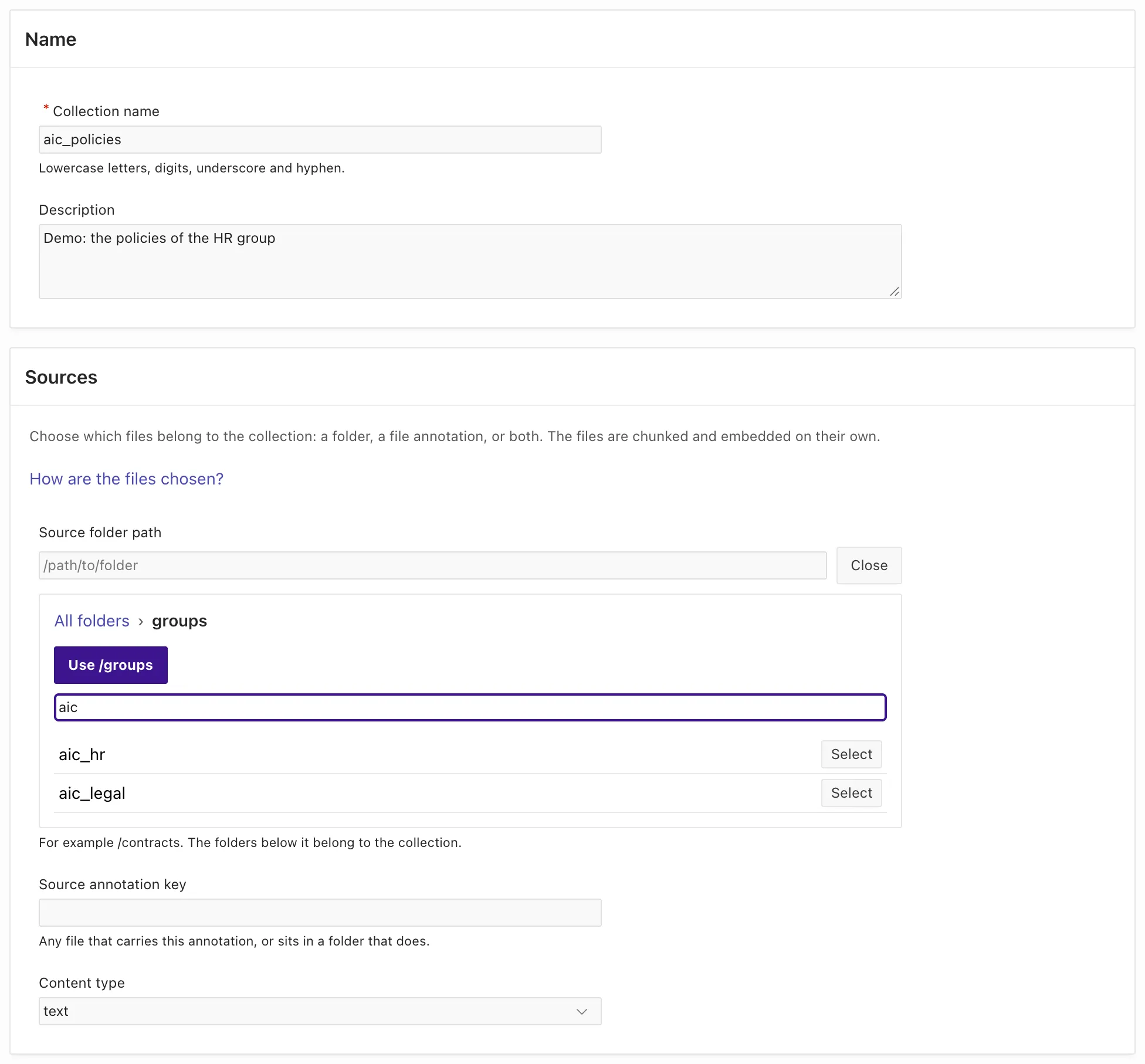
-
In the section Embedding, set Preset to
openai / text-embedding-3-small (1536). The preset fills Provider, Model and Dimensions. EnterOPENAIin Web credential (static ID). -
Keep Vector store at
ORACLEandCosine. -
In the section Chunking, enter
700in Target size,100in Overlap,200in Minimum size and900in Maximum size. The sample files are only one or two pages long, so the course uses chunks that are smaller than the defaults. The sizes are in characters.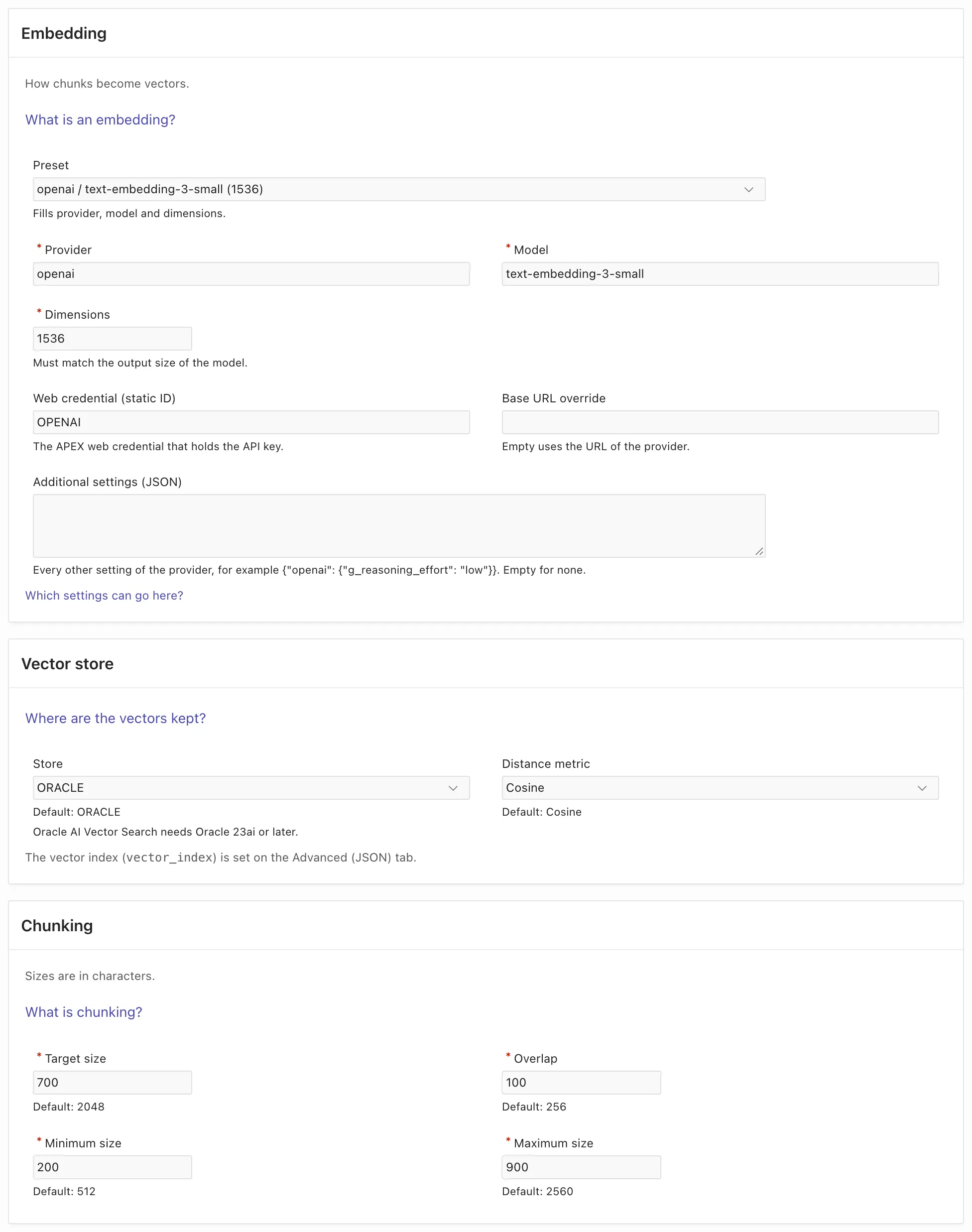
-
Keep Text extraction at None. The policies have a text layer.
-
In the section Answer model, select This collection generates answers. Enter
openaiin Provider,gpt-6.1-solin Model andOPENAIin Web credential (static ID). Keep the other fields empty. An empty System prompt uses the built-in prompt, which answers only from the sources and cites them.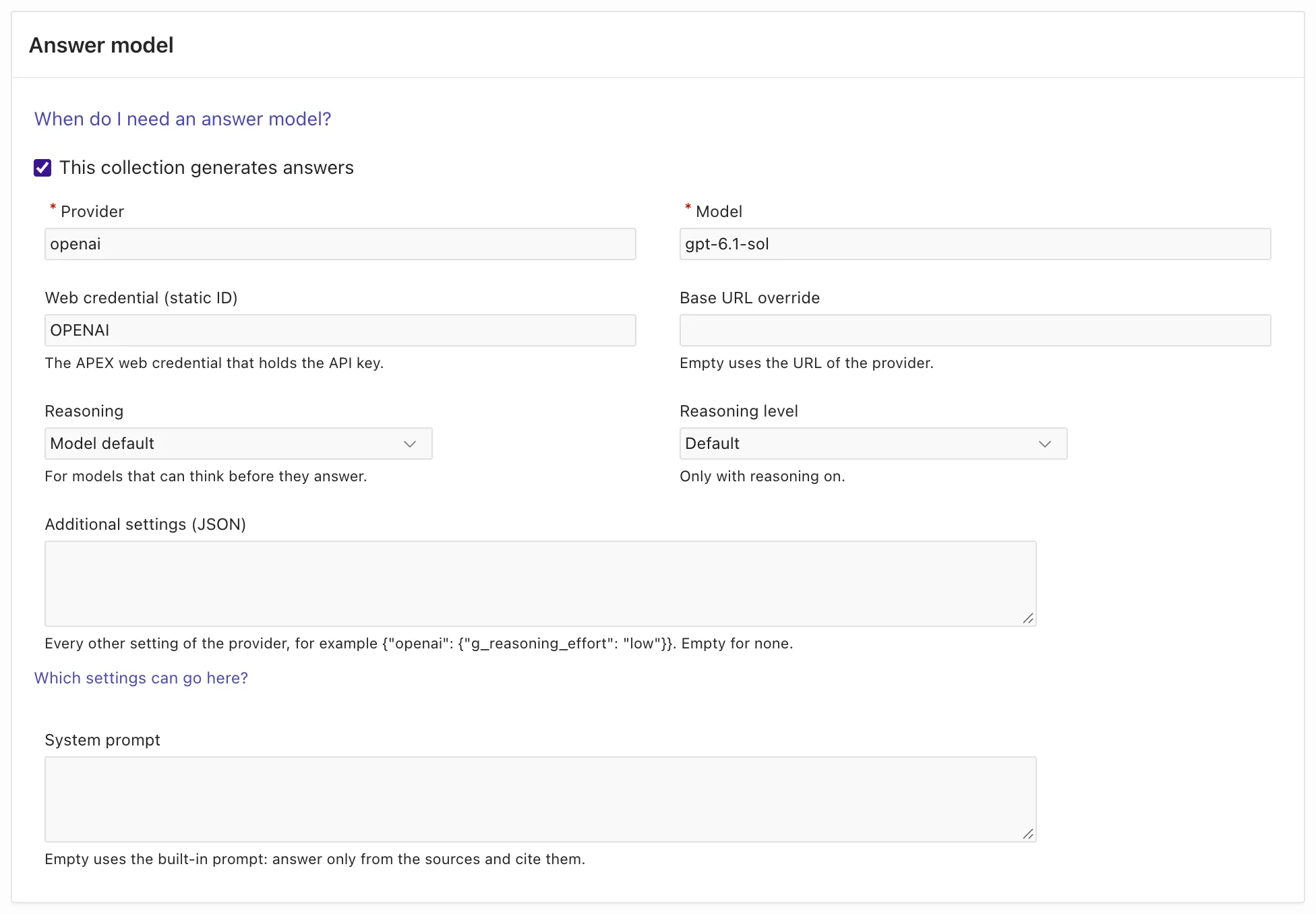
The server validates the configuration while you type. When all fields are correct, the message The configuration is valid. shows next to Create collection.
Read the configuration that the form built
Section titled “Read the configuration that the form built”Select the tab Advanced (JSON) at the top of the form. It shows the JSON that the form built from your entries:
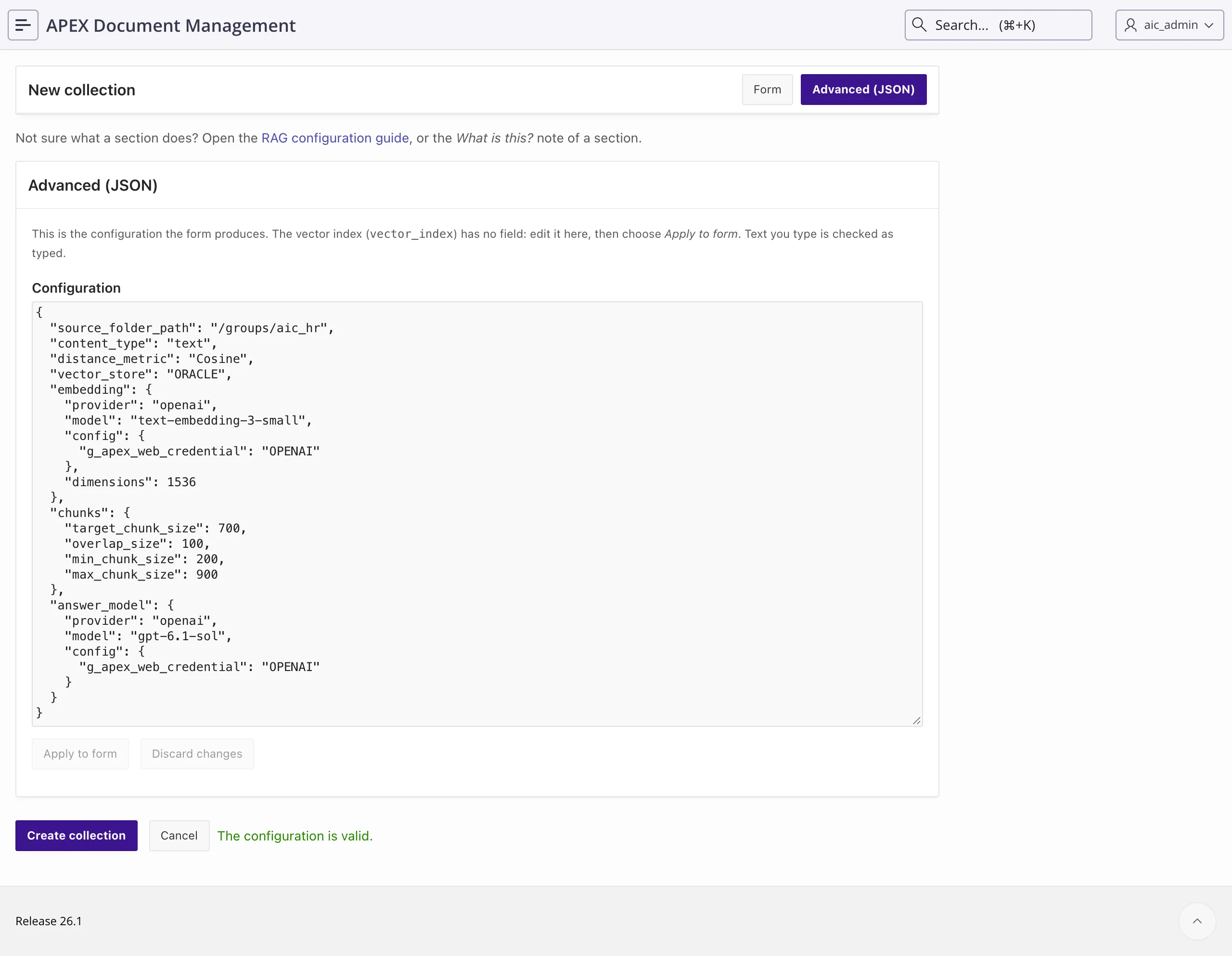
{ "source_folder_path": "/groups/aic_hr", "content_type": "text", "distance_metric": "Cosine", "vector_store": "ORACLE", "embedding": { "provider": "openai", "model": "text-embedding-3-small", "config": { "g_apex_web_credential": "OPENAI" }, "dimensions": 1536 }, "chunks": { "target_chunk_size": 700, "overlap_size": 100, "min_chunk_size": 200, "max_chunk_size": 900 }, "answer_model": { "provider": "openai", "model": "gpt-6.1-sol", "config": { "g_apex_web_credential": "OPENAI" } }}Each section of the form is one part of the JSON. g_apex_web_credential is the static ID of the APEX web credential, which holds the OpenAI key. The key itself is not in the configuration.
03b_aic_policies.sql passes the same configuration to adm_ai_rag_api.create_rag_collection:
l_id := adm_ai_rag_api.create_rag_collection( p_collection_name => 'aic_policies', p_description => 'Demo: the policies of the HR group', p_config_json => '{ "source_folder_path": "/groups/aic_hr", ... }' -- the JSON above);Select Create collection. The page now shows the collection aic_policies with the status No files. The collection has no files yet, because nothing has read the folder.
When ADM stores a collection, it adds the default search settings to the configuration, for example "default_score_threshold": 0.5. Lesson 6 changes that threshold.
Index the collection
Section titled “Index the collection”Select Index now. ADM starts the indexing run in a background job, with your ADM user. The run finds the five files in /groups/aic_hr, extracts their text, cuts chunks and calls the embedding model.
For the five policies, the run took less than a minute in the recording.
The page refreshes while the status is Pending or Processing. When the run is complete, the status is Ready, and every file has the status Indexed:
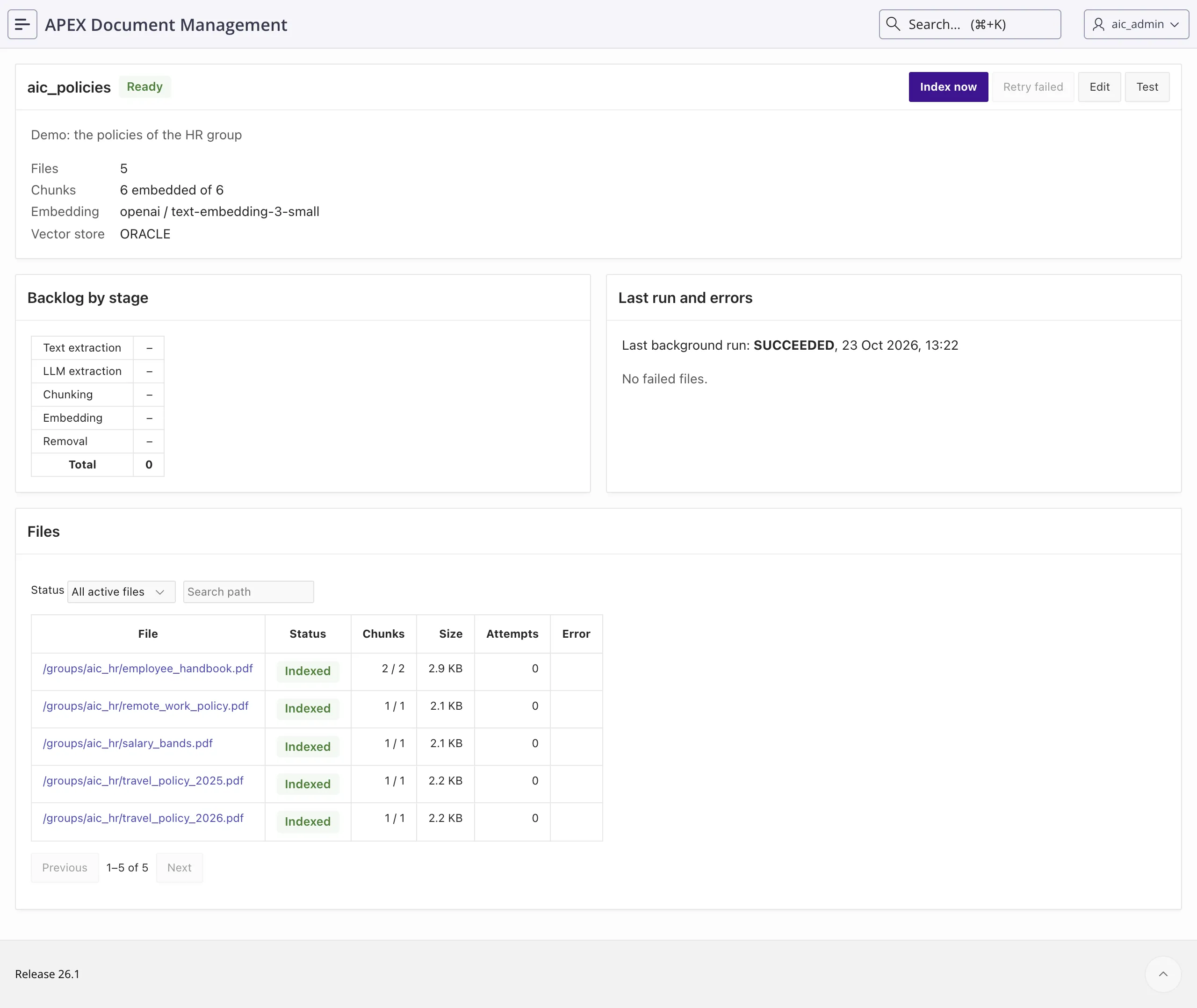
Backlog by stage shows the work that is still waiting, and Last run and errors shows the result of the last background run. A file that failed shows its error in the Files table. The guide section Start indexing lists every status.
After this first run, two scheduled jobs keep the collection current. Discovery runs every hour and finds new, changed and deleted documents in the folder. Processing runs every 5 minutes and extracts, chunks and embeds what discovery found. So a new document can take up to an hour and a few minutes to reach the collection. Index now runs both steps at once. The guide section Synchronisation explains the two jobs.
Read the text that a model extracted
Section titled “Read the text that a model extracted”The contract amendment scan_nordlicht_amendment.pdf is a scanned page. It has no text layer, so the built-in extractor finds only the file title.
The collection aic_contracts sends this file to a model instead, through its setting llm_text_extraction. The setting applies only to PDF files with the annotation aic.scan = Y:
"llm_text_extraction": { "provider": "openai", "model": "gpt-6.1-sol", "apply_to": { "mime_types": ["application/pdf"], "annotation_key": "aic.scan", "annotation_value": "Y" }, "config": { "g_apex_web_credential": "OPENAI" }}In the form, this is the section Text extraction with the option LLM. To see the result, do these steps:
-
Open the collection
aic_contractsfrom the RAG Collections list. -
In the Files table, select
/groups/aic_legal/scan_nordlicht_amendment.pdf.
The file page shows Text source LLM, the text that the model read from the scan, and the chunks that ADM cut from that text:
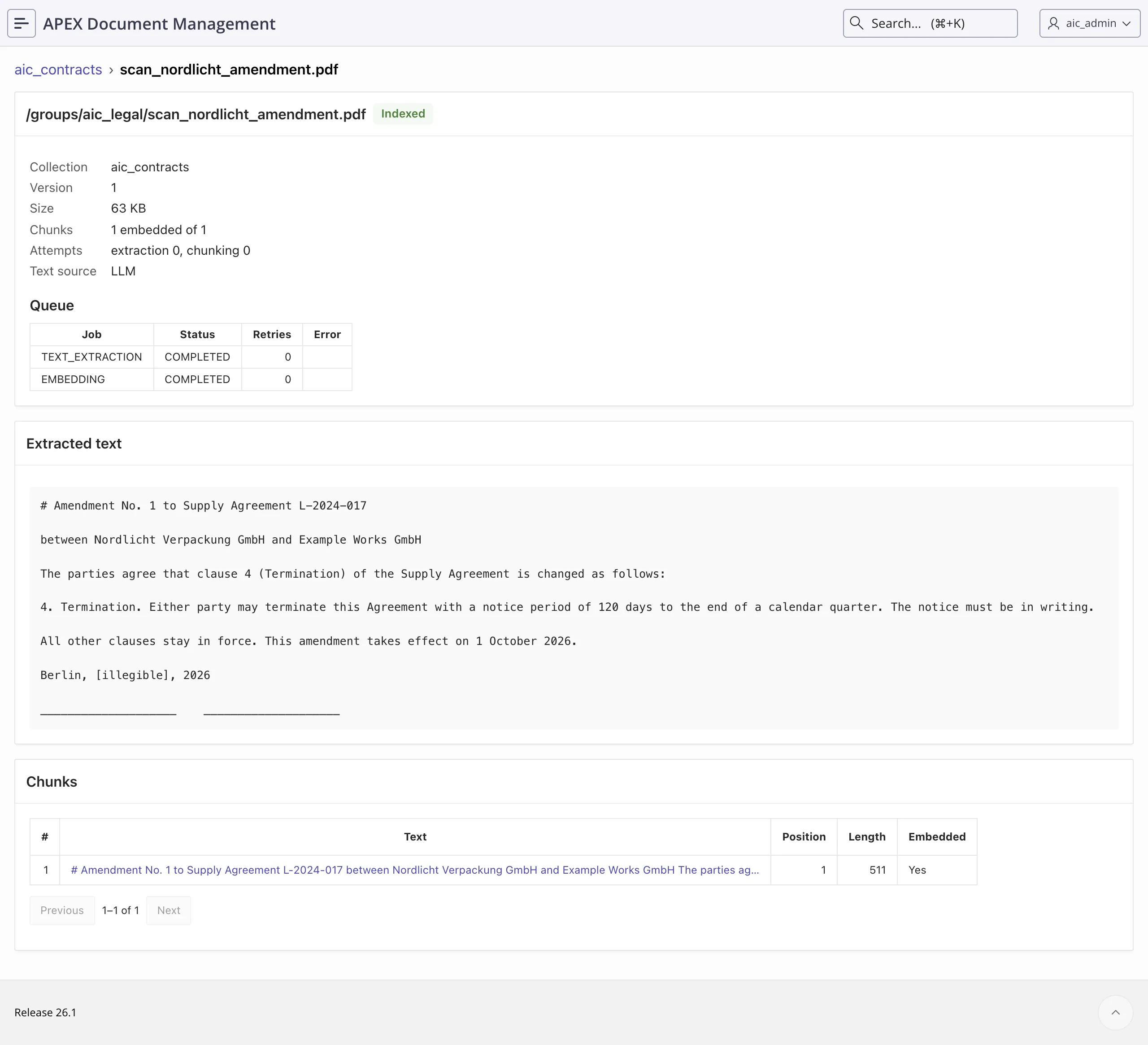
The model writes the text as Markdown. It marks a word that it cannot read, for example [illegible] in the date line. The extracted text in your run can differ in such details.
Select a chunk to read its full text. A search of the collection finds only these chunks, so a passage that is missing here cannot appear in an answer.
Ask one collection a question
Section titled “Ask one collection a question”adm_ai_rag_api.generate_answer searches one collection, gives the best passages to the answer model, and returns the answer. It runs as the current ADM user:
adm_context_api.system_user_login('AIC_LEGAL');
l_answer := adm_ai_rag_api.generate_answer(  p_rag_collection_id => l_contracts, p_query             => 'What notice period applies if we want to end the Alpenwerk maintenance contract?');
Run @05_aic_lesson1_answers.sql. It asks three questions as AIC_LEGAL and prints the sources of the first answer with adm_ai_rag_api.prepare_sources.
The third question goes to aic_policies. If that collection does not exist, the script stops with a message that tells you to create it.
--- 1. a question the contracts can answerQ: What notice period applies if we want to end the Alpenwerk maintenance contract?A: You must give **30 days’ notice, effective at the end of a calendar month**. The termination notice **must be in writing**. These requirements apply to either party under Section 4 of the Alpenwerk maintenance contract. [Source 1: *contract_alpenwerk_maintenance.pdf*, Section 4]
In practical terms, choose a calendar month-end as the termination date and give written notice at least 30 days before that date. The clause does **not** allow termination on any date simply by giving 30 days’ notice; the termination date must be a month-end. [Source 1: *contract_alpenwerk_maintenance.pdf*, Section 4]   (5.9 s)
Sources of that answer (prepare_sources):  contract_alpenwerk_maintenance.pdf     score .682, chunks 1
--- 2. the natural follow-up: the same collectionQ: And what does our travel policy say about hotel costs?A: No relevant sources found to answer this question.   (.4 s)
--- 3. the same follow-up, if YOU pick the right collectionQ: And what does our travel policy say about hotel costs?A: Under **Travel Policy 2026**, valid from **1 January 2026**, the hotel limits are:
| Location | Limit per night ||---|---:|| Large cities | **EUR 165** || Other places | **EUR 120** |
This policy applies to all employees of Example Works GmbH and replaces the 2025 policy. The provided policy does **not** specify which locations count as “large cities” or describe exceptions to these hotel limits. [Source 1: *travel_policy_2026.pdf*]
Two related requirements are also relevant when booking and claiming hotel costs:- **Approval:** If the **total trip costs more than EUR 750**, you need your line manager’s approval **before booking**.- **Expense claims:** Submit your claim **within 30 days after the trip**.[Source 1: *travel_policy_2026.pdf*]
For comparison, the previous policy, valid until **31 December 2025**, allowed **EUR 140 per night in large cities** and **EUR 110 per night elsewhere**. [Source 2: *travel_policy_2025.pdf*]   (7.7 s)
The first answer comes from the contract and names the section. The score of a source is the mean score of its matched chunks. The wording of the answer and the timings differ in your run.
Why one call cannot hold a conversation
Section titled “Why one call cannot hold a conversation”The second question, about the travel policy, searched the collection of the contracts. ADM found no passage above the score threshold, so it answered with a fixed text in a fraction of a second and did not call the answer model. The third question names the collection of the policies, and the answer is right.
Two limits follow from how the call works:
- A call searches one collection, and the caller picks it. For a question that can belong to either collection, your code would have to decide.
- A call has no memory of the earlier questions. The words “And what does our travel policy say” mean nothing to it without the conversation.
An agent removes both limits. It decides which collection to search, and it keeps the conversation. Lesson 2 builds one.