
Add an APEX chat page
By the end of this lesson, you can run the agent from an APEX page, and you can show that each signed-in user searches only the documents that ADM lets them see.
Prepare the chat page
Section titled “Prepare the chat page”This lesson continues with the agent of lessons 2 and 3, with both tools registered. People use the agent in a chat page, so the page has to run it as the signed-in user. The page needs three things:
- An APEX account for each user, because the page signs the user in. The ADM user of the same name decides what that user may read.
- An APEX application with the UC AI Chat plug-in. A plug-in is a component that you add to an APEX application. This one is a region type,
ucAiChat, and it is the plug-in that the ADM file browser uses. - A way to hand the signed-in user to ADM, because the plug-in runs the agent in a background job. A job has no APEX session and no ADM context.
The UC AI tutorial A chat region covers the region itself. This lesson covers the ADM identity.
Create the APEX accounts
Section titled “Create the APEX accounts”Run @18_aic_apex_users.sql. It creates the APEX accounts AIC_LEGAL and AIC_HR in the workspace of your schema, with a demo password that is written in the script: Aic-Demo-2026.
Use it on a local schema only. The accounts are not developers or administrators. Running the script again skips accounts that exist, and 99_aic_teardown.sql removes them.
APEX account created: AIC_LEGAL (workspace ADM) APEX account created: AIC_HR (workspace ADM) password of both accounts: Aic-Demo-2026Import the chat application
Section titled “Import the chat application”The application is stored as APEXlang, the text format that APEX 26.1 uses for application exports. The folder chat-app holds application 218 with one chat page. Importing it needs APEX 26.1 or later
and a SQLcl release that supports apex import for APEXlang. The recordings come from SQLcl 26.3. Connect SQLcl as the ADM schema owner and run this, with the absolute path of the folder:
apex import -input /path/to/examples/ai-chat-demo/chat-appIn the folder examples/ai-chat-demo, make app-import runs the same command. It uses the saved SQLcl connection local-23ai-adm, so pass your own with make app-import DB_CONN=my-connection.
If application 218 exists already, the import replaces it.
Importing application ID: 218 into workspace: ADMImport successful.The import creates the application in the workspace of your connection. It includes the plug-in as a shared component. Open the page of the application, https://<your ORDS host>/ords/r/<path prefix of your workspace>/aic-chat/.
99_aic_teardown.sql removes the APEX accounts but not the application. Delete application 218 in the App Builder when you finish.
Hand the signed-in user to ADM
Section titled “Hand the signed-in user to ADM”ADM checks the ADM context before it returns a passage, so every request and every job needs the context. The import already contains the settings below. This section explains what they do and why, so that you can set them in your own application. Four settings do the work:
| Setting | Value | What it does |
|---|---|---|
| Initialization PL/SQL Code (application) | adm_context_api.establish_from_session; |
Sets the ADM user from the APEX user at the start of each request. |
| Cleanup PL/SQL Code (application) | adm_context_api.clear_context; |
Clears the context at the end of each request, so that a pooled connection does not carry the user to the next request. |
Application item AI_USER_ROLE and a computation |
after authentication | establish_from_session reads the role of the user from this item. |
Authorization has-adm-account |
the APEX account has an active ADM user | Refuses an APEX account that ADM does not know. |
The item and its computation are the part that is easy to miss. This is the computation. It looks up the role of the signed-in user in ADM:
select role_name from adm_users ur join adm_roles r on ur.role_id = r.role_id where ur.username = upper(:APP_USER) and is_active = 'Y'Without the item, establish_from_session finds no role and sets no user. The tool then answers no_identity, and the chat shows the answer of rule 5 of the prompt: the search is not available.
This is the status check of lesson 2 at work, and the reason it exists.
Configure the chat region
Section titled “Configure the chat region”The imported page has one region of the type ucAiChat. These are the attributes that matter, as the Page Designer shows them:
| Attribute | Value |
|---|---|
| Agent Code | aic_assistant |
| Agent Input Mapping | {"question": "#USER_MESSAGE#"} |
| Session Init Code | the block below |
| Session Item | P1_SESSION_ID |
The key of the input mapping must match the input parameter of the agent, which is question. The mapping applies to the first message of a conversation.
Follow-up messages reuse the conversation, and the session item holds the conversation id that ties them together.
The plug-in runs the agent in a background scheduler job. The job has no APEX session, so the Session Init Code runs in the job just before the agent, and joins the session of the user:
apex_session.attach( p_app_id => :APP_ID, p_page_id => :APP_PAGE_ID, p_session_id => :APP_SESSION);adm_context_api.establish_from_session;apex_session.attach does not run the initialization code of the application. That is why the second line is there: without it, the job has no ADM user, and the search tool answers no_identity.
This is the normal path for an agent in an application. The helper of lesson 2 is only for scripts. For a callback outside an APEX page, ADM has adm_context_api.establish_for_callback, which clears the context, attaches the session and establishes the user in one call.
Ask questions as two users
Section titled “Ask questions as two users”Sign in as AIC_LEGAL with the password Aic-Demo-2026, and ask the question of lesson 2. Then ask the follow-up about the travel policy in the same conversation.
An answer took 7 to 9 seconds in the recorded run, because the page waits for the background job and the model. The time depends on the load of the provider.
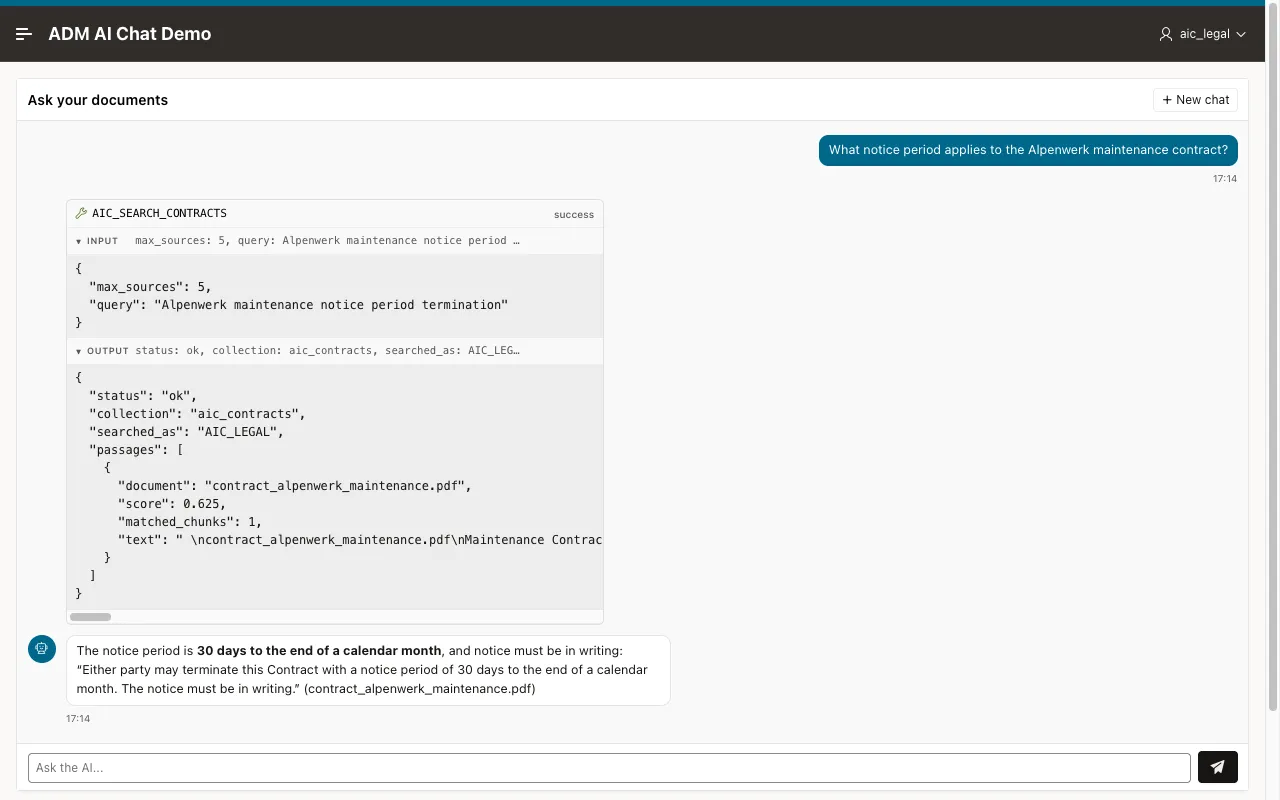
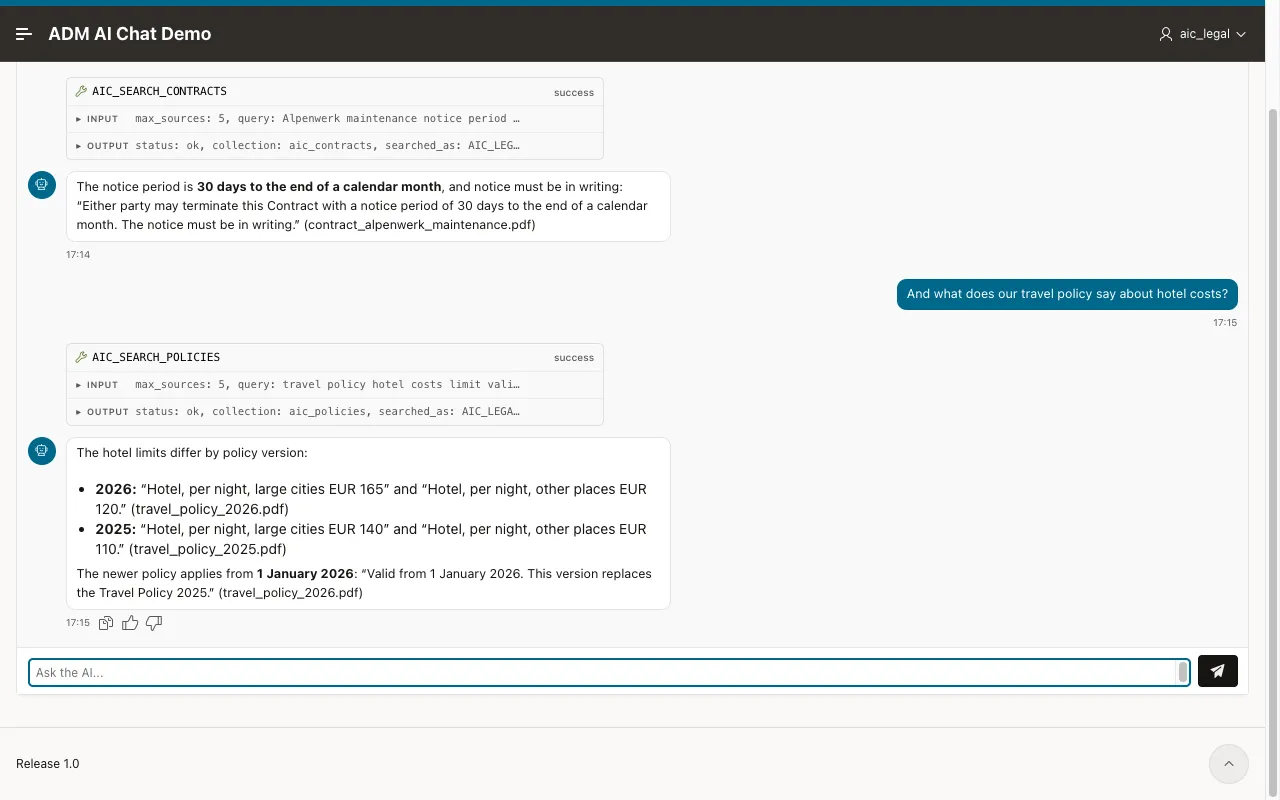
The follow-up goes to the policies tool, because both tools carry the tag of the profile. Now sign out, sign in as AIC_HR, and ask for the notice period of the Helios distribution agreement:
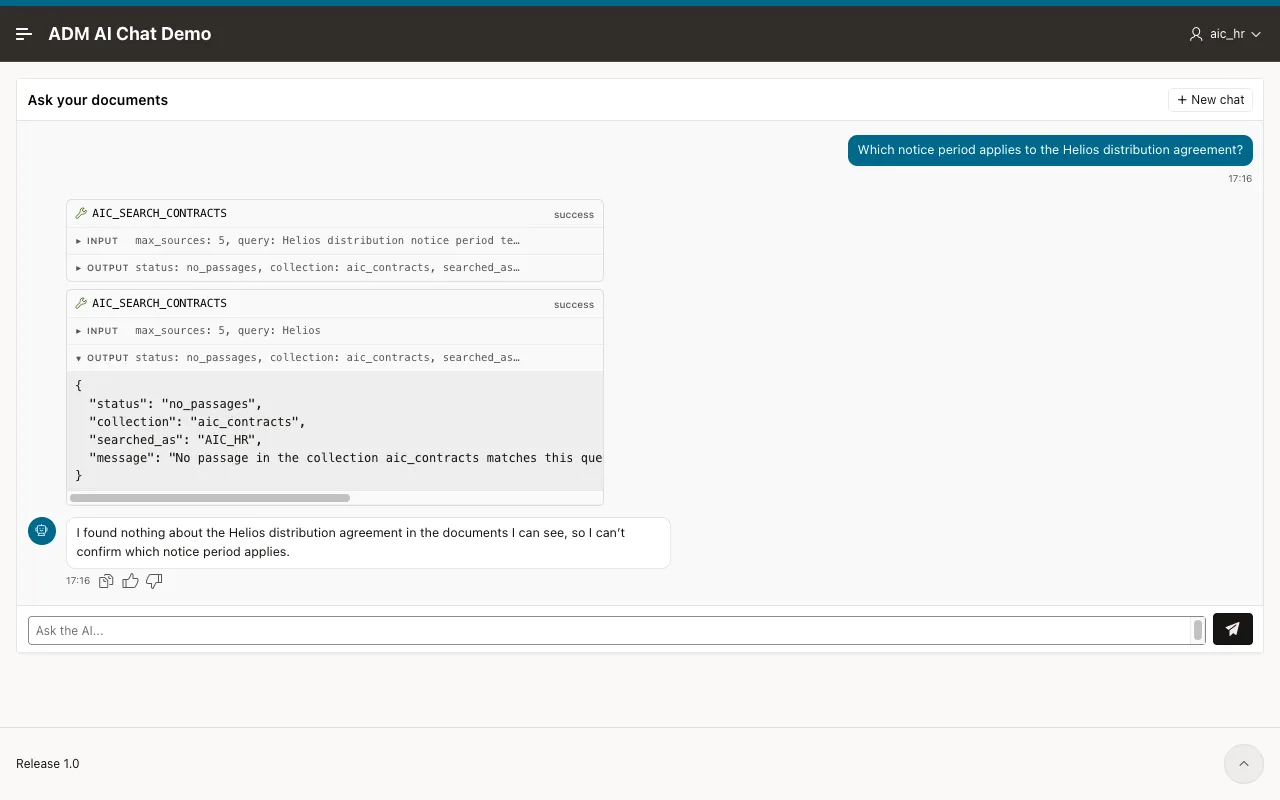
The agent searched the contracts twice, and both searches returned no_passages. The HR user may not see that contract. Ask for the salary band of a senior engineer as AIC_HR, and the answer is band B4.
Check who each run ran as
Section titled “Check who each run ran as”The answer text does not prove who ran the agent. Run @19_aic_chat_verify.sql. It lists the runs of the chat application and the user that each search tool read from the ADM context:
   EXECUTION_ID CREATED_BY    APEX_USER    QUESTION_______________ _____________ ____________ _______________________________________________________________            546 AIC_LEGAL     AIC_LEGAL    What notice period applies to the Alpenwerk maintenance cont            547 AIC_LEGAL     AIC_LEGAL    And what does our travel policy say about hotel costs?            548 AIC_HR        AIC_HR       Which notice period applies to the Helios distribution agree            549 AIC_HR        AIC_HR       Which salary band is a senior engineer in?
   EXECUTION_ID TOOL_NAME               RESULT_STATUS             SEARCHED_AS_______________ _______________________ _________________________ ____________________________            546 AIC_SEARCH_CONTRACTS    "status":"ok"             "searched_as":"AIC_LEGAL"            547 AIC_SEARCH_POLICIES     "status":"ok"             "searched_as":"AIC_LEGAL"            548 AIC_SEARCH_CONTRACTS    "status":"no_passages"    "searched_as":"AIC_HR"            548 AIC_SEARCH_CONTRACTS    "status":"no_passages"    "searched_as":"AIC_HR"            549 AIC_SEARCH_POLICIES     "status":"ok"             "searched_as":"AIC_HR"
created_by and apex_user are the signed-in account. searched_as is written by the tool from the ADM context while the model was running, and it names the same user. The HR runs searched as AIC_HR.